
Tab Snoozer – Save Memory & Battery by Pausing Inactive Tabs
Reduce memory usage and extend battery life by automatically snoozing unused tabs after inactivity.
As of June 2026, Tab Snoozer – Save Memory & Battery by Pausing Inactive Tabs has 487 users and a 5.00/5 rating from 3 reviews in the Productivity category.
Usersup 17.6 percent+17.6%
487
487
Ratingno change0%
5.00
3 reviews
Reviewsno change0%
3
Version
1.0.0
Manifest V3
History
4 snapshotsTracking since Apr 1, 2026.
View as table
| Date | Users | Rating | Reviews | Version |
|---|---|---|---|---|
| Apr 1, 2026 | 414 | 5.00 | 3 | 1.0.0 |
| Apr 21, 2026 | 438 | 5.00 | 3 | 1.0.0 |
| May 11, 2026 | 437 | 5.00 | 3 | 1.0.0 |
| Jun 6, 2026 | 455 | 5.00 | 3 | 1.0.0 |
| Now | 487 | 5.00 | 3 | 1.0.0 |
Permissions & access
- Permissions
- storagetabsalarms
- Host access
- <all_urls>
Screenshots
About
🚀 Tab Snoozer for Chrome – Automatically Suspend Inactive Tabs to Save Memory, Boost Speed & Extend Battery Life

Are you tired of your browser lagging because of too many open tabs? 😩 Frustrated by poor battery life on your laptop due to background tabs consuming your memory and CPU? Tab Snoozer is your must-have Chrome extension that automatically suspends inactive tabs, dramatically improving browser speed, reducing memory usage, and extending battery life.

🌟 Why Millions of Users Trust Tab Snoozer:

💤 Auto-Suspend Tabs
Automatically suspend tabs that haven't been used for a customizable period of inactivity. Reduce clutter and prevent browser slowdown effortlessly.

🎵 Enjoy uninterrupted music and video playback!
Tab Snoozer is smart enough to detect tabs that are actively playing audio or video—like YouTube, Spotify, and SoundCloud—and won’t suspend them, so your media keeps playing without disruption. 🎧📺

⚙️ Powerful Performance Boost
Immediately reduce your browser’s RAM and CPU usage by up to 60%. Tab Snoozer ensures tabs stay open but don't drain resources.

🔋 Extended Battery Life
Perfect for laptop users—extend your battery life significantly by minimizing background browser activity and tab usage. Tab Snoozer optimizes resource allocation, giving you hours of additional battery runtime.

🌐 Eliminate Tab Clutter
Keep dozens of tabs open without worrying about system slowdowns. Tab Snoozer makes your browsing neat, organized, and responsive by auto-managing inactive tabs.

🛠️ Easy-to-Use & Highly Customizable

- Customizable Snooze Timer: You decide exactly how long your tabs should stay idle before being snoozed, from 1 minute up to 24 hours (1440 minutes).

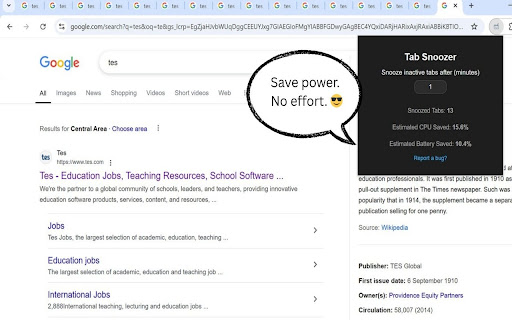
- Real-Time Tab Management: View exactly how many tabs are currently snoozed and track the resources you’ve saved in real-time via an intuitive popup UI.

- Minimal UI, Maximum Performance: Lightweight, fast-loading, and zero performance hit—Tab Snoozer blends effortlessly into your browsing experience.

- Privacy-Focused & Secure: Zero external servers or tracking. Your data remains fully secure and private in your local browser storage.

🔍 Who Needs Tab Snoozer?

🎓 Students & Educators
Keep essential research and reference tabs open without browser lag. Improve your focus and productivity during study sessions and online learning.

💻 Developers & Designers
Maintain multiple documentation tabs, GitHub repositories, and Stack Overflow pages open without slowing down your development environment.

🏢 Remote Workers & Professionals
Navigate between emails, meetings, project management tools, and reports quickly without any performance drawbacks.

🌟 Everyday Users & Casual Browsers
Enjoy streaming videos, social media, news, and online shopping without worrying about browser performance issues or battery drain.

🎯 How Tab Snoozer Works:
1. Install Tab Snoozer from Chrome Web Store: Fast, lightweight setup with zero complicated configurations.

2. Set Your Preferences: Choose how long inactive tabs should wait before being snoozed.

3. Browse Normally: Use Chrome as you normally would. Tab Snoozer works silently in the background.

4. Tabs Auto-Snooze: Tabs automatically suspend after your selected inactivity threshold..

🚨 Powerful Benefits You’ll Experience:
-  Instant Speed Improvements: Enjoy a faster, smoother Chrome browser with minimal RAM usage.

- Significant Memory Reduction: Keep hundreds of tabs open while using significantly less memory.

- Extended Laptop Battery Life: Less battery drain equals longer battery runtime and productivity.

- Automatic Organization: No more manual tab management or unnecessary bookmarking. Stay organized effortlessly.

🔐 Your Privacy Is Guaranteed:
No data tracking: Tab Snoozer does not collect, send, or share your browsing data with any external server or third-party service.

🎉 What's New (v1.0.0 – April 2025):

🚀 Redesigned Onboarding Experience: Easier setup, faster user adaptation.

🔄 Real-Time Snooze Statistics: Clear, informative, and interactive tab usage insights.

✅ Stability Improvements: Optimized for newer Chrome versions, improved compatibility with pinned and special tabs.
Technical
- Version
- 1.0.0
- Manifest
- V3
- Size
- 64.75KiB
- Min Chrome
- 88
- Languages
- 1
- Featured
- No
Metadata
- ID
- mpoolpoofcfeebfameikimddlgoidjaj
- Developer ID
- uad516eac73e3829386626a0a85a329fe
- Developer Email
- [email protected]
- Created
- Apr 16, 2025
- Last Updated (Store)
- Apr 16, 2025
- Last Scraped
- Jun 6, 2026
- Website
- —
- Support URL
- —
- Privacy Policy
- —
Similar extensions
Alternatives to Tab Snoozer – Save Memory & Battery by Pausing Inactive Tabs, ranked by description similarity.

Tab Suspender & Manager
Save memory by suspending inactive tabs, organize by groups, and save sessions. Boost browser performance with smart tab management.
19

Tab Suspender - Free Up Memory & Boost Performance (Open Source)
Suspend tabs to save memory and CPU by replacing them with lightweight pages
79

NapTab
Optimizes memory by suspending inactive tabs using LRU cache and WASM.
35
★ 4.9

Auto Pause Inactive Tabs
Automatically suspends inactive tabs to reduce CPU usage and save resources
99
★ 5.0

Tab Suspender Pro
Auto-suspend inactive tabs to save memory. Smart protection for audio, video calls, and forms. Keyboard shortcuts included.
8.0K
★ 4.8

Tabs Suspender for Chrome
Use this extension to suspend current, all, or unsuspend tabs to save memory and boost browser speed.
7

SynapseSave - Snooze Your Tabs
Snooze tabs to specific times. Free your RAM. Save your sanity.
8
★ 4.7

RamSaver - Tab Memory Manager
Automatically suspend inactive tabs to free RAM. Keep Chrome fast with smart tab sleeping, whitelists, and live memory stats.
63
★ 5.0
Data sourced from the Chrome Web Store · last verified Jun 6, 2026.