
Blur Bar for YouTube - Language Learning Tool
A simple yet powerful tool to place an adjustable blur bar that covers a YouTube videos embedded subtitles!
As of May 2026, Blur Bar for YouTube - Language Learning Tool has 501 users and a 4.71/5 rating from 14 reviews in the Workflow & Planning category.
Usersup 6.4 percent+6.4%
501
501
Ratingno change0%
4.71
14 reviews
Reviewsno change0%
14
Version
3.07
Manifest V3
History
3 snapshotsTracking since Apr 1, 2026.
View as table
| Date | Users | Rating | Reviews | Version |
|---|---|---|---|---|
| Apr 1, 2026 | 471 | 4.71 | 14 | 3.07 |
| Apr 30, 2026 | 465 | 4.71 | 14 | 3.07 |
| May 29, 2026 | 493 | 4.71 | 14 | 3.07 |
| Now | 501 | 4.71 | 14 | 3.07 |
Permissions & access
- Permissions
- storage
- Host access
- None declared
Screenshots

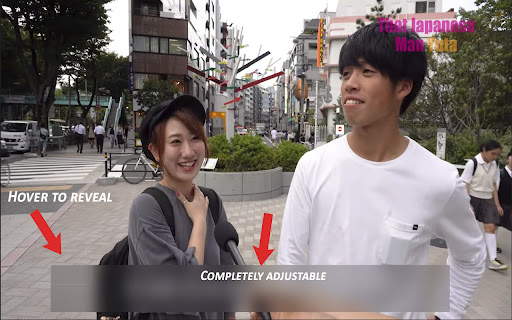
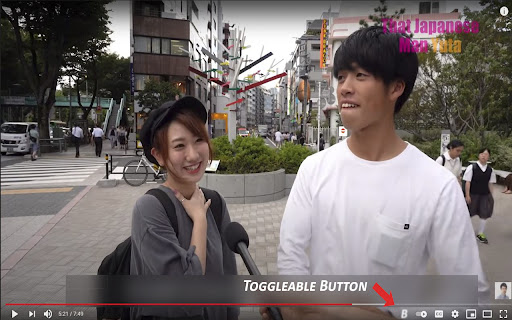

About
Adds an adjustable blur bar to cover subtitles that are embedded into a YouTube video. Blur bar comes with a hover-able panel that will reveal the subtitles(which also can be accessed with controls). This is a great tool for language learners as often times people put their subtitles within the YouTube video itself and not the CC. You can throw the bar over the subtitles and reveal them to check if you are translating it correctly within your head. I found this extremely useful while studying Japanese and figured I could help some fellow learners.

HOW TO USE:
Simply load up the YouTube video of your choice and our extension will inject a B button within the YouTube video player controls. Click this button to reveal the Blur Bar then drag and resize as you see fit. The Blur Bar comes equipped with a hover-able square at the top left corner of the bar in which when hovered it will reveal the subtitles. You can also access this feature by clicking the "S" key.

OPTIONS:
There is a popup located in your extensions at the top right corner of the browser, click it to reveal your options. As of now we have two options available.

Pause-on-Hover option allows you to toggle whether or not the video pauses and rewinds upon hovering the reveal square or pressing S.

The Height limit allows you to toggle whether or not you can adjust the height past the said limit. I recommended you keep this toggled on as sometimes the bar can get lost under the controls.

Confirm your Options by clicking the submit key.

DISCLAMIER:
I am new to developing and currently am in school, so if you have any questions or if there are any problems just email me at [email protected] and ill try to get to it as soon as possible. As the extension stands now it is in very early BETA. Thank you.
Technical
- Version
- 3.07
- Manifest
- V3
- Size
- 200KiB
- Min Chrome
- 88
- Languages
- 1
- Featured
- Yes
Metadata
- ID
- mndlpifkemjipbkoejnekcieebmoicmk
- Developer ID
- u755dea312b87a1307894a63f93d31875
- Developer Email
- [email protected]
- Created
- Aug 23, 2021
- Last Updated (Store)
- Oct 7, 2023
- Last Scraped
- May 29, 2026
- Website
- —
- Support URL
- —
- Privacy Policy
- —
Similar extensions
Alternatives to Blur Bar for YouTube - Language Learning Tool, ranked by description similarity.

Listen and Repeat - Language Learning
Learn a new language on Youtube
342
★ 5.0

SubtitleEasy
This extension allows you to view two captions at the same time on Coursera/Apple WWDC sessions.
31

No Spoilers
Hide all spoiler content from youtube.
1.0K
★ 4.7

Movie Subtitles
Add your own subtitles almost anywhere you want such as Disney, Netflix, YouTube and many more!
8.0K
★ 3.9

Speak YouTube Subtitles
Reads YouTube subtitles aloud with multi-language support
1.0K
★ 4.1
Painless CC
Make a good use of Youtube's Auto-generated Captions
1.0K
★ 5.0

Video Speed Controller
Control video playback speed with configurable increments.
58
★ 4.7

Clear Text in Fog
First, blur the entire text. Then, selected parts are clearly displayed.
31
Data sourced from the Chrome Web Store · last verified May 29, 2026.