
SubtitleEasy
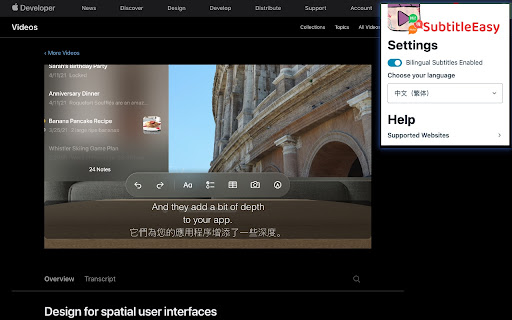
This extension allows you to view two captions at the same time on Coursera/Apple WWDC sessions.
As of May 2026, SubtitleEasy has 31 users in the Workflow & Planning category.
Usersup 6.9 percent+6.9%
31
31
Ratingno change0%
—
— reviews
Reviewsno change0%
—
Version
1.0
Manifest V3
History
2 snapshotsTracking since Apr 24, 2026.
View as table
| Date | Users | Rating | Reviews | Version |
|---|---|---|---|---|
| Apr 24, 2026 | 29 | — | — | 1.0 |
| May 21, 2026 | 30 | — | — | 1.0 |
| Now | 31 | — | — | 1.0 |
Permissions & access
- Permissions
- storageactiveTab
- Host access
- None declared
Screenshots
About
Introducing a Chrome extension that will completely transform your viewing and learning experience! With our innovative tool, you can now enjoy bilingual subtitles for Apple Developer/WWDC videos seamlessly within your browser.

As you explore the vast library of Apple Developer/WWDC videos, our Chrome extension integrates seamlessly into your browsing experience, providing real-time bilingual subtitles for the videos. Whether you're a seasoned developer or a curious learner, this extension will help you understand the content more effectively, break down language barriers, and expand your knowledge.

Please note that currently our extension does not support Coursera functionality, but we will be adding support for Coursera in the next version. We are actively working on developing and releasing this feature as soon as possible, so you can enjoy the benefits of bilingual subtitles on Coursera. Stay tuned!

Designed with simplicity and convenience in mind, our Chrome extension seamlessly integrates into your browser after installation, with just a click to toggle the switch for bilingual subtitles. You can flexibly choose your preferred language combination to ensure full immersion in the content without missing any important information.

We understand that learning is a personal journey, and everyone has their own preferences. Therefore, our Chrome extension allows you to customize the appearance of the subtitles to meet your needs. Adjust font size, color, and background for optimal readability and create a comfortable viewing experience.

Our commitment to excellence goes beyond providing subtitles. We will continuously update our extension to ensure compatibility with the latest Apple Developer/WWDC videos and add support for Coursera in the next version. Stay ahead and never miss a learning moment with our reliable and cutting-edge Chrome extension.

Join the thousands of satisfied users who have transformed their viewing and learning experiences through our Chrome extension. Whether you're a developer seeking to understand the latest Apple technologies or a lifelong learner looking to expand your knowledge on Coursera, our bilingual subtitles will be your trusted companion.

Don't let language barriers limit your learning potential. Install our Chrome extension now and unlock the world of knowledge with the power of bilingual subtitles, right at your fingertips. Start your mastery journey and experience learning like never before!
Technical
- Version
- 1.0
- Manifest
- V3
- Size
- 179KiB
- Min Chrome
- 88
- Languages
- 1
- Featured
- Yes
Metadata
- ID
- odlcgahekgnbhianilgcdeijognkflpo
- Developer ID
- u745007133f4ac0849f26de0b0e0c6402
- Developer Email
- [email protected]
- Created
- Jul 3, 2023
- Last Updated (Store)
- Jul 3, 2023
- Last Scraped
- May 21, 2026
- Website
- —
- Privacy Policy
- —
Similar extensions
Alternatives to SubtitleEasy, ranked by description similarity.

CST - Coursera Subtitle Translation
Coursera Subtitle Translation. Dual language. (lexxai)
1.0K
★ 4.6

SubtitleKit
A must-have tool for all YouTube lovers!
27

Duplex Subtitles
Display two subtitles on Coursera videos.
20

Lecture Summary: Youtube, Udemy And Coursera
Helping you easily get summaries from #youTube, #udemy & #coursera video courses.
498
★ 3.9
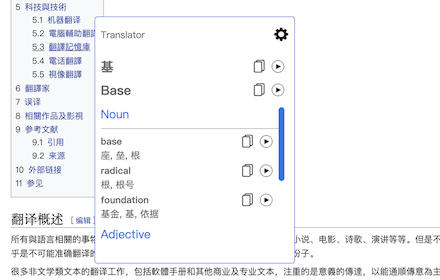
Translator
Translate words and phrases while browsing the web, using Google translator.
60.0K
★ 4.1
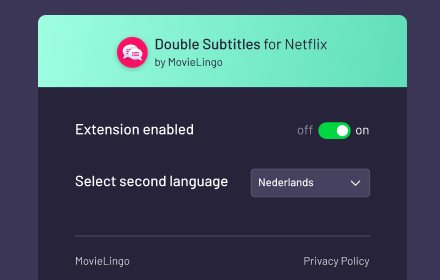
Double Subtitles for Netflix by MovieLingo
Extension allows for displaying additional subtitles above the standard Netflix ones.
991
★ 3.5

iHeart Dictionary
A dictionary helps you to remember new words and getting results from most well-known dictionaries.
10
★ 5.0

Surf Learning - Open Beta
Select your native language from extension configuration and start to learn language with the content you surf on youtube
40
★ 5.0
Data sourced from the Chrome Web Store · last verified May 21, 2026.