
DataLens Pro — Excel Analyzer
Analyze, visualize and pivot Excel/CSV data instantly. Professional analytics in your browser.
As of June 2026, DataLens Pro — Excel Analyzer has — users in the Workflow & Planning category.
Usersno change0%
—
—
Ratingno change0%
—
— reviews
Reviewsno change0%
—
Version
2.0.1
Manifest V3
History
5 snapshotsTracking since May 10, 2026.
View as table
| Date | Users | Rating | Reviews | Version |
|---|---|---|---|---|
| May 10, 2026 | — | — | — | 2.0.1 |
| May 15, 2026 | 1 | — | — | 2.0.1 |
| May 21, 2026 | 2 | — | — | 2.0.1 |
| Jun 3, 2026 | 3 | — | — | 2.0.1 |
| Jun 9, 2026 | 2 | — | — | 2.0.1 |
| Now | — | — | — | 2.0.1 |
Permissions & access
- Permissions
- storage
- Host access
- None declared
Screenshots

About
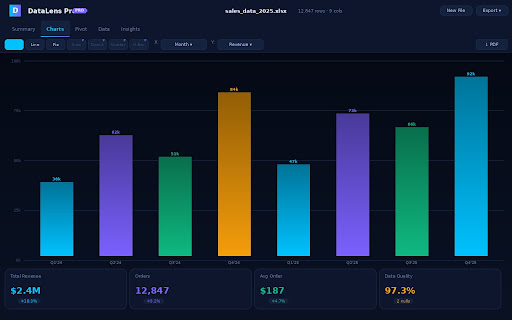
Analyze, visualize and export your Excel and CSV data — right inside Chrome, with zero server uploads. Every byte of your data stays on your device.

DataLens Pro opens as a full browser tab, giving you a professional data analytics workspace that works on any file, any time, with no account required.

────────────────────────────────────────────────
📊 INSTANT COLUMN STATISTICS
────────────────────────────────────────────────
• Min, max, mean, median, standard deviation, sum, quartiles
• Unique value counts, most common values (top 10), null detection
• Data quality score across all columns
• Auto-generated insights: outliers, skew, distribution patterns

────────────────────────────────────────────────
📈 INTERACTIVE CHARTS (Free: 3 types · Pro: all 7)
────────────────────────────────────────────────
• Bar, Line, Pie — free for all users
• Area, Donut, Scatter, Horizontal Bar — Pro
• 6 color palettes: Vivid, Ocean, Neon, Warm, Emerald, Spectrum
• Toggle data labels, grid lines, and chart legend independently
• Interactive tooltips on hover

────────────────────────────────────────────────
🔄 PIVOT TABLE BUILDER (Pro)
────────────────────────────────────────────────
• Drag-and-drop Row / Column / Value fields
• 5 aggregation modes: Sum, Average, Count, Min, Max
• Optional heatmap overlay and grand totals
• Export pivot as CSV or PDF

────────────────────────────────────────────────
📤 EXPORT FROM EVERY PANEL
────────────────────────────────────────────────
Free users:
• CSV download from the Data tab

Pro users (all of the above plus):
• JSON export
• Chart PNG screenshot
• Chart PDF via print dialog
• Pivot table CSV + PDF
• Data table PDF (up to 500 rows)
• Summary PDF with KPI cards
• Full Analysis Report PDF (stats + insights + sample data)

────────────────────────────────────────────────
🔒 YOUR DATA NEVER LEAVES YOUR DEVICE
────────────────────────────────────────────────
All file parsing, statistics computation, chart rendering, and export happen entirely inside your Chrome browser tab. No file contents are transmitted, uploaded, logged, or shared — ever. DataLens Pro works fully offline after installation.

────────────────────────────────────────────────
💎 FREE & PRO PLANS
────────────────────────────────────────────────

FREE (no account, no payment):
✓ 20 file uploads per calendar month (auto-resets on the 1st)
✓ First 5,000 rows of each file
✓ All statistics and insights
✓ 3 chart types (Bar, Line, Pie)
✓ Sortable, searchable data table
✓ CSV export

PRO — One-time payment, lifetime access:
✓ Unlimited file uploads
✓ Full data — all rows, no cap
✓ All 7 chart types
✓ Full Pivot Table builder
✓ All export formats (JSON, PNG, PDF, Full Report)
✓ Priority support
✓ All future updates included

Payment: ৳550 (bKash) or $4.99 (Payoneer/International)
No subscription. No account. Activate instantly with a license key.

────────────────────────────────────────────────
📁 SUPPORTED FILE FORMATS
────────────────────────────────────────────────
• Microsoft Excel: .xlsx, .xls
• Comma-Separated Values: .csv
• File size: up to 10MB

────────────────────────────────────────────────
🌙 DAY & NIGHT THEMES
────────────────────────────────────────────────
Switch between a dark navy theme (default) and a clean light theme. Your preference is saved automatically.
Technical
- Version
- 2.0.1
- Manifest
- V3
- Size
- 39.25KiB
- Min Chrome
- 88
- Languages
- 1
- Featured
- No
Metadata
- ID
- mmoidccmfpjbjofglgfnfnjdbjgffele
- Developer ID
- u0f8bb04803818bef40506f7f8bccf371
- Developer Email
- [email protected]
- Created
- Mar 16, 2026
- Last Updated (Store)
- Mar 16, 2026
- Last Scraped
- Jun 9, 2026
- Website
- https://sumangeo.vercel.app/
- Support URL
- https://sumangeo.vercel.app/#contact
Similar extensions
Alternatives to DataLens Pro — Excel Analyzer, ranked by description similarity.

Datastripes Lens
Superpowers for data: transform tables and numbers into interactive insights on any webpage.
17
★ 5.0

ChartMaker Pro
Generate beautiful charts from CSV, Excel, TSV & TXT files instantly and completely offline
27

CSV & Excel Viewer - Online File Viewer
Free online CSV viewer and Excel viewer. Open CSV files (.csv) and Excel spreadsheets (.xlsx, .xls) instantly in your browser.
162
★ 5.0

TableLens: Edit, Visualize & Export Web Tables
The Ultimate Web Scraper to Edit, Visualize & Export any Table to Excel, CSV, PDF & More
67
★ 5.0

Snapsheet - 1-Click HTML Table to CSV Exporter
Automatically detects HTML tables and injects a floating 'Export to CSV' button.
8
★ 5.0

Advanced Tab Copier Pro
Professional tab management tool with multiple export formats, filtering, and dpaste sharing.
13
★ 5.0

TradChart to CSV Exporter
Scan TradingView charts and export OHLC/Volume data to CSV .
410
★ 3.0

Tab manager pro
Transform browser chaos into organized productivity with smart tab grouping, session saving, and duplicate removal.
1
Data sourced from the Chrome Web Store · last verified Jun 9, 2026.