
TableLens: Edit, Visualize & Export Web Tables
The Ultimate Web Scraper to Edit, Visualize & Export any Table to Excel, CSV, PDF & More
As of June 2026, TableLens: Edit, Visualize & Export Web Tables has 67 users and a 5.00/5 rating from 2 reviews in the Workflow & Planning category.
Usersup 168.0 percent+168.0%
67
67
Ratingno change0%
5.00
2 reviews
Reviewsup 100.0 percent+100.0%
2
Version
1.0.1
Manifest V3
History
4 snapshotsTracking since Apr 21, 2026.
View as table
| Date | Users | Rating | Reviews | Version |
|---|---|---|---|---|
| Apr 21, 2026 | 25 | 5.00 | 1 | 1.0.1 |
| May 6, 2026 | 54 | 5.00 | 2 | 1.0.1 |
| May 18, 2026 | 52 | 5.00 | 2 | 1.0.1 |
| Jun 1, 2026 | 62 | 5.00 | 2 | 1.0.1 |
| Now | 67 | 5.00 | 2 | 1.0.1 |
Permissions & access
- Permissions
- scriptingdownloadsoffscreenstorageactiveTabcontextMenus
- Host access
- <all_urls>
Screenshots



About
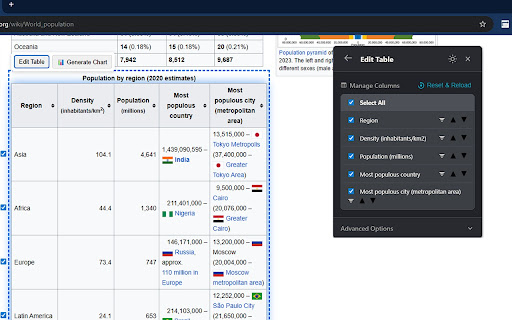
TableLens helps you easily work with tables from any website. Edit, visualize, copy, or download data in seconds.

✏️ Edit Tables Live
Clean up your data right on the page before you export.
✔️ Sort & Filter: Quickly arrange data and filter rows to find what you need.
✔️ Reorder & Hide: Drag and drop to reorder columns, and hide any you don't need.
________________________________________
📊 Create Charts Instantly
Understand your data visually without leaving the webpage.
✔️ Visualize Data: Turn any table into a chart with one click.
✔️ Chart Types: Choose from Bar, Line, Pie, and Scatter plots.
_______________________________________
_
⬇️ Download or Copy Your Data
Get your data off the page and into your workflow.
Download to Any Format:
✔️ Save your data in the format you need. Choose from spreadsheets (Excel, CSV), documents (PDF, Word), or developer-friendly options (JSON, Markdown).
Copy in Two Ways:
✔️ Copy as CSV: Grab the clean text to paste into spreadsheets.
✔️ Copy Styled: Keep the original look and feel for documents and emails.
________________________________________
✨ Other Features
✔️ Smart Detection: Finds tables even on complex modern websites.
✔️ Easy to Use: A simple, draggable interface that's easy to navigate.
✔️ Dark Mode: Work comfortably at any time of day.

Install TableLens to make working with web data simple.
Technical
- Version
- 1.0.1
- Manifest
- V3
- Size
- 870KiB
- Min Chrome
- 88
- Languages
- 1
- Featured
- Yes
Metadata
- ID
- lahononablbbfocabaeliibgiicgbjkl
- Developer ID
- u7566c9b9810f4b1a3999b1f16e140eee
- Developer Email
- [email protected]
- Created
- Sep 10, 2025
- Last Updated (Store)
- Sep 25, 2025
- Last Scraped
- Jun 1, 2026
- Website
- https://supbyte.com/
- Support URL
- —
- Privacy Policy
- https://supbyte.com/tablelens-privacy-policy
Similar extensions
Alternatives to TableLens: Edit, Visualize & Export Web Tables, ranked by description similarity.

Tabulazer - Table Filter and Sorter
Filter, sort, page and style any existing HTML table using the Tabulator JS library.
1.0K
★ 4.7

Instant Table Converter
Instantly convert HTML tables to Excel, CSV, JSON, or Markdown locally.
5

Datastripes Lens
Superpowers for data: transform tables and numbers into interactive insights on any webpage.
17
★ 5.0

Snapsheet - 1-Click HTML Table to CSV Exporter
Automatically detects HTML tables and injects a floating 'Export to CSV' button.
8
★ 5.0

TableClipper
Copy any website table to your clipboard & paste into Google Sheets in one click.
14

Table to CSV Exporter
Easily export HTML tables to Excel-compatible CSV files with UTF-8 support
104
★ 3.0

Gentables: AI Sheets for Unstructured Data
Gentables: AI Sheets for Unstructured Data
103
★ 5.0
Table as CSV - Table Capture
Allows to copy, select, export HTML tables to Microsoft Excel, CSV, Google Sheets, etc
1.0K
★ 3.6
Data sourced from the Chrome Web Store · last verified Jun 1, 2026.