
Weet for Chrome: Video and Screen recorder
A picture paints a thousand words. So why send an email or schedule a meeting when you can send a video message.
As of May 2026, Weet for Chrome: Video and Screen recorder has 891 users and a 4.29/5 rating from 7 reviews in the Workflow & Planning category.
Usersup 2.5 percent+2.5%
891
891
Ratingno change0%
4.29
7 reviews
Reviewsno change0%
7
Version
3.0.04
Manifest V3
History
2 snapshotsTracking since Apr 23, 2026.
View as table
| Date | Users | Rating | Reviews | Version |
|---|---|---|---|---|
| Apr 23, 2026 | 869 | 4.29 | 7 | 3.0.04 |
| May 19, 2026 | 879 | 4.29 | 7 | 3.0.04 |
| Now | 891 | 4.29 | 7 | 3.0.04 |
Permissions & access
- Permissions
- storagenotificationscontextMenus
- Host access
- None declared
Screenshots


About
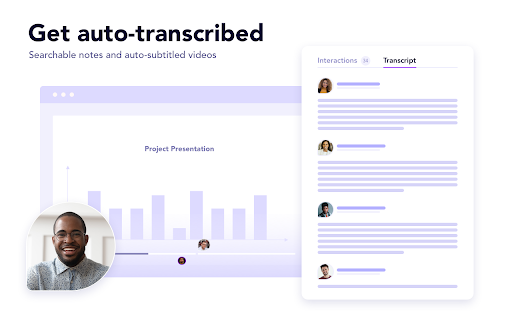
With Weet, you can record your face, your voice, and share your screen. Then, you get a link to share the video and easily circulate it across channels like instant messengers or email. Your teammates and clients can answer directly in your Weet by recording a screencast, video, or adding reactions for easy and fun asynchronous communication. From onboarding to troubleshooting customer issues, or troubleshooting a technical issue with your team, Weet makes collaboration quick, simple, and clear with collaborative video messaging and other features that set us apart from the rest. Save time by reducing back-and-forth typing and the need for synchronous communication. Your colleagues and clients will love it! Record and share videos for customer presentations, employee onboarding, team updates, and more—in just a few clicks. Weet was created by a team with years of experience building smart collaboration and video messaging tools. Why Weet ? 🤔 🎥 Record your video with co-authors ⚙️ Add filters and virtual backgrounds ✏️ Update your online video even after sharing the link ✂️ Add or remove sections of your video 👀 Track who watches your video 💼 Use workspaces and channels to organize your video - Add links & a CTA in your video - Rich commenting options - Auto-transcription & auto-captions ...and much more - no installation needed! 🌟 Record your webcam only 🌟 Record your screen with or without your webcam 🌟 Add filters on your webcam 🌟 Add a virtual background to your webcam 🌟 Record different sections in the same video and add chapters 🌟 Update your video anytime (even after sharing the link) 🌟 Add a virtual background to your webcam 🌟 Invite others to record their section in your video 🌟 Interact with your webcam & share your screen at any point of the video 🌟 Get notified about who watched your video 🌟 Export in mp4 format, embed your video on other websites and share it on social media 🌟 Share your video with anyone, anywhere and with advanced control options 🌟 Help your viewers get right to the point in your video tutorial with chapters 🌟 Use workspaces and channels to organize your conversations Info/Contact us: Website : https://weet.co Linkedin : https://www.linkedin.com/company/beeweet Twitter : https://twitter.com/beweet Facebook : https://www.facebook.com/Weet-1029656… Youtube : https://www.youtube.com/channel/UCeSULSpZZxie605zRdz4t4A How it works: https://www.youtube.com/watch?v=aWOFSnovpyo Support: [email protected]
Technical
- Version
- 3.0.04
- Manifest
- V3
- Size
- 95.45KiB
- Min Chrome
- 88
- Languages
- 1
- Featured
- Yes
Metadata
- ID
- mhohnenkbgmndjgdccjmelopdaceibfk
- Developer ID
- u99d8916f03cee4eb367156597a9dd3e7
- Developer Email
- [email protected]
- Created
- Sep 2, 2020
- Last Updated (Store)
- Jun 8, 2022
- Last Scraped
- May 19, 2026
- Website
- weet.co
- Support URL
- https://help.weet.co
- Privacy Policy
- https://weet.co/privacy-policy/
Similar extensions
Alternatives to Weet for Chrome: Video and Screen recorder, ranked by description similarity.
WeVideo Screen & Webcam Recorder
A simple way to capture your screen and easily create instructional videos, demos, internal communications, and more.
—
★ 4.0

Video & Screen Recorder For Work | Covideo
Record video from your webcam & screen, share them instantly, track who’s watching!
2.0K
★ 5.0

Diznote
Diznote - Screen Recorder
402
★ 5.0

Vimeo Record - Screen & Webcam Recorder
Record and share free video messages from your browser
600.0K
★ 4.5

Powtoon Capture - Screen and Webcam Recorder
Make a video recording from a website, application, or anything else you can show on your screen to start communicating visually.
60.0K
★ 4.2

Screencastify - Screen Video Recorder
An easy-to-use screen recorder for your browser. Capture, edit and share videos in seconds.
6.0M
★ 4.0
Vidline Screen Recorder
Quickly record screen with audio and camera. Instantly share videos with one click.
40.0K
★ 4.6

Powtoon Capture for Business
Make a video recording from a website, application, or anything else you can show on your screen to start communicating visually.
1.0K
★ 5.0
Data sourced from the Chrome Web Store · last verified May 19, 2026.