
WA Web Plus – WhatsApp Web Tools for Privacy & Deleted Messages
Blur chats & media for privacy, view deleted messages, download status, track online activity on WhatsApp Web.
As of June 2026, WA Web Plus – WhatsApp Web Tools for Privacy & Deleted Messages has 10,000 users and a 4.79/5 rating from 42 reviews in the Social & Communication category.
Usersup 900.0 percent+900.0%
10.0K
10,000
Ratingdown 4.2 percent−4.2%
4.79
42 reviews
Reviewsup 2000.0 percent+2000.0%
42
Version
1.3.9
Manifest V3
90-day change · In the last 90 days this extension gained 9.0K users, 6 version updates, changed permissions.
History
13 snapshotsTracking since Apr 1, 2026.
View as table
| Date | Users | Rating | Reviews | Version |
|---|---|---|---|---|
| Apr 1, 2026 | 1.0K | 5.00 | 2 | 1.2.5 |
| Apr 16, 2026 | 2.0K | 5.00 | 5 | 1.2.5 |
| Apr 22, 2026 | 3.0K | 5.00 | 8 | 1.2.5 |
| Apr 26, 2026 | 4.0K | 5.00 | 10 | 1.2.5 |
| May 1, 2026 | 4.0K | 5.00 | 10 | 1.2.5 |
| May 7, 2026 | 4.0K | 5.00 | 10 | 1.2.6 |
| May 11, 2026 | 5.0K | 5.00 | 11 | 1.2.6 |
| May 23, 2026 | 6.0K | 5.00 | 11 | 1.2.6 |
| May 27, 2026 | 7.0K | 5.00 | 11 | 1.3.1 |
| Jun 1, 2026 | 8.0K | 5.00 | 14 | 1.3.1 |
| Jun 6, 2026 | 8.0K | 4.83 | 18 | 1.3.2 |
| Jun 10, 2026 | 9.0K | 4.89 | 28 | 1.3.5 |
| Jun 21, 2026 | 10.0K | 4.77 | 31 | 1.3.8 |
| Now | 10.0K | 4.79 | 42 | 1.3.9 |
Changelog
- Jun 21, 2026permissions
storage, offscreen, unlimitedStorage
storage, offscreen, unlimitedStorage, activeTab
- Jun 10, 2026host_permissions
https://web.whatsapp.com/*, https://huggingface.co/*, https://cdn-lfs.huggingface.co/*, https://cas-bridge.xethub.hf.co/*
https://web.whatsapp.com/*
- Jun 6, 2026host_permissions
https://web.whatsapp.com/*
https://web.whatsapp.com/*, https://huggingface.co/*, https://cdn-lfs.huggingface.co/*, https://cas-bridge.xethub.hf.co/*
- Jun 6, 2026permissions
storage
storage, offscreen, unlimitedStorage
- May 27, 2026description
WA Web Plus is a privacy extension for WhatsApp Web that lets you blur chats, hide online status, view deleted messages and track online activity—all running locally in your browser. Perfect for using WhatsApp Web in public spaces or shared screens.

🔍 View Deleted Messages
See messages that others deleted or recalled, even after they disappear. Never miss what was said.

📡 Online Status Tracker
Know when your contacts are online in real time, right from the chat list.

🔐 Privacy & Blur
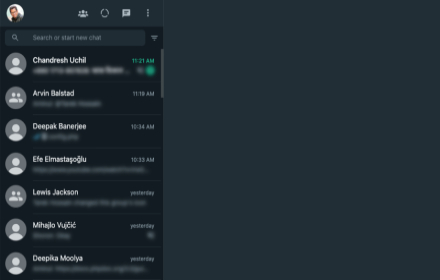
Blur chats, media, profile pictures, and names — reveal on hover
Lock screen with custom PIN for instant protection
Auto-blur when idle — your screen stays private even when you walk away
Hide text input field while typing

⚡ Productivity Tools
Status Download — save images and videos from Status updates
Translation — translate any message instantly, 12+ languages
Quick Chat — message any number without saving as contact
Pin unlimited chats — no limit on pinned conversations
View profile info — country, local time, currency from phone numbers

🎨 Personalization
colorful wallpapers — personalize your chat background with colors, gradients, or images

⭐ Why Choose WA plus?
- Protects your screen in public or shared spaces.
- Combines privacy protection + productivity features in one extension.
- Safe, lightweight, actively maintained with frequent updates.
- Trusted by users who rely on WhatsApp Web for both personal and business use.

⚡ Installation & Getting Started
1. Click “Add to Chrome” to install in seconds.
2. Use the toolbar button or shortcut (Alt+X by default) to toggle privacy mode.
3. Open extension options to customize blur settings and automation tools.

✅ Call to Action
Protect your chats and amplify your WhatsApp Web experience.
👉 Install WA Web plus today and take control of your privacy!

📬 Contact Us
Email: [email protected]
Website: https://wawebgenie.com
WA Web Plus — Privacy & Productivity for WhatsApp Web

Protect your WhatsApp Web privacy in public spaces. Blur chats, hide sensitive content, and customize your workspace — all running locally in your browser.

✓ Updated for the latest WhatsApp Web (May 2026)
✓ Working blur — verified on the current WhatsApp Web release
✓ Active development with fast bug fixes
✓ Lightweight and privacy-focused
✓ Available in 8 languages

━━━━━━━━━━━━━━━━━━━━━━━━━━━━

🔐 PRIVACY PROTECTION

• Blur messages, media, profile pictures, and contact names — reveal on hover
• Instant privacy mode for public or shared spaces
• Auto-blur when idle so your screen stays protected when you step away
• Customize blur intensity for different content types
• Lock screen with custom PIN
• Hide text input while typing

Open WhatsApp Web and your chats are instantly protected.

━━━━━━━━━━━━━━━━━━━━━━━━━━━━

⚡ PRODUCTIVITY TOOLS

• Quick Chat — message any number without saving as contact
• Status Download — save images and videos from Status updates
• Translation — translate messages instantly in 12+ languages
• Pin unlimited chats
• Mark all chats as read in one click
• Export contacts and group members to CSV
• Click-to-Chat link & QR code generator

━━━━━━━━━━━━━━━━━━━━━━━━━━━━

🎨 PERSONALIZATION

• Customize your chat background with wallpapers, gradients, and colors
• 16 built-in wallpapers included

━━━━━━━━━━━━━━━━━━━━━━━━━━━━

🧩 ADVANCED FEATURES

• Access recalled (deleted) messages locally in your browser
• See online presence directly from your chat list
• Hide read receipts — read messages without sending blue ticks
• Hide typing & recording status
• View statuses without sending a "seen" notification
• Invisible Mode — control your online visibility
• View profile information such as country, local time, and currency from phone numbers

━━━━━━━━━━━━━━━━━━━━━━━━━━━━

⌨️ KEYBOARD SHORTCUTS

• Alt + X — instantly blur the entire page
• Cmd + Shift + L / Ctrl + Shift + L — quick lock screen

━━━━━━━━━━━━━━━━━━━━━━━━━━━━

🛠️ PRIVACY

• Your messages stay 100% on your device
• No account required, no data uploaded

━━━━━━━━━━━━━━━━━━━━━━━━━━━━

⚡ GETTING STARTED

1. Click "Add to Chrome"
2. Open WhatsApp Web
3. Privacy features activate automatically
4. Customize settings anytime from the extension toolbar icon

━━━━━━━━━━━━━━━━━━━━━━━━━━━━

📬 CONTACT

Email: [email protected]
Website: https://wawebgenie.com

Not affiliated with WhatsApp Inc. or Meta. WhatsApp is a trademark of Meta Platforms, Inc.
Permissions & access
- Permissions
- storageoffscreenunlimitedStorageactiveTab
- Host access
- https://web.whatsapp.com/*
Screenshots


About
WA Web Plus — Privacy & Productivity for WhatsApp Web

Protect your WhatsApp Web privacy in public spaces. Blur chats, hide sensitive content, and customize your workspace — all running locally in your browser.

✓ Updated for the latest WhatsApp Web (May 2026)
✓ Working blur — verified on the current WhatsApp Web release
✓ Active development with fast bug fixes
✓ Lightweight and privacy-focused
✓ Available in 8 languages

━━━━━━━━━━━━━━━━━━━━━━━━━━━━

🔐 PRIVACY PROTECTION

• Blur messages, media, profile pictures, and contact names — reveal on hover
• Instant privacy mode for public or shared spaces
• Auto-blur when idle so your screen stays protected when you step away
• Customize blur intensity for different content types
• Lock screen with custom PIN
• Hide text input while typing

Open WhatsApp Web and your chats are instantly protected.

━━━━━━━━━━━━━━━━━━━━━━━━━━━━

⚡ PRODUCTIVITY TOOLS

• Quick Chat — message any number without saving as contact
• Status Download — save images and videos from Status updates
• Translation — translate messages instantly in 12+ languages
• Pin unlimited chats
• Mark all chats as read in one click
• Export contacts and group members to CSV
• Click-to-Chat link & QR code generator

━━━━━━━━━━━━━━━━━━━━━━━━━━━━

🎨 PERSONALIZATION

• Customize your chat background with wallpapers, gradients, and colors
• 16 built-in wallpapers included

━━━━━━━━━━━━━━━━━━━━━━━━━━━━

🧩 ADVANCED FEATURES

• Access recalled (deleted) messages locally in your browser
• See online presence directly from your chat list
• Hide read receipts — read messages without sending blue ticks
• Hide typing & recording status
• View statuses without sending a "seen" notification
• Invisible Mode — control your online visibility
• View profile information such as country, local time, and currency from phone numbers

━━━━━━━━━━━━━━━━━━━━━━━━━━━━

⌨️ KEYBOARD SHORTCUTS

• Alt + X — instantly blur the entire page
• Cmd + Shift + L / Ctrl + Shift + L — quick lock screen

━━━━━━━━━━━━━━━━━━━━━━━━━━━━

🛠️ PRIVACY

• Your messages stay 100% on your device
• No account required, no data uploaded

━━━━━━━━━━━━━━━━━━━━━━━━━━━━

⚡ GETTING STARTED

1. Click "Add to Chrome"
2. Open WhatsApp Web
3. Privacy features activate automatically
4. Customize settings anytime from the extension toolbar icon

━━━━━━━━━━━━━━━━━━━━━━━━━━━━

📬 CONTACT

Email: [email protected]
Website: https://wawebgenie.com

Not affiliated with WhatsApp Inc. or Meta. WhatsApp is a trademark of Meta Platforms, Inc.
Technical
- Version
- 1.3.9
- Manifest
- V3
- Size
- 4.16MiB
- Min Chrome
- 88
- Languages
- 16
- Featured
- No
Metadata
- ID
- malbhapfcgbblgipdpmbcaiemnkchhgh
- Developer ID
- ue797489da8e7ad7cc9be9748078e0528
- Developer Email
- [email protected]
- Created
- Sep 17, 2025
- Last Updated (Store)
- Jun 13, 2026
- Last Scraped
- Jun 21, 2026
- Website
- wawebgenie.com
- Support URL
- —
- Privacy Policy
- —
Similar extensions
Alternatives to WA Web Plus – WhatsApp Web Tools for Privacy & Deleted Messages, ranked by description similarity.

WhatPlus – Smart Privacy & Power Tools for WhatsApp
Upgrade WhatsApp Web with smart privacy. Blur chats, hide content, lock screen. Stay private without changing how you use WhatsApp.
4

Privacy Extension For WhatsApp Web - Chat Lock & Blur | WPPME.COM
Lock WhatsApp Web with a password and blur chats, names, or media to protect your privacy when using WhatsApp on your browser.
711
★ 4.7

Privacy Extension for WhatsApp Privacy
Instantly blur WhatsApp messages, media, names, and previews. Protect your chats and lock the app with a password.
300.0K
★ 4.4

Privacy Blur for WhatsApp
Smart privacy for WhatsApp Web. Blur messages, images & contacts. Hover to reveal. Secure your screen from prying eyes.
878
★ 5.0

WhatsApp Privacy - Cloak of Invisibility 2.0
WhatsApp Web Privacy extension for Google Chrome. Created with ❤️ by Shivam Chopra
45
★ 5.0
Smart Privacy Extension For WA Message
It enables the user to hide or show the whatsapp messages on the web.
926
★ 5.0

Privacy Extension for WhatsApp Web
Protect your privacy on WhatsApp Web, lock your screen, and hide messages, images, profile, and more with blur effects.
285
★ 5.0

Privacy Extension For WhatsApp Web
Hides your messages until you hover over them.
1.0M
★ 2.8
Data sourced from the Chrome Web Store · last verified Jun 21, 2026.