
EasyRead
EasyRead: Better browser experence: ReadLater, AutoRecord, AddNote, Save Markdown.
As of May 2026, EasyRead has 39 users in the Workflow & Planning category.
Usersdown 22.0 percent−22.0%
39
39
Ratingno change0%
—
— reviews
Reviewsno change0%
—
Version
1.0.1
Manifest V3
History
2 snapshotsTracking since Apr 24, 2026.
View as table
| Date | Users | Rating | Reviews | Version |
|---|---|---|---|---|
| Apr 24, 2026 | 50 | — | — | 1.0.1 |
| May 20, 2026 | 38 | — | — | 1.0.1 |
| Now | 39 | — | — | 1.0.1 |
Permissions & access
- Permissions
- activeTabtabsstorageunlimitedStoragecontextMenus
- Host access
- None declared
Screenshots
About
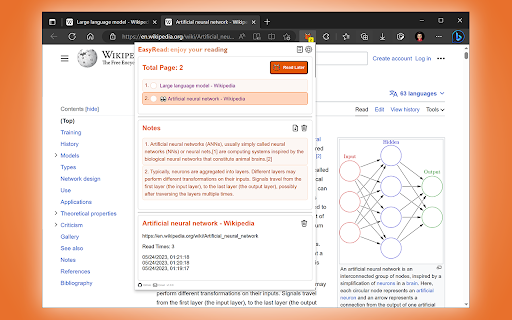
This is a Chrome / Edge extension that creates a smooth web browsing experience for you, providing but not limited to: core functions such as reading later, adding notes, and auto-recording.

https://github.com/volnet/chrome-extensions-easyread/

We recommend this reading process:

1. Easily read any web page, as usual, without any interruptions.
2. When you see something worth recording, select it and **Add to note**.
3. When you have a lot of materials, click **Read Later** to turn them into to-do items, and then read them slowly.
4. When you open a webpage that you have already visited, it will automatically restore you to the **last visited location**.
5. In order to consolidate knowledge, we recommend that you regularly perform data management, export and delete historical data, and use third-party tools to organize your access history and notes.
6. The next reading does not start randomly from anywhere on the Internet, but from **EasyRead**'s **Read Later** list.

For a better user experience:

We recommend you keep the EasyRead extension always displayed in the toolbar, you will get **read it later** quantity reminders and **fewer steps**.

1. After the extension is installed, it is not displayed in the toolbar by default.
2. To adjust the extension to always appear in the toolbar, please try the following steps:
     - Google Chrome: Extensions icon > EasyRead > "Pin" (pin icon).
     - Microsoft Edge: Alt+F > Extensions > EasyRead > "Show in toolbar" (visual icon).

## Features

### Read Later

1. Add current page to read later list.
2. Later read counter to help you manage unread.
3. The reading progress helps you to continue reading.
4. The pop-up reminder on the current page will confirm for you whether it is already in the list.

### Add Notes

1. Manage notes by page, an article is a knowledge unit.
2. Select the text on the page and add it to the note.
3. View notes by page, multi-paragraph notes are presented in the order they were added.
4. Support exporting to Markdown format.

### Auto Record

1. Log all visited web pages.
2. Track the number of visits, time, etc.

### Export & Import

1. All data is stored locally in the browser.
2. Support one-click all export as backup.
3. Supports two recovery modes: replace storage and merge storage.
4. Support the purpose of deleting all data and some data to save space.
Technical
- Version
- 1.0.1
- Manifest
- V3
- Size
- 109KiB
- Min Chrome
- 88
- Languages
- 2
- Featured
- Yes
Metadata
- ID
- lpopnmoejimlifiejilnpneckijlgodg
- Developer ID
- udbf13318479a6d5266ae8a1f32998e62
- Developer Email
- [email protected]
- Created
- Jun 1, 2023
- Last Updated (Store)
- Jun 1, 2023
- Last Scraped
- May 20, 2026
- Website
- —
- Support URL
- https://twitter.com/GongCen
- Privacy Policy
- —
Similar extensions
Alternatives to EasyRead, ranked by description similarity.

Chrome Reader Mode
Reader Mode Chrome extension offers distraction-free reading. It removes clutter, ads allowing users to focus on the content
10.0K
★ 3.9

Do Read Later
Save pages to read later.
13

Read Later
A temporary bookmark focuses on reading later, rather than closing and removing, with several Vim keybindings!
3.0K
★ 4.6

Reader View
Strips away clutter like buttons, background images, and changes the page's text size, contrast and layout for better readability
40.0K
★ 4.6

BitRead Extension
Save articles to your BitRead library with intelligent weeklist and read-later organization.
3
★ 5.0

Read Later
Save pages to read later with notes, tags, and favicons.
92
★ 4.0

Read It Later App
Read It Later App: The ultimate reading list app to reduce the count of open tabs and access your saved articles anytime with ease.
887
★ 5.0

Reading list
Save articles, videos, and other content for later use
4.0K
★ 4.1
Data sourced from the Chrome Web Store · last verified May 20, 2026.