
Read It Later App
Read It Later App: The ultimate reading list app to reduce the count of open tabs and access your saved articles anytime with ease.
As of May 2026, Read It Later App has 887 users and a 5.00/5 rating from 4 reviews in the Workflow & Planning category.
Usersup 3.7 percent+3.7%
887
887
Ratingno change0%
5.00
4 reviews
Reviewsup 33.3 percent+33.3%
4
Version
0.0.1
Manifest V3
History
2 snapshotsTracking since Apr 23, 2026.
View as table
| Date | Users | Rating | Reviews | Version |
|---|---|---|---|---|
| Apr 23, 2026 | 855 | 5.00 | 3 | 0.0.1 |
| May 19, 2026 | 918 | 5.00 | 3 | 0.0.1 |
| Now | 887 | 5.00 | 4 | 0.0.1 |
Permissions & access
- Permissions
- tabsstorage
- Host access
- None declared
Screenshots

About
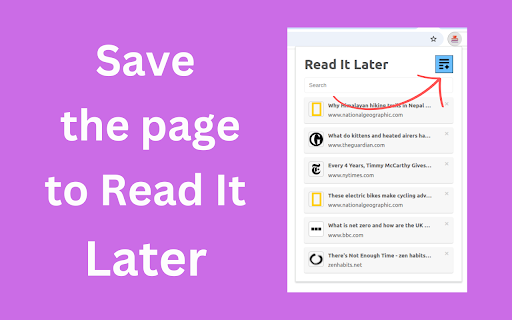
With the Read It Later App Chrome extension, you can easily save links of all the web pages and articles you want to revisit later and organize them in a reading list bookmark. This read later app provides a streamlined way to save articles and web pages, letting you return to them whenever you want without keeping tabs open or digging through bookmarks.

Features of the Read It Later App Chrome extension:
🧩 Two-Click Saving: Add links to the article saver with a couple of clicks
🧩 Organized Storage: tag your saved links to keep everything neat and easy to find
🧩 Curated List of Content: Tailor your reading list bookmark to match your interests
🧩 Easy detection: find the pages you need by searching among the saved articles

Who can benefit from using the read it later apps?
This simple link saver is perfect for anyone looking to organize their internet browsing. Here are just a few examples:
✏️ Students and researchers
✏️ Busy professionals
✏️ Content creators
✏️ Avid readers
✏️ Curious minds

Why the Read It Later App Chrome extension stands out

Instead of struggling with endless bookmarks or getting lost among the bunch of open tabs, the Read It Later App Chrome extension lets you efficiently manage and organize your work in the browser. With such a reading list application, you can focus on the content when you want, with everything saved in one accessible location.

🚀 Quick start tips:
1️⃣ Install the Read It Later App extension
2️⃣ Click the Add button to save this article
3️⃣ Manage your collection of saved links
4️⃣ Revisit saved articles whenever you want

✨ Declutter your browser: Keep your browsing experience smooth and organized by saving websites directly to your reading list app.

✨ Quick access to postponed content: All of your saved links are available right from the extension, allowing you to browse, study, and revisit your list without hassle. With search and categorization options, you can retrieve your pages in seconds.

✨ Stay focused: Save articles for later without interrupting your current workflow.

✨ Never lose track of content: By saving websites and articles with a click, you can rely on the read it later app to keep your content safely stored.

✨ Organize your content effortlessly
Use a read later app to keep everything you need in one organized location. Whether for work, research, or leisure pursuits, the reading list bookmark provides a seamless way to save and retrieve content. You can:

✳️ Search through saved links
✳️ Use tags for quicker access
✳️ Archive old content

✨ Make your browsing experience smoother
The Read It Later App Chrome extension is an ideal tool for anyone who values efficient content management. Whether it’s saving articles for work, study, or personal interest, this reading list application helps you capture content without the clutter.

💬 Frequently Asked Questions

❓ What is the Read It Later App?
💡This is a reading list application that allows you to save links to everything you would like to explore at your leisure without cluttering up the tabs.

❓ How do I add items to my read later list?
💡 Simply click the button in the context menu to save this article or open the Read It Later Chrome extension on the desired page and click Add to reading list.

❓ Can I organize my article compilation?
💡 Yes, with tags, folders, and search options in the read later app, you can easily sort your saved articles.

❓ Is my list easy to access?
💡 Yes, open your reading list application in Chrome anytime to retrieve your content.

❓ How can I find specific articles in my collection?
💡 The read it later app includes a search function, allowing you to find the saved links by keywords, tags, or titles.

❓ Can I edit or delete items from my reading list?
💡 Absolutely! The chrome read it later app allows you to remove or update saved articles and folders anytime.

❓ Is there a limit on saved links?
💡 You can save as many links as you need. Use the article saver to organize the to be read list app according to your interests.
🌟 Discover the ease of managing your links and articles with the Read It Later App chrome extension, and create a handy storage that works for you. Download today and experience organized, streamlined browsing.
Technical
- Version
- 0.0.1
- Manifest
- V3
- Size
- 200KiB
- Min Chrome
- 88
- Languages
- 52
- Featured
- No
Metadata
- ID
- mheealjbmchbkjjamdinbaebeiomblif
- Developer ID
- u8b545ef455c245b559f0318b14be8fd3
- Developer Email
- [email protected]
- Created
- Nov 21, 2024
- Last Updated (Store)
- Nov 21, 2024
- Last Scraped
- May 19, 2026
- Website
- —
- Support URL
- —
Similar extensions
Alternatives to Read It Later App, ranked by description similarity.

BitRead Extension
Save articles to your BitRead library with intelligent weeklist and read-later organization.
3
★ 5.0

Read Later with Tags
Save and organize links with tags. Reading-time estimate, themes, sync, export/import, and weekly auto-backup.
2

Read Later
Save pages to read later with notes, tags, and favicons.
92
★ 4.0

Read Later Tab
Read Later Tab helps to make progress with your read later bookmarks
131
★ 3.5

ReadLater
Save webpages with AI summaries. Use right-click menu or floating button to collect and manage your reading list easily.
31

Do Read Later
Save pages to read later.
13

Reading list
Save articles, videos, and other content for later use
4.0K
★ 4.1

Link Saver
Save, categorize, and access your important links or entertaining reels with ease.
20
★ 5.0
Data sourced from the Chrome Web Store · last verified May 19, 2026.