
Read Later
A temporary bookmark focuses on reading later, rather than closing and removing, with several Vim keybindings!
As of June 2026, Read Later has 3,000 users and a 4.57/5 rating from 21 reviews in the Workflow & Planning category.
Usersno change0%
3.0K
3,000
Ratingdown 1.7 percent−1.7%
4.57
21 reviews
Reviewsup 5.0 percent+5.0%
21
Version
9.1.0
Manifest V3
History
2 snapshotsTracking since Apr 21, 2026.
View as table
| Date | Users | Rating | Reviews | Version |
|---|---|---|---|---|
| Apr 21, 2026 | 3.0K | 4.65 | 20 | 9.1.0 |
| Jun 5, 2026 | 3.0K | 4.65 | 20 | 9.1.0 |
| Now | 3.0K | 4.57 | 21 | 9.1.0 |
Permissions & access
- Permissions
- tabsstoragecontextMenusfavicon
- Host access
- None declared
Screenshots
About
Please check https://github.com/willbchang/chrome-read-later#readme for a better document. This page will automatically show up after installation.

Features
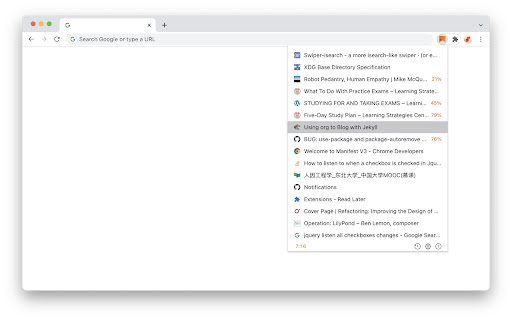
• Reading List
  •  Reading Progress: It saves the reading progress of current page.
  •  Sync in Cloud: Sync across Chrome browsers with one google account.
  •  Local History: Save the reading list history locally.
• Status Bar
  •  Row Number : Total Count
  •  History Icon: Click to on/off history mode.
  •  Export Icon: Click to export reading list to JSONL text/file.
  •  Import Icon: Click to import reading list from JSONL text/file.
  •  Options Icon: Click to open options page.
  •  Question Icon: Click to open the documentation & feedback page.

Usages

| Mac Keyboard | Windows Keyboard |
|------------------------+--------------------------------|
|       Control       |               Ctrl               |
|       Option        |                Alt                |
|    Command    |         Windows            |
|       Delete        |        Backspace          |


• Mouse Click
  • Current Page:
    •  Right Click current page and select Read Later in context menus to save page info and close current tab.
    •  Right Click a link and select Read Later in context menus to save the target link info.
    •  Click the Read Later icon to open the Reading List(Popup Window).

  • Reading List(Popup Window):
    •  Mouse Hover:                show full title and link.
    •  Mouse Hover(image):  show the delete icon.
    •  Click:                               open link in current tab.
    •  Click(image):                 delete current link.
    •  Alt + Click:         open link in a new tab.
    •  Command + Click:         open link in a new tab and stay in current tab, and keep reading list.

• Keyboard Shortcuts
  • Current Page:
    •  Alt + Shift + S:            Save to reading list.
    •  Alt + Shift + Z:            Zoom In/Out reading list.

If you pressed the shortcuts and it didn't work, please enter chrome://extensions/shortcuts in your address bar.
Find Read Later and set the shortcuts(resolve the keyboard shortcuts conflicts)

  • Reading List(Popup Window):
    •  ↑:                               move to previous link.
    •  ↓:                               move to next link.
    •  Delete:                      delete current link.
    •  Command + z:         restore a deletion.
    •  Enter:                        open select link in current tab.
    •  Alt + Enter:               update link in a new tab.
    •  Command + Enter: open link in a new tab and stay in current tab, and keep reading list.

  • For Vim user(Popup Window):
    •  Esc:     close reading list.
    •  j:           move to next link.
    •  k:          move to previous link.
    •  gg:       move to the first link.
    •  G:         move to the last link.
    •  o:         open select link in current tab.
    •  O:         open link in a new tab and stay in current tab with reading list stay.
    •  dd:       delete current link.
    •  u:          restore a deletion.
    •  yy:        copy current link.
    •  ,:           open option page.
    •  ?:          open documentation & feedback site.
Technical
- Version
- 9.1.0
- Manifest
- V3
- Size
- 136KiB
- Min Chrome
- 88
- Languages
- 1
- Featured
- Yes
Metadata
- ID
- fbmfcfkokefgbmfcjahdmomlifclekib
- Developer ID
- ue1b10af016e63db871a578ac2d3606d1
- Developer Email
- [email protected]
- Created
- Dec 24, 2019
- Last Updated (Store)
- Dec 15, 2025
- Last Scraped
- Jun 5, 2026
- Website
- —
Similar extensions
Alternatives to Read Later, ranked by description similarity.

EasyRead
EasyRead: Better browser experence: ReadLater, AutoRecord, AddNote, Save Markdown.
39

Reading list
Save articles, videos, and other content for later use
4.0K
★ 4.1

Read It Later App
Read It Later App: The ultimate reading list app to reduce the count of open tabs and access your saved articles anytime with ease.
887
★ 5.0

Read Later
Save pages to read later with notes, tags, and favicons.
92
★ 4.0

Super Focus Tabs
Quickly find out tab/page. Reduce much more time while working with multiple tabs/pages.
1.0K
★ 3.9

Read Later with Tags
Save and organize links with tags. Reading-time estimate, themes, sync, export/import, and weekly auto-backup.
2

Read Later Bookmarks
Read later view addon for chrome bookmarks
51

Expanded Reading List
The Expanded Reading list helps you to store links to wepsites for a later use
349
★ 5.0
Data sourced from the Chrome Web Store · last verified Jun 5, 2026.