Desktop app for Google Tasks
Standalone Desktop app for Google Tasks. Export and share your Google Tasks lists in one click.
As of June 2026, Desktop app for Google Tasks has 500,000 users and a 4.66/5 rating from 1,156 reviews in the Workflow & Planning category.
Usersno change0%
500.0K
500,000
Ratingno change0%
4.66
1.2K reviews
Reviewsup 0.3 percent+0.3%
1.2K
Version
0.5.4
Manifest V3
History
4 snapshotsTracking since Apr 18, 2026.
View as table
| Date | Users | Rating | Reviews | Version |
|---|---|---|---|---|
| Apr 18, 2026 | 500.0K | 4.66 | 1.2K | 0.5.4 |
| Apr 28, 2026 | 500.0K | 4.66 | 1.2K | 0.5.4 |
| May 7, 2026 | 500.0K | 4.66 | 1.2K | 0.5.4 |
| May 24, 2026 | 500.0K | 4.66 | 1.2K | 0.5.4 |
| Now | 500.0K | 4.66 | 1.2K | 0.5.4 |
Permissions & access
- Permissions
- sidePanelcontextMenus
- Host access
- https://tasksboard.com/*, http://localhost/*
Screenshots


About
The TasksBoard Chrome extension let you add a task to your Google Tasks in one click from any page on Google Chrome.

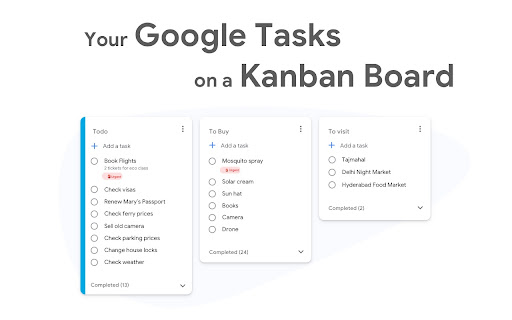
✅ TasksBoard lets you manage, edit and share your Google Tasks on a full-screen interface.

👥  Collaborate with your team in real-time with the option to share the lists.

✨  TasksBoard offers a Premium plan with additional features such as unlimited shared lists, customisable boards, tags and more.


⭐️ FEATURES

👌 Increase your productivity: Drag and drop your tasks from one list to another

🤝 Collaborate with your team: Share your Google Tasks lists with anyone

🗄️ Keep everything organized: Create multiple boards for each of your projects

🌈 Better Task management: Set highlight color to your lists to find them instantly

🏷️ Easily organize and prioritize your tasks with custom labels

📁 Attach documents from Google Drive directly to your tasks

✉️ Make emails actionable by turning them into tasks from within your Gmail inbox

💻 Access your Google Tasks directly on the desktop by installing the desktop app

🔑 Ensure secure sign-on with your team's existing Google credentials through Single-Sign-On authentication


🛟 SUPPORT

Need a helping hand? Have a look to our extensive guides, the documentation on https://tasksboard.com/support and/or contact us at [email protected]


💰 PRICING

TasksBoard has individual and enterprise Premium plans available. Check our pricing options: https://tasksboard.com/pricing


🔐  PRIVACY

By design, your data stays at all times on Google servers. We have no access to your data, and we never copy your tasks on our server..

Here's all the data we need in order to make TasksBoard work:
- Your email address - to know who you are
- Campaigns sent metadata (spreadsheet name, date of sending - that's all)
- Emails sent metadata (date of sending, open / clicks events - that's all again)

TasksBoard / TaskBoard complies with privacy laws (especially GDPR) to protect your data.

Check out the full privacy policy on this page https://tasksboard.com/privacy


***********************************
WEBSITE: https://tasksboard.com
TWITTER: @tasksboard
SUPPORT: [email protected]
Technical
- Version
- 0.5.4
- Manifest
- V3
- Size
- 26.57KiB
- Min Chrome
- 88
- Languages
- 40
- Featured
- Yes
Metadata
- ID
- lpofefdiokgmcdnnaigddelnfamkkghi
- Developer ID
- ub73e6a4333003170e38adc2ba5574402
- Developer Email
- [email protected]
- Created
- Apr 17, 2020
- Last Updated (Store)
- Dec 13, 2025
- Last Scraped
- Jun 3, 2026
- Website
- tasksboard.com
- Support URL
- https://tasksboard.com/help
- Privacy Policy
- https://tasksboard.app/privacy.html
Similar extensions
Alternatives to Desktop app for Google Tasks, ranked by description similarity.
checklist for Google Tasks™
Access and manage all your Google Tasks™ directly in Chrome
10.0K
★ 3.6

Light Kanban Board
A simple and light Kanban board Chrome extension for task management
16

Kanban Boards in Gmail and Google Workspace
Visual Kanban for Google Tasks & Gmail: turn emails into tasks, share boards, track with due dates, tags & comments.
1.0K
★ 4.4
Sidebar for Google Tasks
Access Google Tasks directly in Chrome’s sidebar (side panel)—stay organized without needing Gmail or Google Calendar.
30.0K
★ 4.4
Full Screen for Google Tasks - Desktop App for Google Tasks | TaskDisplay
Display full screen for Google Tasks and acts as desktop app for Google Tasks. Use this Google Tasks manager for more productivity.
151
★ 5.0

Tasks - To do & task list by Workona
The best task list for work in the browser.
30.0K
★ 4.8

DragApp: Gmail shared inbox
Turn Gmail into a collaboration tool for teams to manage shared inbox, Help Desk, CRM, Task Management and more from Gmail.
10.0K
★ 4.1

ToDo Kanban Tasker
A simple Kanban-style task manager or a Todo List in Chrome side panel.
6
★ 5.0
Data sourced from the Chrome Web Store · last verified Jun 3, 2026.