Sidebar for Google Tasks
Access Google Tasks directly in Chrome’s sidebar (side panel)—stay organized without needing Gmail or Google Calendar.
As of June 2026, Sidebar for Google Tasks has 30,000 users and a 4.43/5 rating from 118 reviews in the Workflow & Planning category.
Usersno change0%
30.0K
30,000
Ratingno change0%
4.43
118 reviews
Reviewsup 0.9 percent+0.9%
118
Version
26.4.4
Manifest V3
90-day change · In the last 90 days this extension 1 version update.
History
2 snapshotsTracking since Apr 5, 2026.
View as table
| Date | Users | Rating | Reviews | Version |
|---|---|---|---|---|
| Apr 5, 2026 | 30.0K | 4.43 | 117 | 26.1.31 |
| Apr 14, 2026 | 30.0K | 4.43 | 117 | 26.4.4 |
| Now | 30.0K | 4.43 | 118 | 26.4.4 |
Permissions & access
- Permissions
- declarativeNetRequestWithHostAccesssidePanel
- Host access
- https://tasks.google.com/*/
Screenshots
About
Enhance your productivity with Sidebar for Google Tasks!

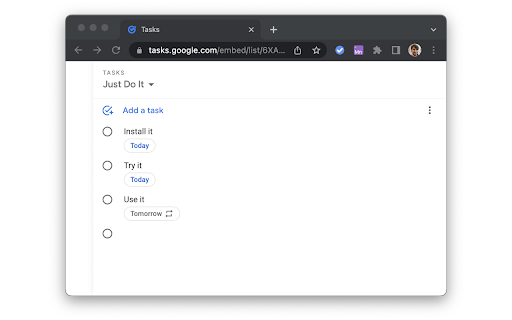
Our extension provides a convenient way to access, manage, and organize your Google Tasks directly from Chrome's side panel.

Key Features:
• Quick Access: Open Google Tasks with a single click from your toolbar.
• Task Management: Easily add, edit, and delete tasks.
• Reminders: Set and receive notifications for your tasks.
• Synchronization: Sync tasks across all your devices in real time.
• Customization: Personalize your task list with custom colors and labels.
• Drag-and-Drop: Reorder tasks with simple drag-and-drop functionality.
• Search Functionality: Quickly find tasks with the built-in search feature.
• Offline Access: Manage tasks even when you're offline.

Why choose Sidebar for Google Tasks?
• Efficiency: Save time by accessing your tasks directly from your browser.
• User-Friendly: Intuitive interface designed for maximum productivity.
• Regular Updates: Frequent updates to ensure compatibility with the latest Google Tasks features.

The Sidebar for Google Tasks is perfect for anyone looking to stay organized and productive. Get it now to streamline your task management. Download Google Tasks for Sidebar today and take control of your to-do list!


ADS
When using the Input Tab in Google Keep, you may encounter ads. These situational ads allow us to develop the product and make it free.


— Made with ❤️ by BrowseCraft gang.
Technical
- Version
- 26.4.4
- Manifest
- V3
- Size
- 42.35KiB
- Min Chrome
- 88
- Languages
- 54
- Featured
- Yes
Metadata
- ID
- jlgndcbgcfaaidgacjgelccmedbjenhb
- Developer ID
- ue4ab703c8aadbceedaa89b1faa20460e
- Developer Email
- [email protected]
- Created
- Jul 12, 2019
- Last Updated (Store)
- Apr 4, 2026
- Last Scraped
- Jun 14, 2026
- Website
- browsecraft.com
- Support URL
- https://browsecraft.com/contacts
- Privacy Policy
- https://browsecraft.com/privacy
Similar extensions
Alternatives to Sidebar for Google Tasks, ranked by description similarity.

TaskMaster Pro
Task manager with categories, priorities, dark mode, search, deadlines, and notifications. Keep your tasks organized and tracked.
7
★ 5.0

Todoist Custom Sidebar
Native sidebar using Todoist API.
23

checklist for Google Tasks™
Access and manage all your Google Tasks™ directly in Chrome
10.0K
★ 3.6

Today's Task - Organize Your Day with a To-Do List Extension
Turn Your Chrome Home Page Into a Powerful To-Do List Manager
44
★ 4.5

ToDo List
A simple ToDo list.
5
★ 5.0

ToDo Kanban Tasker
A simple Kanban-style task manager or a Todo List in Chrome side panel.
6
★ 5.0

Task Manager
A simple task manager to use with chrome
797
★ 5.0

Todo List
A simple todo list with context menu integration, drag-to-reorder, and auto URL detection.
3
★ 5.0
Data sourced from the Chrome Web Store · last verified Jun 14, 2026.