TestCase Studio - Selenium IDE
TestCase Studio record the user actions performed on a web application in English Sentences. Best alternative for Selenium IDE
As of June 2026, TestCase Studio - Selenium IDE has 80,000 users and a 4.86/5 rating from 205 reviews in the Developer Tools category.
Usersno change0%
80.0K
80,000
Ratingdown 0.4 percent−0.4%
4.86
205 reviews
Reviewsup 1.5 percent+1.5%
205
Version
1.9.6
Manifest V3
90-day change · In the last 90 days this extension 2 version updates, changed permissions.
History
6 snapshotsTracking since Apr 1, 2026.
View as table
| Date | Users | Rating | Reviews | Version |
|---|---|---|---|---|
| Apr 1, 2026 | 80.0K | 4.88 | 202 | 1.9.2 |
| Apr 16, 2026 | 80.0K | 4.88 | 202 | 1.9.3 |
| Apr 26, 2026 | 80.0K | 4.88 | 202 | 1.9.3 |
| Apr 29, 2026 | 80.0K | 4.88 | 203 | 1.9.3 |
| May 23, 2026 | 80.0K | 4.88 | 203 | 1.9.6 |
| May 25, 2026 | 80.0K | 4.86 | 204 | 1.9.6 |
| Now | 80.0K | 4.86 | 205 | 1.9.6 |
Changelog
- Apr 29, 2026description
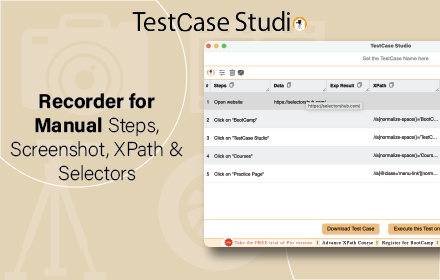
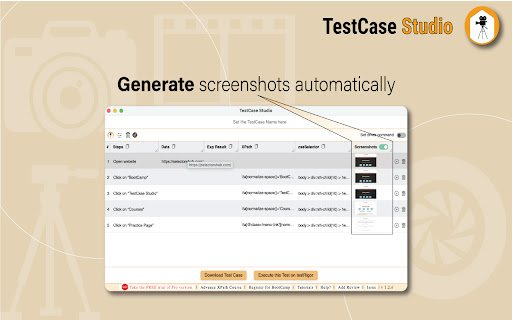
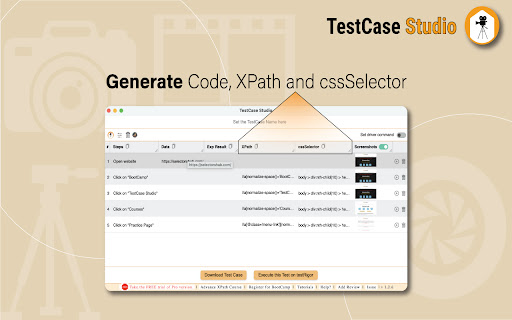
TestCase Studio is a platform to record the user actions performed on a web application in English Sentences. This recorder plugin also records screenshots. It will also generate the XPath and Automation Code for every user action. User can save or copy these recorded steps as a Test case.
Watch this video tutorial to make the best use of TestCase Studio.
https://www.youtube.com/watch?v=Gcofn71bJdo

New Features: Screen Recording, Customise Command, Record TestCase in any Language and BDD Format Support.

Very simple steps to use the tool-
1. Click on the TestCase Studio logo in the tool bar.
2. It will open the TestCase Studio window.
3. Now keep performing your steps, it will automatically write english sentence for every user action.
4. You can download the written steps by clicking on download button.

Upgrade to Pro version for more advanced features.
Compare the Pro version features here-
https://selectorshub.com/testcase-studio-pro/plans/
TestCase Studio is a platform to record and replay the user actions performed on a web application in English Sentences. This recorder plugin also records screenshots. It will also generate the XPath and Automation Code for every user action. User can save or copy these recorded steps as a Test case.

Watch this video tutorial to make the best use of TestCase Studio.
https://www.youtube.com/watch?v=Gcofn71bJdo

New Features: Screen Recording, Customise Command, Record TestCase in any Language and BDD Format Support.

Very simple steps to use the tool-
1. Click on the TestCase Studio logo in the tool bar.
2. It will open the TestCase Studio window.
3. Now keep performing your steps, it will automatically write english sentence for every user action.
4. You can download the written steps by clicking on download button.

Upgrade to Pro version for more advanced features.
Compare the Pro version features here-
https://selectorshub.com/testcase-studio-pro/plans/
- Apr 29, 2026permissions
contextMenus, notifications, storage, cookies
contextMenus, notifications, storage, cookies, tabs, windows, scripting, webNavigation
Permissions & access
- Permissions
- contextMenusnotificationsstoragecookiestabswindowsscriptingwebNavigation
- Host access
- <all_urls>
Screenshots



About
TestCase Studio is a platform to record and replay the user actions performed on a web application in English Sentences. This recorder plugin also records screenshots. It will also generate the XPath and Automation Code for every user action. User can save or copy these recorded steps as a Test case.

Watch this video tutorial to make the best use of TestCase Studio.
https://www.youtube.com/watch?v=Gcofn71bJdo

New Features: Screen Recording, Customise Command, Record TestCase in any Language and BDD Format Support.

Very simple steps to use the tool-
1. Click on the TestCase Studio logo in the tool bar.
2. It will open the TestCase Studio window.
3. Now keep performing your steps, it will automatically write english sentence for every user action.
4. You can download the written steps by clicking on download button.

Upgrade to Pro version for more advanced features.
Compare the Pro version features here-
https://selectorshub.com/testcase-studio-pro/plans/
Technical
- Version
- 1.9.6
- Manifest
- V3
- Size
- 837KiB
- Min Chrome
- 88
- Languages
- 1
- Featured
- Yes
Metadata
- ID
- loopjjegnlccnhgfehekecpanpmielcj
- Developer ID
- uf8770c250d79ce3900d21e6d7376c1d8
- Developer Email
- [email protected]
- Created
- Aug 3, 2021
- Last Updated (Store)
- Apr 29, 2026
- Last Scraped
- Jun 17, 2026
- Website
- selectorshub.com
- Support URL
- https://bit.ly/SH_Slack
- Privacy Policy
- https://www.selectorshub.com/privacy-policy/
Similar extensions
Alternatives to TestCase Studio - Selenium IDE, ranked by description similarity.

TestCase Studio Pro
TestCase Studio Pro record the user actions performed on a web application in English Sentences.
1.0K
★ 5.0

Girik QA Studio
Girikon QA Studio is a Chrome extension for Girikon QA team to perform various QA activities.
33
★ 5.0

Smart AI Steps Recorder
Record browser actions and generate human-readable test steps for QA engineers
—

TestSnapper
Record UI test sessions with smart field detection, locator extraction, and export to DOCX, PDF, and JSON.
6

GoTestPro
Achieve End-to-End Automation Testing with GoTestPro
100
★ 5.0

Testto
Easily record and replay test steps. Enhance productivity with our intuitive extension.
24

Test Companion
Captures webpage interactions with screenshots and URLs, sending data to Test Companion for test cases and bug reports.
227
★ 5.0

TestForge Recorder
Record, replay and report UI tests with Azure DevOps integration, AI self-healing, Playwright export and data-driven testing.
—
Data sourced from the Chrome Web Store · last verified Jun 17, 2026.