
TestCase Studio Pro
TestCase Studio Pro record the user actions performed on a web application in English Sentences.
As of June 2026, TestCase Studio Pro has 1,000 users and a 5.00/5 rating from 7 reviews in the Developer Tools category.
Usersno change0%
1.0K
1,000
Ratingno change0%
5.00
7 reviews
Reviewsup 40.0 percent+40.0%
7
Version
2.6.1
Manifest V3
90-day change · In the last 90 days this extension 3 version updates, changed permissions.
History
6 snapshotsTracking since Apr 19, 2026.
View as table
| Date | Users | Rating | Reviews | Version |
|---|---|---|---|---|
| Apr 19, 2026 | 1.0K | 5.00 | 5 | 2.5.3 |
| May 25, 2026 | 1.0K | 5.00 | 5 | 2.5.3 |
| May 30, 2026 | 1.0K | 5.00 | 5 | 2.5.7 |
| Jun 4, 2026 | 1.0K | 5.00 | 6 | 2.5.7 |
| Jun 8, 2026 | 1.0K | 5.00 | 7 | 2.5.7 |
| Jun 14, 2026 | 1.0K | 5.00 | 7 | 2.6.0 |
| Now | 1.0K | 5.00 | 7 | 2.6.1 |
Changelog
- Jun 14, 2026permissions
contextMenus, notifications, storage, tabs, cookies
contextMenus, notifications, storage, tabs, cookies, windows, scripting, webNavigation
Permissions & access
- Permissions
- contextMenusnotificationsstoragetabscookieswindowsscriptingwebNavigation
- Host access
- <all_urls>
Screenshots


About
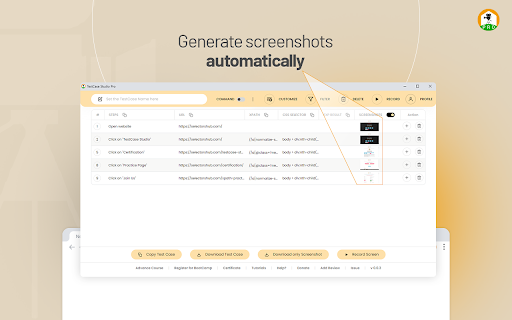
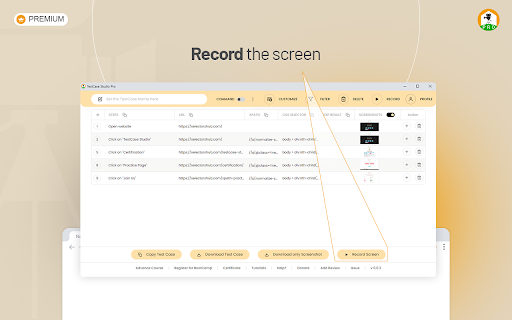
TestCase Studio Pro is a plugin to record the user actions performed on a web application along with screenshots and screen recording. User can save or copy these recorded steps and screenshots.

Very simple 5 steps to start with Pro Version-
1- Add TestCase Studio Pro to your Chrome Browser.
2- Now pin the extension to tool bar in your browser. TestCase Studio Pro is installed and setup is ready.
3- Now checkout the plans and take the Free trial to experience the new timesaver innovations-
Compare and Take the Free Trial from here-
https://selectorshub.com/testcase-studio-pro/plans/

4- After taking a subscription you will get the login credentials.
5- Now Click on the TestCase Studio Pro logo in browser toolbar and here Login with the credentials which you have received in email after taking a subscription.

Wow!! You are all set, Enjoy using the Pro version and increase your productivity.

For any query please write us to [email protected]
Technical
- Version
- 2.6.1
- Manifest
- V3
- Size
- 1.16MiB
- Min Chrome
- 88
- Languages
- 1
- Featured
- Yes
Metadata
- ID
- nbikaeclldnpbfeffmhakhfaekkbfjel
- Developer ID
- uf0eec06de0eb10371692230faa48b65e
- Developer Email
- [email protected]
- Created
- Mar 17, 2022
- Last Updated (Store)
- Jun 13, 2026
- Last Scraped
- Jun 14, 2026
- Website
- https://selectorshub.com/
- Support URL
- https://bit.ly/shub_slack
Similar extensions
Alternatives to TestCase Studio Pro, ranked by description similarity.
TestCase Studio - Selenium IDE
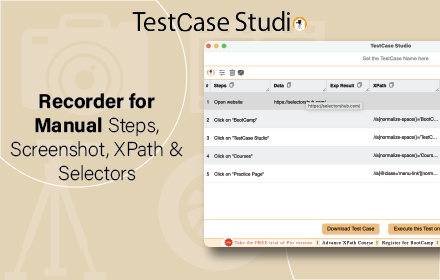
TestCase Studio record the user actions performed on a web application in English Sentences. Best alternative for Selenium IDE
80.0K
★ 4.9

GoTestPro
Achieve End-to-End Automation Testing with GoTestPro
100
★ 5.0

SelectorsHub Pro
xPath plugin to auto generate, write and verify xpath & cssSelector.
5.0K
★ 5.0

Test Companion
Captures webpage interactions with screenshots and URLs, sending data to Test Companion for test cases and bug reports.
227
★ 5.0
Preflight Recorder
Preflight Chrome Extension
823
★ 4.2

autotest.tech - Automated Test Script Generator
Generate automation scripts in all most popular test frameworks (Playwright, Nightwatch, Puppeteer, Cypress).
72

theTestRo
theTestRo is a powerful tool that simplifies test automation by recording and replaying user actions on any web application.
28
★ 5.0

TestWheel Recorder
Capture Application Workflow to obtain the TestWheel Application Data Inputs for Test Automation
61
★ 5.0
Data sourced from the Chrome Web Store · last verified Jun 14, 2026.