
Crop It!
Crop It! Provide users crop current web page's screenshot feature. Users could use it to capture images they need.
As of May 2026, Crop It! has 9,000 users and a 2.58/5 rating from 12 reviews in the Workflow & Planning category.
Usersup 12.5 percent+12.5%
9.0K
9,000
Ratingdown 6.9 percent−6.9%
2.58
12 reviews
Reviewsdown 7.7 percent−7.7%
12
Version
1.0.8
Manifest V3
90-day change · In the last 90 days this extension gained 1.0K users.
History
2 snapshotsTracking since Apr 24, 2026.
View as table
| Date | Users | Rating | Reviews | Version |
|---|---|---|---|---|
| Apr 24, 2026 | 8.0K | 2.77 | 13 | 1.0.8 |
| May 20, 2026 | 9.0K | 2.77 | 13 | 1.0.8 |
| Now | 9.0K | 2.58 | 12 | 1.0.8 |
Permissions & access
- Permissions
- contextMenusactiveTabdownloadsstorage
- Host access
- None declared
Screenshots



About
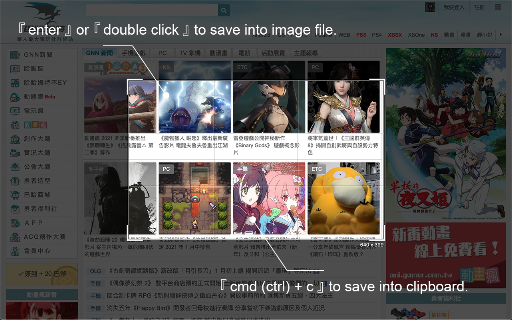
Use 「Crop It!」 to crop the exactly screenshot you need. Users could choose to save the screenshot into a file or clipboard.

- Here comes several ways to turn on 「Crop It!」.
1. Turn on contextMenu & choose 「Crop It!」.
2. Use keyboard shortcut > 「Cmd (Ctrl) + . 」.

- Usage instructions:
1. Turn on 「Crop It!」.
2. Adjust the selection size & position you need. (Users could press keyboard 「Esc」or click overlay to turn off 「Crop It!」)
3. Right-click on selection, there will be many aspect-ratio to choose.
4. Double click the selection or press keyboard 「Enter」 to save screenshot into a  image file. Or press 「Cmd (Ctrl) + c」to save screenshot into clipboard.

Otherwise, users could always use options to set overlay's color or opacity they like.

- Change Log:
1.0.8
  a. Fix shortcut > f issue.

1.0.7
  a. Fix shortcut issue.

1.0.6
  a. Migrate to MV3.
  b. Performance enhancement.

1.0.5
  a. Add  keyboard shortcut >「 Shift 」when resize selection for fix its aspect-ratio.
  b. Unify system UI & dark mode support.
  c. Unfreeze scroll-lock when 「Crop It!」turn on.
  d. Minor bug fixed & performance enhance.

1.0.4
  a. Add aspect-ratio picker for different usages.
  b. Add keyboard shortcut >「 f 」for quick expand / shrink selection to fullscreen.

1.0.3
  a. Add keyboard shortcut guide (「 Shift 」 + 「 ? 」) & performance enhance.

1.0.2
  a. Add keyboard shortcut > 「 ↑ 」、「 ↓ 」、「 ← 」、「 → 」to move selection strictly.
Technical
- Version
- 1.0.8
- Manifest
- V3
- Size
- 45.18KiB
- Min Chrome
- 88
- Languages
- 1
- Featured
- No
Metadata
- ID
- lobkhfpaoaonbpgaakbdonkpilldgmib
- Developer ID
- u4a5096f7fdaec08c0c2f85e504f25e1c
- Developer Email
- [email protected]
- Created
- Dec 31, 2020
- Last Updated (Store)
- Dec 7, 2021
- Last Scraped
- May 20, 2026
- Website
- —
- Support URL
- —
- Privacy Policy
- —
Similar extensions
Alternatives to Crop It!, ranked by description similarity.
Shot Crop - Screen Capture & Editor
Capture parts of a page or entire sites and then edit and share your image!
7.0K
★ 3.4

Pirate
Pirate - Provide users grab current web page's all images into files or clipboard.
123
★ 5.0

mei's Handy Tool
mei's Handy Tool provides some useful features for browsing、present and everything you need.
1
★ 5.0

Screenshot Collab
Take unlimited screenshots of any webpage. Annotate, edit, and save screenshots locally, or upload and share them via Google Drive.
167
★ 5.0

Snippit
Grab screenshots easy from your browser!
3.0K
★ 5.0

SwiftSelect - Capture, Copy & Download Screenshots
The all-in-one tool to snap, scroll-capture, copy and download screenshots instantly.
49
★ 5.0

Scrolling screenshot tool & screen capture
Scrolling Screenshot tool for screen capture and screen sharing
400.0K
★ 4.3

WebClip Element
Take a screenshot of highligthed element (or visible page)
93
★ 5.0
Data sourced from the Chrome Web Store · last verified May 20, 2026.