Pirate
Pirate - Provide users grab current web page's all images into files or clipboard.
As of June 2026, Pirate has 123 users and a 5.00/5 rating from 3 reviews in the Workflow & Planning category.
Usersup 0.8 percent+0.8%
123
123
Ratingno change0%
5.00
3 reviews
Reviewsno change0%
3
Version
1.0.7
Manifest V3
History
3 snapshotsTracking since Apr 1, 2026.
View as table
| Date | Users | Rating | Reviews | Version |
|---|---|---|---|---|
| Apr 1, 2026 | 122 | 5.00 | 3 | 1.0.7 |
| May 2, 2026 | 115 | 5.00 | 3 | 1.0.7 |
| Jun 1, 2026 | 106 | 5.00 | 3 | 1.0.7 |
| Now | 123 | 5.00 | 3 | 1.0.7 |
Permissions & access
- Permissions
- contextMenusdownloads
- Host access
- None declared
Screenshots


About
- Here comes several ways to turn on 「Pirate」.
1. Turn on contextMenu & choose 「Pirate」.
2. Press  shortcut 「 Pirate 」 which right next to url bar.

- How to use 「Pirate」?
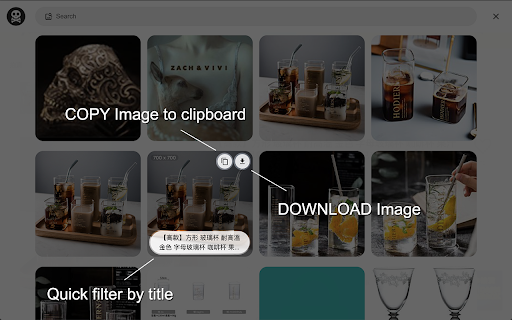
1. Press contextMenu & choose 「Pirate」to turn it on.
2. Pick image you like to 「 COPY 」or 「 DOWNLOAD 」it.
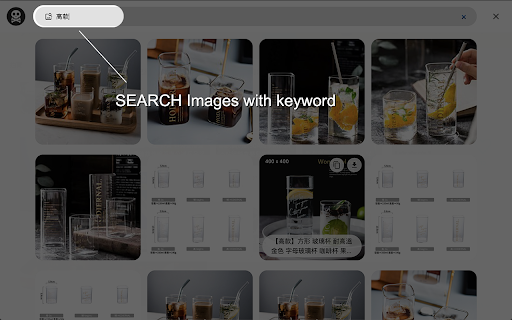
3. You could also use search function to find images you like quickly.

- Keyboard shortcut
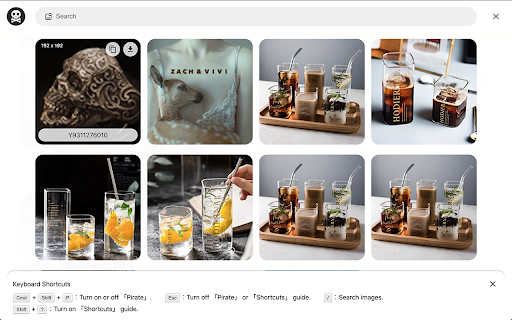
1.「 Cmd + Shift + O」︰Turn on or off 「Pirate」.
2.「 Esc 」︰Turn off 「Pirate」 or 「Shortcuts」 guide.
3.「 / 」︰Search images.
4.「 Tab 」︰Switch content.
5.「 Shift + ? 」Turn on 「Shortcuts」 guide.


Enjoy it.


- Change Log:
1.0.7:
  a. Fixed keyboard shortcut issue.

1.0.6:
  a. Migrate to MV3.
  b. Performance enhancement.

1.0.5:
  a. Dark mode support.

1.0.4:
  a. Refactor card structure.

1.0.3:
  a. Accessibility & performance enhancement.

1.0.2:
  a. Masonry layout display bug fixed.

1.0.1:
  a. Add keyboard shortcuts guide.
  b. Ally enhancement.
  c. Add scroll to top function.
  d. Fetch more images from meta / video / touch-icon / startup-image.
  e. Add multi keyword search. (use space as separate sign)
Technical
- Version
- 1.0.7
- Manifest
- V3
- Size
- 75.8KiB
- Min Chrome
- 88
- Languages
- 1
- Featured
- No
Metadata
- ID
- acnlkdkaejckfnegikjjaeknjjckbnca
- Developer ID
- u4a5096f7fdaec08c0c2f85e504f25e1c
- Developer Email
- [email protected]
- Created
- Jan 23, 2021
- Last Updated (Store)
- Dec 5, 2021
- Last Scraped
- Jun 1, 2026
- Website
- —
- Support URL
- —
- Privacy Policy
- —
Similar extensions
Alternatives to Pirate, ranked by description similarity.

Crop It!
Crop It! Provide users crop current web page's screenshot feature. Users could use it to capture images they need.
9.0K
★ 2.6

mei's Handy Tool
mei's Handy Tool provides some useful features for browsing、present and everything you need.
1
★ 5.0

Pinboard Plus
Save, tag, and manage Pinboard bookmarks in one click. The toolbar icon shows whether the current page is already saved.
8.0K
★ 4.2

Pop-up History
Pop-up a History
1.0K
★ 4.7

Key Surf
Supercharge your browsing with Key Surf. Ditch the clicks, boost your speed, and navigate the web like a pro. Download now! 🚀
34
★ 5.0

Tab Manager
Pltab: Management of all windows and tabs. You can quickly find tabs. Includes pinning, copying, deleting, sorting, reordering,…
220
★ 5.0

Miao Productivity
Be more productive on Miao!
—
★ 5.0

Minimalist Speed Dial - New Tab Shortcuts
Minimalist speed dial new tab with a customizable shortcuts grid—add lots of shortcuts fast.
186
★ 5.0
Data sourced from the Chrome Web Store · last verified Jun 1, 2026.