mei's Handy Tool
mei's Handy Tool provides some useful features for browsing、present and everything you need.
As of June 2026, mei's Handy Tool has 1 users and a 5.00/5 rating from 1 reviews in the Workflow & Planning category.
Usersdown 66.7 percent−66.7%
1
1
Ratingno change0%
5.00
1 reviews
Reviewsno change0%
1
Version
1.0.5
Manifest V3
History
1 snapshotsTracking since Jun 2, 2026.
View as table
| Date | Users | Rating | Reviews | Version |
|---|---|---|---|---|
| Jun 2, 2026 | 3 | 5.00 | 1 | 1.0.5 |
| Now | 1 | 5.00 | 1 | 1.0.5 |
Permissions & access
- Permissions
- contextMenusactiveTab
- Host access
- None declared
Screenshots


About
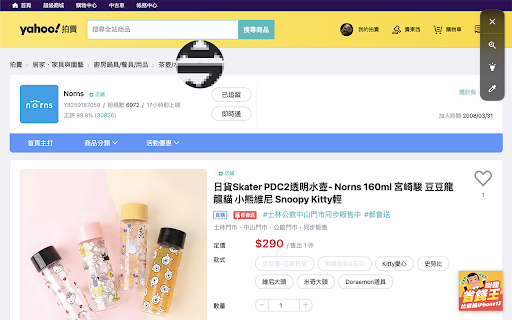
「mei's Handy Tool」provides some useful features for browsing、present and everything you need。

With 「mei's Handy Tool」you could do the following stuff。
- Zoom in / out︰toggle zoom icon,tap where you like to zoom-in。
- Spotlight︰toggle spotlight icon,highlight where you like to highlight。
- Dropper︰Pick up the exactly color stamp you like and it will be store in your clipboard。

- How to use 「mei's Handy Tool」?
1. Turn on「mei's Handy Tool」by context menu or browser bar icon。
2. Tap what kind feature you like to apply。

- Change Log:
1.0.5
  a. Performance enhancement.

1.0.4
  a. Add 「design mode」feature for document editable.

1.0.3
  a. Performance enhancement.

1.0.2
  a. Performance enhancement.
  a. Drag UI enhancement.

1.0.1
  a. Performance enhancement.
Technical
- Version
- 1.0.5
- Manifest
- V3
- Size
- 47.97KiB
- Min Chrome
- 88
- Languages
- 1
- Featured
- No
Metadata
- ID
- ahkmfhnnaehikaaphccaonmddgcjdhee
- Developer ID
- u4a5096f7fdaec08c0c2f85e504f25e1c
- Developer Email
- [email protected]
- Created
- Oct 31, 2021
- Last Updated (Store)
- Nov 22, 2021
- Last Scraped
- Jun 2, 2026
- Website
- —
- Support URL
- —
- Privacy Policy
- —
Similar extensions
Alternatives to mei's Handy Tool, ranked by description similarity.

deerblock-toolkit
网页工具集合
4

DRAWER2
創造の“引き出し”を増やす、新しいデザイン習慣を。
DRAWERは、UIデザインをする人・興味がある人のために生まれたChrome拡張機能です。新規タブを開くだけで、イラストやアイコン、UI…
39
★ 5.0

nTools 效率工具箱
这是一款浏览器上的多功能效率工具
53

Crop It!
Crop It! Provide users crop current web page's screenshot feature. Users could use it to capture images they need.
9.0K
★ 2.6

Flash Copilot - Powered by DeepSeek
Powered By DeepSeek, Efficiency x10, including immersive web notes, bilingual immersive translation,etc.
10.0K
★ 4.6
Pirate
Pirate - Provide users grab current web page's all images into files or clipboard.
123
★ 5.0

IHome(bdtab)新标签页
IHome(bdtab新标签页)是一款实用的工具类浏览器插件(new tab,新标签页)。并且您可在多个不同的浏览器之间切换使用,而这完全不用考虑数据备份的问题,
1.0K
★ 4.4

NeonFlux
A customizable new tab page that categorizes frequently visited links by workflow with a liquid glass fluid grid UI.
15
Data sourced from the Chrome Web Store · last verified Jun 2, 2026.