
Bookmarks Quick Search
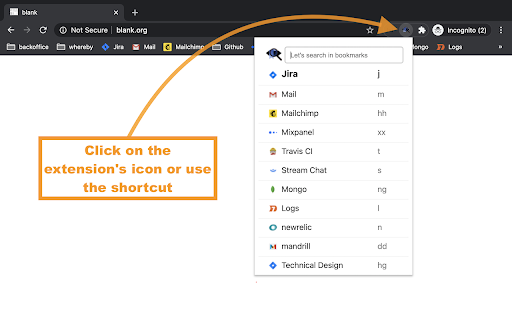
Search bookmarks quickly and easily, with a search popup, which can be opened by a click on the extension logo (or by cmd+E/ctrl+W).
As of May 2026, Bookmarks Quick Search has 20,000 users and a 4.62/5 rating from 50 reviews in the Productivity category.
Usersno change0%
20.0K
20,000
Ratingup 0.9 percent+0.9%
4.62
50 reviews
Reviewsup 11.1 percent+11.1%
50
Version
0.0.16
Manifest V3
History
2 snapshotsTracking since Apr 30, 2026.
View as table
| Date | Users | Rating | Reviews | Version |
|---|---|---|---|---|
| Apr 30, 2026 | 20.0K | 4.58 | 45 | 0.0.16 |
| May 29, 2026 | 20.0K | 4.59 | 46 | 0.0.16 |
| Now | 20.0K | 4.62 | 50 | 0.0.16 |
Permissions & access
- Permissions
- bookmarksdeclarativeContentfaviconactiveTab
- Host access
- None declared
Screenshots


About
Whenever you get too many bookmarks and folders it's becoming really annoying to find the one you're looking for. That's why I made this extension - to make it simple!

Now you can simply click the logo of the extension (after installed), and start typing until you find your bookmark and click it. This is also available by a shortcut - cmd+E (Mac)/ctrl+W (Windows/Linux).

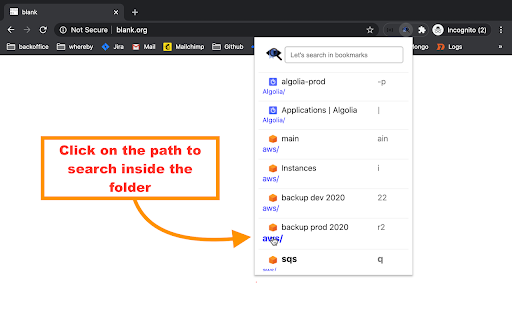
Although there are other similar extensions out there, I couldn't find at the time anyone that searches according to the folder(s) name as well. Likewise, all extensions I found, search by URL as well, which I find faulty. So they search by name and URL, while I search by name and folder(s) name.

And on top of that I added some cool features I found really helpful:
- Search by multiple words or partial words separated by spaces.
- When there are no results the search algorithm collapses and starts searching by letters instead of words, a search which easily overcomes typos.
- For every bookmark, a dedicated (technical) shortcut is calculated (and shown to the right of the every result), with the shortest length possible, and also by a priority which is based on how close are the keyboard keys to each other. Type a shortcut to get its bookmark as the first result on the search, so you can then simply press enter to open it. If you want to checkout alternative suggested shortcuts - click it. It will reveal a list of alternative suggestions you might prefer.

The suggested shortcut to show the search popup is cmd+E (Mac)/ctrl+W (Windows).
If you're having issues with this shortcut, please try reinstalling the extension.
If you want to change the shortcut, go to chrome://extensions/shortcuts and set a shortcut for "Bookmarks Quick Search".

Tip:
To make the search faster - make sure the extension is pinned to show always on the top menu-bar.

Enjoy :)

#0.0.8:
- Fix google autocomplete here and there appearance on the search box.
- Support JS-Script bookmarks as well.

#0.0.9:
- Fix slow load of icons - now it's instant.

#0.0.10
- Highlight query in results.

#0.0.11
- Allow more animation frames for a smoother look and feel.

#0.0.12
- Fix chrome's shortcut.

#0.0.13
- Query match highlighting is brown (was magenta)
- Remove support of bookmarklets (due to chrome restrictions)
- Full code refactor to allow better maintenance in the future

#0.0.14
- Improve performance

#0.0.15
- New feature - Multi Shortcuts List - If you want to explore alternative suggested shortcuts - click any suggested shortcut. It will reveal a list of alternative suggestions you might prefer.
- Fix small UI issues

#0.0.16
- Fix a bug when sometimes there's no highlighted bookmark at all
- Improve load time
Technical
- Version
- 0.0.16
- Manifest
- V3
- Size
- 364KiB
- Min Chrome
- 88
- Languages
- 1
- Featured
- Yes
Metadata
- ID
- lniofgaicnjjdfinpnkhmlpmnhacnkca
- Developer ID
- u6756ccd607a17a3e8ee556d9dcbd6612
- Developer Email
- [email protected]
- Created
- Jun 15, 2020
- Last Updated (Store)
- Jun 5, 2023
- Last Scraped
- May 29, 2026
- Website
- —
- Support URL
- —
- Privacy Policy
- —
Similar extensions
Alternatives to Bookmarks Quick Search, ranked by description similarity.

Smart Bookmarker (Save bookmark to folder)
Save bookmarks smartly to folders, with smart bookmarker and see your bookmark's folder structure.
225
★ 4.8

Quick Find for Google Chrome™
Port of Firefox Quick Find features + awesome new ones. Search results in one location. Navigate to links in just a few keystrokes.
4.0K
★ 4.1

Holmes
Chrome Bookmark Search Extension
10.0K
★ 4.5

Trufflepiggy - Quick Search
The all-in-one search tool: select and search. Find on multiple websites at once. Easy anonymous setup. Cross-browser sync.
2.0K
★ 4.3

Smart Bookmark Finder
Best Chrome extension to instantly search, manage and find your bookmarks right from your toolbar.
12

Mark My Search
Highlight searched keywords. Find matches instantly.
3.0K
★ 4.4

Search It All
Search across multiple search engines with one click - no retyping needed
936
★ 3.9

Favorite Search
Search your browser favorites/bookmarks and display matching results
13
Data sourced from the Chrome Web Store · last verified May 29, 2026.