
Reading List
This extension saves a list of links to pages to read later.
As of May 2026, Reading List has 40,000 users and a 4.72/5 rating from 748 reviews in the Productivity category.
Usersno change0%
40.0K
40,000
Ratingdown 0.2 percent−0.2%
4.72
748 reviews
Reviewsup 0.1 percent+0.1%
748
Version
3.0.1
Manifest V3
History
1 snapshotsTracking since Apr 30, 2026.
View as table
| Date | Users | Rating | Reviews | Version |
|---|---|---|---|---|
| Apr 30, 2026 | 40.0K | 4.73 | 747 | 3.0.1 |
| Now | 40.0K | 4.72 | 748 | 3.0.1 |
Permissions & access
- Permissions
- tabsstorage
- Host access
- None declared
Screenshots
About
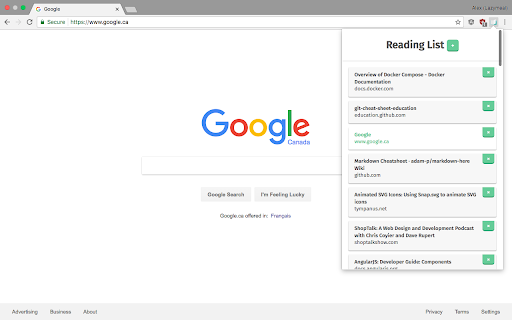
This reading list extension allows you to save pages in a list to get back to later. It’s super slick and easy to use, and it helps keep your tab count down.

How to use it?

 1. Go to a page you want to save for later
 2. Click the reading list icon on the top right of your browser Chrome Reading List icon
 3. Click the + button
 4. When you want to read a page you saved, open up the extension and click the reading item you want to read (control + click or command ⌘/windows key ⊞ + click to open the page in a new tab)
 5. Done with a page? Click the × next to said page in your reading list, and it will magically vanish.
Technical
- Version
- 3.0.1
- Manifest
- V3
- Size
- 29.1KiB
- Min Chrome
- 88
- Languages
- 7
- Featured
- Yes
Metadata
- ID
- lloccabjgblebdmncjndmiibianflabo
- Developer ID
- ubf1d969df5d522d1f967793e5d9b456b
- Developer Email
- [email protected]
- Created
- Nov 2, 2016
- Last Updated (Store)
- Oct 24, 2024
- Last Scraped
- May 29, 2026
- Website
- —
- Support URL
- —
- Privacy Policy
- —
Similar extensions
Alternatives to Reading List, ranked by description similarity.

Saved
Save now, read (or watch) later
—

Link Later
With LinkLater, you can save links and important pages to revisit later.
220
★ 4.8

My Reading List
Capture and save articles for future reading.
17

Reading List
Save articles and web pages to read later
14
★ 5.0

ReadItLater
The extension all users to add all the open tabs to reading list or share.
17
★ 5.0

Read Later List
Capture snippets from webpages to read later.
2

Reading List
Reading List - Save links, read later
109
★ 5.0

Read Me Later - Save Tabs to Read List
Quickly save all of your tabs for later reading with just one click!
57
★ 5.0
Data sourced from the Chrome Web Store · last verified May 29, 2026.