
Link Later
With LinkLater, you can save links and important pages to revisit later.
As of June 2026, Link Later has 220 users and a 4.79/5 rating from 14 reviews in the Productivity category.
Usersup 7.8 percent+7.8%
220
220
Ratingdown 1.2 percent−1.2%
4.79
14 reviews
Reviewsup 7.7 percent+7.7%
14
Version
2.1.0
Manifest V3
90-day change · In the last 90 days this extension 2 version updates.
History
12 snapshotsTracking since Apr 21, 2026.
View as table
| Date | Users | Rating | Reviews | Version |
|---|---|---|---|---|
| Apr 21, 2026 | 204 | 4.85 | 13 | 1.0.3 |
| Apr 26, 2026 | 208 | 4.85 | 13 | 2.0.0 |
| May 1, 2026 | 205 | 4.85 | 13 | 2.1.0 |
| May 6, 2026 | 207 | 4.85 | 13 | 2.1.0 |
| May 10, 2026 | 202 | 4.85 | 13 | 2.1.0 |
| May 13, 2026 | 207 | 4.85 | 13 | 2.1.0 |
| May 18, 2026 | 215 | 4.85 | 13 | 2.1.0 |
| May 27, 2026 | 221 | 4.85 | 13 | 2.1.0 |
| May 31, 2026 | 208 | 4.85 | 13 | 2.1.0 |
| Jun 5, 2026 | 205 | 4.85 | 13 | 2.1.0 |
| Jun 9, 2026 | 217 | 4.85 | 13 | 2.1.0 |
| Jun 18, 2026 | 224 | 4.85 | 13 | 2.1.0 |
| Now | 220 | 4.79 | 14 | 2.1.0 |
Changelog
- Apr 26, 2026description
LinkLater - Easily save your reading and add notes

With LinkLater, you can easily save important links and pages for later reference. This Chrome extension is made for you, who are looking for a simple and efficient way to manage your readings and keep your browser organized.

Key features:

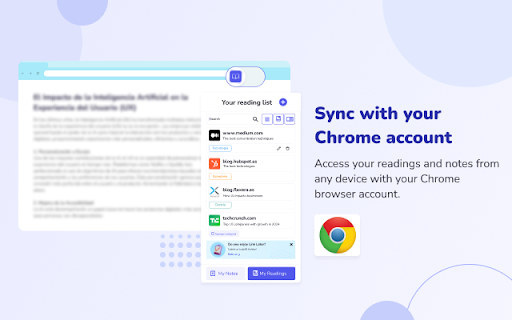
✅ Automatic sync: Keep everything up to date on all your devices thanks to Chrome's sync.
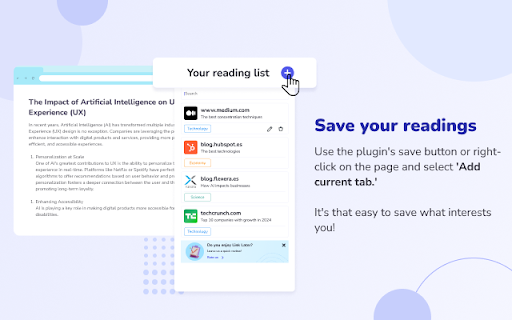
✅ Save your favorite links: Store web pages to review them whenever you want.
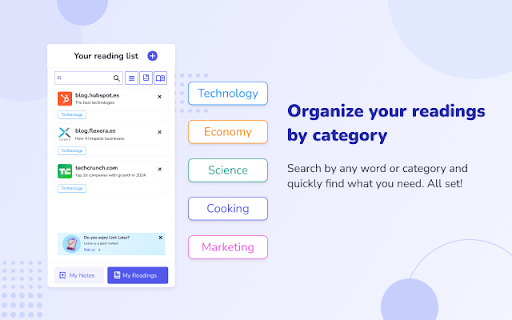
✅ Add categories: Organize the way you like your content.
✅ Add key notes: Select notes from your pages to remember important details.
✅ Note reader: You can listen to your saved notes at any time.
✅ Quick search: Easily find what you need with our search function.
✅ Multilingual support: Enjoy LinkLater in more than 15 languages, adapting to your preferences.

How to use LinkLater:

1. Open the web page you wish to save.
2. Click on the LinkLater icon in the top right corner of your browser.
3. Select “Add current page” to save it.
4. Use the search bar to find any saved readings.
When you are done with a page, delete it by clicking on the “X” in the right corner.

With LinkLater, you'll have all your reading and notes organized and accessible from any device - start enjoying an easier and more organized reading experience today!
LinkLater — Save links, highlights & notes in one place

LinkLater is your personal reading companion. Save pages, capture highlights, and write your own notes — all synced across your devices and organized exactly how you like.

Key features:

✅ Save links for later — Bookmark any page in one click and come back to it whenever you're ready.
✅ Capture highlights — Save key quotes and passages directly from the pages you're reading.
✅ Your own notebook — Write notes that live independently of any page. Capture ideas, summaries, reactions, or anything worth keeping. Add a color, a category, and find it in seconds later.
✅ Read aloud — Listen to your highlights and notes with the built-in reader. Perfect for reviewing on the go without looking at a screen.
✅ Color labels & categories — Tag everything with colors and custom labels to build a system that matches how you think.
✅ Quick search & filters — Find any link, highlight, or note instantly. Filter by color to narrow things down even faster.
✅ Automatic sync — Your reading list, highlights, and notes stay in sync across all your Chrome devices without lifting a finger.
✅ 15+ languages — Full support for English, Spanish, French, Portuguese, German, Italian, Japanese, Korean, Chinese, and more.

How it works:

Click the LinkLater icon while browsing.
Save the page, grab a quote, or jot down a thought.
Organize with colors and categories. Search when you need it.
Delete anything with one click when you're done.
One extension. Everything you read, everything you think — in one place.
Permissions & access
- Permissions
- storagereadingListtabscontextMenusbookmarkstts
- Host access
- None declared
Screenshots


About
LinkLater — Save links, highlights & notes in one place

LinkLater is your personal reading companion. Save pages, capture highlights, and write your own notes — all synced across your devices and organized exactly how you like.

Key features:

✅ Save links for later — Bookmark any page in one click and come back to it whenever you're ready.
✅ Capture highlights — Save key quotes and passages directly from the pages you're reading.
✅ Your own notebook — Write notes that live independently of any page. Capture ideas, summaries, reactions, or anything worth keeping. Add a color, a category, and find it in seconds later.
✅ Read aloud — Listen to your highlights and notes with the built-in reader. Perfect for reviewing on the go without looking at a screen.
✅ Color labels & categories — Tag everything with colors and custom labels to build a system that matches how you think.
✅ Quick search & filters — Find any link, highlight, or note instantly. Filter by color to narrow things down even faster.
✅ Automatic sync — Your reading list, highlights, and notes stay in sync across all your Chrome devices without lifting a finger.
✅ 15+ languages — Full support for English, Spanish, French, Portuguese, German, Italian, Japanese, Korean, Chinese, and more.

How it works:

Click the LinkLater icon while browsing.
Save the page, grab a quote, or jot down a thought.
Organize with colors and categories. Search when you need it.
Delete anything with one click when you're done.
One extension. Everything you read, everything you think — in one place.
Technical
- Version
- 2.1.0
- Manifest
- V3
- Size
- 7.03MiB
- Min Chrome
- 88
- Languages
- 15
- Featured
- Yes
Metadata
- ID
- gpehbbegbcpjmipphokcmfhkchhcpfam
- Developer ID
- u22e9862576726ab0e4b9bcd2bd84bd2c
- Developer Email
- [email protected]
- Created
- Oct 17, 2024
- Last Updated (Store)
- Apr 23, 2026
- Last Scraped
- Jun 18, 2026
- Support URL
- https://linklater.netlify.app/
- Privacy Policy
- —
Similar extensions
Alternatives to Link Later, ranked by description similarity.

LinkLater
Save links to read later. Simple, clean, no account needed.
2

ReadItLater
The extension all users to add all the open tabs to reading list or share.
17
★ 5.0

ReadLater
保存稍后查看的网页。
16

FutureReads
Effortlessly save links with a one-click. Seamlessly integrate, set reminders, and stay informed on intriguing content.
—

Read Me Later - Save Tabs to Read List
Quickly save all of your tabs for later reading with just one click!
57
★ 5.0

Reading List
This extension saves a list of links to pages to read later.
40.0K
★ 4.7

My Reading List
Capture and save articles for future reading.
17

Save URL Check Later
A simple to-do list extension to save URLs and check them later.
25
Data sourced from the Chrome Web Store · last verified Jun 18, 2026.