
Read Me Later - Save Tabs to Read List
Quickly save all of your tabs for later reading with just one click!
As of May 2026, Read Me Later - Save Tabs to Read List has 57 users and a 5.00/5 rating from 1 reviews in the Productivity category.
Usersup 21.3 percent+21.3%
57
57
Ratingno change0%
5.00
1 reviews
Reviewsno change0%
1
Version
1.0
Manifest V3
History
3 snapshotsTracking since Apr 1, 2026.
View as table
| Date | Users | Rating | Reviews | Version |
|---|---|---|---|---|
| Apr 1, 2026 | 47 | 5.00 | 1 | 1.0 |
| Apr 30, 2026 | 46 | 5.00 | 1 | 1.0 |
| May 29, 2026 | 48 | 5.00 | 1 | 1.0 |
| Now | 57 | 5.00 | 1 | 1.0 |
Permissions & access
- Permissions
- storagetabs
- Host access
- None declared
Screenshots
About
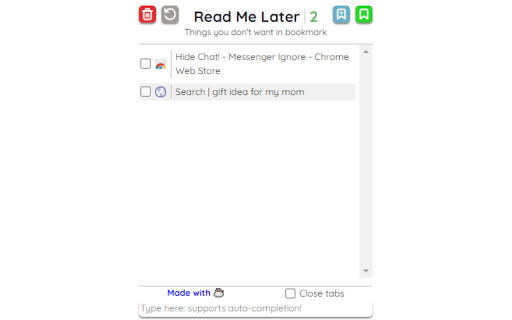
Keep Your Tabs Organized + Store Tabs for Later 📚 😵 Problem: Are you overwhelmed by a growing list of to-read tabs that clutter your browser and make it hard to stay focused? 🤩 Solution: Meet Read Me Later! — the ultimate Chrome extension for tab management designed to keep your browser neat and optimized. Easily save browser tabs for later without the chaos, ensuring an efficient and clean workspace. 🚀 Features: ⭐ Effortless Tab Management: Store one or all of your open tabs with a single click, and optionally close them to optimize browser performance and reduce load. ⭐ Smart Input Bar: Quickly save any site with our intelligent input bar, featuring basic auto-completion for faster access. ⭐ Quick Searches on the Fly: Need to Google something but short on time? Type your query directly into the extension and press enter to save it for later. 👨💻 For Developers: ⭐ Open Source: Contribute to or fork the project on GitHub: https://github.com/yvantot/read-me-later-chromium-extension ❔ Why Choose Read Me Later? Maximize productivity with the ultimate tab management tool that keeps your browser clutter-free. Read Me Later helps you maintain a fast, responsive browser by offloading tabs without losing track of important content. Perfect for those who need a reliable browser productivity extension to stay organized and focused. ❔ Optimize Your Browser Experience: Designed to save and close tabs seamlessly, this Chrome read later extension ensures you never lose a valuable link while keeping your workspace clean and efficient. ❔ Perfect for Busy Professionals: If you're juggling multiple tasks and need to manage your time efficiently, this extension is your go-to tool. Stay organized, reduce distractions, and always have your important links just a click away.
Technical
- Version
- 1.0
- Manifest
- V3
- Size
- 83.56KiB
- Min Chrome
- 88
- Languages
- 1
- Featured
- No
Metadata
- ID
- cfbghmlaammffdganopagclljeoligcb
- Developer ID
- u239007d6ead86c686d098c043a02eaf5
- Developer Email
- [email protected]
- Created
- Sep 2, 2024
- Last Updated (Store)
- Sep 2, 2024
- Last Scraped
- May 29, 2026
- Website
- —
- Support URL
- —
- Privacy Policy
- —
Similar extensions
Alternatives to Read Me Later - Save Tabs to Read List, ranked by description similarity.

ReadItLater
The extension all users to add all the open tabs to reading list or share.
17
★ 5.0
Store Me Free
A simple extension to store and manage Chrome browser tabs
19
★ 5.0

Tab URL Manager: Copy, Organize, and Share Open Tabs Instantly
Manage and copy multiple tab URLs easily
15

ReadLater
保存稍后查看的网页。
16

Close all tabs
A Chrome extension to instantly close all open tabs. Simplify your online browsing and web management with one click.
40
★ 5.0

Personal Tab Manager
A custom tab management tool for personal use.
5
★ 5.0

Tab Organizer
Automatically moves active tabs to the left and organizes tabs based on usage frequency
—

Duplicate Tab Remover
Keep browser clean and organizedby removing duplicate tabs and consolidating tabs into a single window.
166
★ 4.0
Data sourced from the Chrome Web Store · last verified May 29, 2026.