
Screenshot Tool - Screen Capture & Editor
Innovative screenshot tool lets users screen capture and edit screenshot. Full page screen capture.
As of June 2026, Screenshot Tool - Screen Capture & Editor has 1,000,000 users and a 4.71/5 rating from 4,898 reviews in the Accessibility category.
Usersno change0%
1.0M
1,000,000
Ratingup 0.2 percent+0.2%
4.71
4.9K reviews
Reviewsup 4.9 percent+4.9%
4.9K
Version
1.0.10
Manifest V3
History
3 snapshotsTracking since Apr 23, 2026.
View as table
| Date | Users | Rating | Reviews | Version |
|---|---|---|---|---|
| Apr 23, 2026 | 1.0M | 4.70 | 4.7K | 1.0.10 |
| May 12, 2026 | 1.0M | 4.71 | 4.7K | 1.0.10 |
| Jun 7, 2026 | 1.0M | 4.71 | 4.8K | 1.0.10 |
| Now | 1.0M | 4.71 | 4.9K | 1.0.10 |
Permissions & access
- Permissions
- storageunlimitedStoragescripting
- Host access
- <all_urls>
Screenshots



About
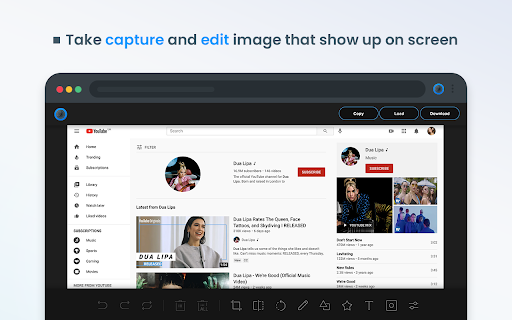
Take stunning screenshots of entire websites and capture page elements. Offline. No registration. Screenshot tool - captures entire websites and user areas. Ready-made screenshots can be quickly edited (crop, paint over, add arrows, captions or text).

Screen Capture tool for making a full page or partial capture with further editing, download, or text adding. Make a full webpage screen capture or just any part of it with an opportunity to edit, save and download screen capture to your PC.

The app is launched from a browser that totally saves your time. Simply click the extension icon to choose from options whole page capture or a selected part.

You will not see any additional windows with websites here. Why waste time if you just want a screenshot?

Want to share your screen for cases like reporting technical issues, making product demos or how-to tutorials?  Here are reasons to choose Screenshot and Screen Capture:

✔️ Screenshot of the full page, not just the visible area or selected area;
✔️ Screenshot on One-Click;
✔️ Storage and processing without a server;
✔️ Save PNG files or Copy it to the clipboard with One-Click;
✔️ No login or registration required;
✔️ There are no restrictions on the size or size of the file;
✔️ Edit and discard changes your screenshot;
✔️ Add graphic and text elements such as pointer, arrow, square and other shapes;

Click on the extension icon (in the upper right corner of the browser) then choose one of the options capture and watch the Screenshot Tool capture each part of the page and then transfer the finished screenshot to a new tab, where you can edit the image and upload it as a file to your PC.

Notes
Remember to reload the page after you install extension before trying to take a screenshot of it (Chrome should initialize the extension for each page).

The extension Screenshot tool is completely free and easy to manage for users. If our extension is useful to you, please give us 5 stars!
Technical
- Version
- 1.0.10
- Manifest
- V3
- Size
- 536KiB
- Min Chrome
- 88
- Languages
- 23
- Featured
- Yes
Metadata
- ID
- edlifbnjlicfpckhgjhflgkeeibhhcii
- Developer ID
- u978cdb0e024a104eeb674bd55e4c213b
- Developer Email
- [email protected]
- Created
- Apr 1, 2021
- Last Updated (Store)
- Jan 29, 2025
- Last Scraped
- Jun 7, 2026
- Website
- screenshot-tool.app
- Support URL
- —
- Privacy Policy
- https://www.screenshot-tool.app/privacy-policy.html
Similar extensions
Alternatives to Screenshot Tool - Screen Capture & Editor, ranked by description similarity.

Screen Capture - Screenshot & Save Tool
Take instant screenshots of your current tab. Save, preview, and download images easily with one click or shortcut.
6

Screenshot Tool
Capture screenshots of the visible area, selected area, or the full webpage.
2

SnapGrab Pro
Easy screen grabber tool with the press of a button
22

Smart Screenshot
Capture, annotate, and share screenshots with ease
7

OneClickShot
Take a screenshot of the active tab with one click.
11

HTML to PNG Screenshot
Click the icon, hover any element, then click to save it as a PNG image.
266
★ 1.0

Screenshot in Page
With a single click, capture a screenshot of the entire website!
26
★ 5.0

PageShot
Capture full page screenshots and download as PNG
3
Data sourced from the Chrome Web Store · last verified Jun 7, 2026.