
Sophos Chrome Security
This is the Sophos Mobile client for Chrome devices.
As of May 2026, Sophos Chrome Security has — users and a 4.29/5 rating from 17 reviews in the Workflow & Planning category.
Usersno change0%
—
—
Ratingno change0%
4.29
17 reviews
Reviewsno change0%
17
Version
2.0.2218
Manifest V3
History
2 snapshotsTracking since Apr 24, 2026.
Not enough history yet for this metric — the chart fills in as we collect more snapshots.
View as table
| Date | Users | Rating | Reviews | Version |
|---|---|---|---|---|
| Apr 24, 2026 | — | 4.29 | 17 | 2.0.2218 |
| May 19, 2026 | 200.0K | 4.29 | 17 | 2.0.2218 |
| Now | — | 4.29 | 17 | 2.0.2218 |
Permissions & access
- Permissions
- gcmalarmswebNavigationwebRequesttabsstoragecontextMenusgeolocationmanagementnotificationsidentityidentity.emailenterprise.deviceAttributesoffscreen
- Host access
- <all_urls>
Screenshots



About
NOTE: Use of this extension is subject to the Sophos End User License Agreement (License Agreement) accessible at https://www.sophos.com/en-us/legal/sophos-end-user-license-agreement.aspx.
By installing or using this extension, you agree to the terms and conditions of the License Agreement. You also acknowledge that Sophos processes personal data in accordance with the Sophos Privacy Policy accessible at https://www.sophos.com/en-us/legal/sophos-group-privacy-policy.aspx.

Sophos Mobile is a Unified Endpoint Management (UEM) solution that allows companies to easily manage, control and secure Android, iOS, macOS, Windows 10 and Chrome devices (like Chromebooks) from a single web console. The Sophos Chrome Security extension allows you to enroll your Chrome device with Sophos Mobile.

FEATURES
Your organization can do the following:
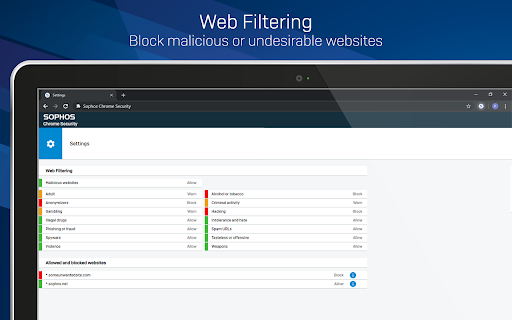
• Use Web Filtering to block web pages with malicious, undesirable or illegal content.
• Find the device.
• Send a message to the device.

Web Filtering uses up-to-the-minute intelligence from SophosLabs. Your device is secured even when you’re not connected to your organization’s network.

Sophos Chrome Security requires a Mobile Advanced or an Intercept X for Mobile license.

For more information, visit https://www.sophos.com/mobile

MANUAL ENROLLMENT
1. Sign in to Chrome with your corporate Google account.
2. Open Sophos Chrome Security in the Chrome Web Store and add it to Chrome.
3. Select the Sophos button in the Chrome toolbar.
4. Select “Enroll” and then enter the enrollment token.

AUTO-ENROLLMENT
If your organization uses G Suite, they can configure Sophos Chrome Security to automatically enroll with Sophos Mobile.
Technical
- Version
- 2.0.2218
- Manifest
- V3
- Size
- 2.24MiB
- Min Chrome
- 110
- Languages
- 10
- Featured
- No
Metadata
- ID
- lkffbjbdklhachngaoeelmcgijmlicph
- Developer ID
- u67de6206025ba70ae3b78e47c25ee313
- Developer Email
- [email protected]
- Created
- Oct 2, 2019
- Last Updated (Store)
- Feb 26, 2025
- Last Scraped
- May 19, 2026
- Website
- —
- Support URL
- https://community.sophos.com/kb
Similar extensions
Alternatives to Sophos Chrome Security, ranked by description similarity.
Barracuda Chromebook Security Extension
Barracuda Chromebook Security Extension is designed to protect you from malicious and inappropriate web content
10.0K
★ 1.7
mSecure
Companion browser extension for mSecure that provides auto-login features in your web browser.
3.0K
★ 2.1

One Key Password Manager Application
This is easy to use file system based password manager.
107
★ 3.0

Browser Security Plus
Manage Google Chrome using Browser Security Plus extension
1.0M
★ 1.6

NetSupport DNA Agent
NetSupport DNA - IT Asset Management
—
★ 5.0

Silverfort
Silverfort Multi-Factor Authentication
6.0K
★ 4.8

Norton Family
Norton Family helps you protect your kids so they can enjoy the Internet safely.
20.0K
★ 2.5

Duo Mono
Automatically log into Duo 2fa. If you have chrome sync turned on it will work anywhere you are signed into chrome.
65
Data sourced from the Chrome Web Store · last verified May 19, 2026.