Document AI Translator - Side-by-side Translate PDF, Google Docs, Notion
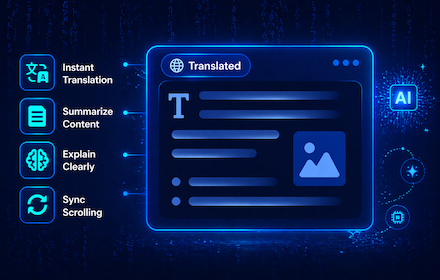
Show a live translated view of PDF, Google Docs, and Notion pages side-by-side with the original, preserving layout and scroll sync.
As of June 2026, Document AI Translator - Side-by-side Translate PDF, Google Docs, Notion has 96 users and a 5.00/5 rating from 1 reviews in the Productivity category.
Usersup 182.4 percent+182.4%
96
96
Ratingno change0%
5.00
1 reviews
Reviewsno change0%
1
Version
1.3.2
Manifest V3
90-day change · In the last 90 days this extension 8 version updates, changed permissions.
History
11 snapshotsTracking since Apr 3, 2026.
View as table
| Date | Users | Rating | Reviews | Version |
|---|---|---|---|---|
| Apr 3, 2026 | 34 | 5.00 | 1 | 1.1.0 |
| Apr 17, 2026 | 37 | 5.00 | 1 | 1.1.1 |
| Apr 24, 2026 | 27 | 5.00 | 1 | 1.1.1.1 |
| May 2, 2026 | 33 | 5.00 | 1 | 1.2.0 |
| May 8, 2026 | 33 | 5.00 | 1 | 1.2.1.1 |
| May 13, 2026 | 39 | 5.00 | 1 | 1.2.4 |
| May 19, 2026 | 45 | 5.00 | 1 | 1.2.4 |
| May 25, 2026 | 52 | 5.00 | 1 | 1.2.5 |
| May 30, 2026 | 56 | 5.00 | 1 | 1.2.5 |
| Jun 4, 2026 | 59 | 5.00 | 1 | 1.3.1 |
| Jun 15, 2026 | 67 | 5.00 | 1 | 1.3.2 |
| Now | 96 | 5.00 | 1 | 1.3.2 |
Changelog
- Jun 4, 2026description
🚀 Getting Started

PDF: Translate PDF files opened in Chrome with a side-by-side translated view, making it easier to read foreign-language documents without switching tabs or copying text manually.

Google Drive & Google Docs: Translate PDF files and Google Docs (.docx) directly within Drive or Docs. The extension displays a side-by-side translated view while preserving the original layout as closely as possible.

Notion: When opening a Notion page, the extension automatically generates a translated version alongside the original. The layout and structure are preserved by cloning and translating visible content directly in the browser.

✨ Key features:

● Automatic translation when opening supported pages
● Side-by-side split view showing both original and translated content and preserving layout by cloning the page DOM structure
● Built-in AI Summarization for quick content overview
● Built-in AI Explanation to simplify and clarify complex content
● Optional synchronized scrolling between original and translated views
● Manual refresh button to update translations when the page content changes
● Supported websites include: drive.google.com, docs.google.com, notion.so, notion.site and PDF (.pdf) links opened in Chrome.
● Supports translation in 50 languages

🔐 Privacy & Data Usage

The extension does not modify or save document content. All processing happens locally in the browser, and translation requests are only made to perform the user-visible translation feature.

Feedback: https://documenttranslator.thegioigiandon.com/feedback
🚀 Getting Started

PDF: Translate PDF files opened in Chrome with a side-by-side translated view, making it easier to read foreign-language documents without switching tabs or copying text manually.

Google Drive & Google Docs: Translate PDF files and Google Docs (.docx) directly within Drive or Docs. The extension displays a side-by-side translated view while preserving the original layout as closely as possible.

Notion: When opening a Notion page, the extension automatically generates a translated version alongside the original. The layout and structure are preserved by cloning and translating visible content directly in the browser.

✨ Key features:

● Automatic translation when opening supported pages
● Side-by-side split view showing both original and translated content and preserving layout by cloning the page DOM structure
● Built-in AI Summarization for quick content overview
● Built-in AI Explanation to simplify and clarify complex content
● Optional synchronized scrolling between original and translated views
● Manual refresh button to update translations when the page content changes
● Supported websites include: drive.google.com, docs.google.com, notion.com, notion.site and PDF (.pdf) links opened in Chrome.
● Supports translation in 50 languages

🔐 Privacy & Data Usage

The extension does not modify or save document content. All processing happens locally in the browser, and translation requests are only made to perform the user-visible translation feature.

Feedback: https://documenttranslator.thegioigiandon.com/feedback
- May 30, 2026description
🚀 Getting Started

Google Drive & Google Docs: Translate PDF files and Google Docs (.docx) directly within Drive or Docs. The extension displays a side-by-side translated view while preserving the original layout as closely as possible.

Notion: When opening a Notion page, the extension automatically generates a translated version alongside the original. The layout and structure are preserved by cloning and translating visible content directly in the browser.

✨ Key features:

● Automatic translation when opening supported pages
● Side-by-side split view showing both original and translated content and preserving layout by cloning the page DOM structure
● Built-in AI Summarization for quick content overview
● Built-in AI Explanation to simplify and clarify complex content
● Optional synchronized scrolling between original and translated views
● Manual refresh button to update translations when the page content changes
● Supported websites include: drive.google.com, docs.google.com, notion.so, and notion.site
● Supports translation in 50 languages

🔐 Privacy & Data Usage

The extension does not modify or save document content. All processing happens locally in the browser, and translation requests are only made to perform the user-visible translation feature.

Feedback: https://documenttranslator.thegioigiandon.com/feedback
🚀 Getting Started

PDF: Translate PDF files opened in Chrome with a side-by-side translated view, making it easier to read foreign-language documents without switching tabs or copying text manually.

Google Drive & Google Docs: Translate PDF files and Google Docs (.docx) directly within Drive or Docs. The extension displays a side-by-side translated view while preserving the original layout as closely as possible.

Notion: When opening a Notion page, the extension automatically generates a translated version alongside the original. The layout and structure are preserved by cloning and translating visible content directly in the browser.

✨ Key features:

● Automatic translation when opening supported pages
● Side-by-side split view showing both original and translated content and preserving layout by cloning the page DOM structure
● Built-in AI Summarization for quick content overview
● Built-in AI Explanation to simplify and clarify complex content
● Optional synchronized scrolling between original and translated views
● Manual refresh button to update translations when the page content changes
● Supported websites include: drive.google.com, docs.google.com, notion.so, notion.site and PDF (.pdf) links opened in Chrome.
● Supports translation in 50 languages

🔐 Privacy & Data Usage

The extension does not modify or save document content. All processing happens locally in the browser, and translation requests are only made to perform the user-visible translation feature.

Feedback: https://documenttranslator.thegioigiandon.com/feedback
- May 30, 2026name
Document AI Translator - Translate Google Drive PDF, Google Docs, Notion.so
Document AI Translator - Side-by-side Translate PDF, Google Docs, Notion
- May 30, 2026permissions
storage, activeTab, contextMenus
storage, contextMenus
- May 2, 2026description
🚀 Getting Started

Google Drive & Google Docs: Translate PDF files and Google Docs (.docx) directly within Drive or Docs. The extension displays a side-by-side translated view while preserving the original layout as closely as possible.

Notion: When opening a Notion page, the extension automatically generates a translated version alongside the original. The layout and structure are preserved by cloning and translating visible content directly in the browser.

✨ Key features:

● Automatic translation when opening supported pages (optional)
● Side-by-side split view showing original and translated content
● Preserves layout and hierarchy by cloning the page DOM structure
● Summarize feature for quick content overview
● Explain feature to simplify and clarify complex content
● Optional synchronized scrolling between original and translated views
● Manual refresh button to update translations when the page content changes
● Supported websites include: drive.google.com, docs.google.com, notion.so, and notion.site
● Supports translation in 50 languages

🔐 Privacy & Data Usage

The extension does not modify or save document content. All processing happens locally in the browser, and translation requests are only made to perform the user-visible translation feature.

Feedback: https://notiontranslator.thegioigiandon.com/feedback
Privacy Policy: https://notiontranslator.thegioigiandon.com/privacy-policy
🚀 Getting Started

Google Drive & Google Docs: Translate PDF files and Google Docs (.docx) directly within Drive or Docs. The extension displays a side-by-side translated view while preserving the original layout as closely as possible.

Notion: When opening a Notion page, the extension automatically generates a translated version alongside the original. The layout and structure are preserved by cloning and translating visible content directly in the browser.

✨ Key features:

● Automatic translation when opening supported pages
● Side-by-side split view showing both original and translated content and preserving layout by cloning the page DOM structure
● Built-in AI Summarization for quick content overview
● Built-in AI Explanation to simplify and clarify complex content
● Optional synchronized scrolling between original and translated views
● Manual refresh button to update translations when the page content changes
● Supported websites include: drive.google.com, docs.google.com, notion.so, and notion.site
● Supports translation in 50 languages

🔐 Privacy & Data Usage

The extension does not modify or save document content. All processing happens locally in the browser, and translation requests are only made to perform the user-visible translation feature.

Feedback: https://documenttranslator.thegioigiandon.com/feedback
- May 2, 2026name
Document Translator - Translate Google Drive PDF, Google Docs, Notion.so
Document AI Translator - Translate Google Drive PDF, Google Docs, Notion.so
- Apr 24, 2026description
🚀 Getting Started

Google Drive & Google Docs: Translate PDF files and Google Docs (.docx) directly within Drive or Docs. The extension displays a side-by-side translated view while preserving the original layout as closely as possible.

Notion: When opening a Notion page, the extension automatically generates a translated version alongside the original. The layout and structure are preserved by cloning and translating visible content directly in the browser.

✨ Key features:

● Automatic translation when opening supported pages (optional)
● Side-by-side split view showing original and translated content
● Preserves layout and hierarchy by cloning the page DOM structure
● Built-in summarization for quick content overview
● Optional synchronized scrolling between original and translated views
● Manual refresh button to update translations when the page content changes
● Supported websites include: drive.google.com, docs.google.com, notion.so, and notion.site
● Supports translation in 50 languages

🔐 Privacy & Data Usage

The extension does not modify, save, or upload Notion content. All processing happens locally in the browser, and translation requests are only made to perform the user-visible translation feature.

Feedback: https://notiontranslator.thegioigiandon.com/feedback
Privacy Policy: https://notiontranslator.thegioigiandon.com/privacy-policy
🚀 Getting Started

Google Drive & Google Docs: Translate PDF files and Google Docs (.docx) directly within Drive or Docs. The extension displays a side-by-side translated view while preserving the original layout as closely as possible.

Notion: When opening a Notion page, the extension automatically generates a translated version alongside the original. The layout and structure are preserved by cloning and translating visible content directly in the browser.

✨ Key features:

● Automatic translation when opening supported pages (optional)
● Side-by-side split view showing original and translated content
● Preserves layout and hierarchy by cloning the page DOM structure
● Summarize feature for quick content overview
● Explain feature to simplify and clarify complex content
● Optional synchronized scrolling between original and translated views
● Manual refresh button to update translations when the page content changes
● Supported websites include: drive.google.com, docs.google.com, notion.so, and notion.site
● Supports translation in 50 languages

🔐 Privacy & Data Usage

The extension does not modify or save document content. All processing happens locally in the browser, and translation requests are only made to perform the user-visible translation feature.

Feedback: https://notiontranslator.thegioigiandon.com/feedback
Privacy Policy: https://notiontranslator.thegioigiandon.com/privacy-policy
- Apr 24, 2026name
Document Translator - Translate Google Drive PDF, Google Docs & Notion.so
Document Translator - Translate Google Drive PDF, Google Docs, Notion.so
- Apr 17, 2026description
🚀 Getting Started

Google Drive: Translate PDFs directly in Google Drive with a simple side-by-side view, aiming to keep the original layout as much as possible while displaying the translated text next to it.

Notion: When a Notion page is opened, the extension automatically translates the page content and displays a translated version alongside the original content. Users can easily read and compare both versions without changing or editing the original Notion document. The translated view preserves the original page structure and layout as closely as possible by cloning and translating visible page content in the browser.

✨ Key features:

● Automatic translation when a PDFs on Drive, or Notion page is opened (optional)
● Side-by-side split view showing original and translated content
● Preserves layout and hierarchy by cloning the page DOM structure
● Summarize feature to generate concise summaries of the current page
● Optional synchronized scrolling between original and translated views
● Manual refresh option to reload the translated view when the page content updates
● Supports both notion.so and notion.site domains
● Supports translation in 50 languages

🔐 Privacy & Data Usage

The extension does not modify, save, or upload Notion content. All processing happens locally in the browser, and translation requests are only made to perform the user-visible translation feature.

Feedback: https://notiontranslator.thegioigiandon.com/feedback
Privacy Policy: https://notiontranslator.thegioigiandon.com/privacy-policy
🚀 Getting Started

Google Drive & Google Docs: Translate PDF files and Google Docs (.docx) directly within Drive or Docs. The extension displays a side-by-side translated view while preserving the original layout as closely as possible.

Notion: When opening a Notion page, the extension automatically generates a translated version alongside the original. The layout and structure are preserved by cloning and translating visible content directly in the browser.

✨ Key features:

● Automatic translation when opening supported pages (optional)
● Side-by-side split view showing original and translated content
● Preserves layout and hierarchy by cloning the page DOM structure
● Built-in summarization for quick content overview
● Optional synchronized scrolling between original and translated views
● Manual refresh button to update translations when the page content changes
● Supported websites include: drive.google.com, docs.google.com, notion.so, and notion.site
● Supports translation in 50 languages

🔐 Privacy & Data Usage

The extension does not modify, save, or upload Notion content. All processing happens locally in the browser, and translation requests are only made to perform the user-visible translation feature.

Feedback: https://notiontranslator.thegioigiandon.com/feedback
Privacy Policy: https://notiontranslator.thegioigiandon.com/privacy-policy
- Apr 17, 2026short_description
Show a live translated view of Drive PDF/Notion page alongside the original, preserving structure, theme, and synchronized scrolling
Show a live translated view of PDF, Google Docs, and Notion pages side-by-side with the original, preserving layout and scroll sync.
- Apr 17, 2026name
Document Translator - Translate PDFs on Google Drive & Notion.so
Document Translator - Translate Google Drive PDF, Google Docs & Notion.so
- Apr 3, 2026name
Document Translator - Free Translate Google Drive PDFs & Notion Page
Document Translator - Translate PDFs on Google Drive & Notion.so
Permissions & access
- Permissions
- storagecontextMenus
- Host access
- None declared
Screenshots


About
🚀 Getting Started

PDF: Translate PDF files opened in Chrome with a side-by-side translated view, making it easier to read foreign-language documents without switching tabs or copying text manually.

Google Drive & Google Docs: Translate PDF files and Google Docs (.docx) directly within Drive or Docs. The extension displays a side-by-side translated view while preserving the original layout as closely as possible.

Notion: When opening a Notion page, the extension automatically generates a translated version alongside the original. The layout and structure are preserved by cloning and translating visible content directly in the browser.

✨ Key features:

● Automatic translation when opening supported pages
● Side-by-side split view showing both original and translated content and preserving layout by cloning the page DOM structure
● Built-in AI Summarization for quick content overview
● Built-in AI Explanation to simplify and clarify complex content
● Optional synchronized scrolling between original and translated views
● Manual refresh button to update translations when the page content changes
● Supported websites include: drive.google.com, docs.google.com, notion.com, notion.site and PDF (.pdf) links opened in Chrome.
● Supports translation in 50 languages

🔐 Privacy & Data Usage

The extension does not modify or save document content. All processing happens locally in the browser, and translation requests are only made to perform the user-visible translation feature.

Feedback: https://documenttranslator.thegioigiandon.com/feedback
Technical
- Version
- 1.3.2
- Manifest
- V3
- Size
- 486KiB
- Min Chrome
- 88
- Languages
- 7
- Featured
- Yes
Metadata
- ID
- ljijjonpmmfgbpinakkcfoifkahjagji
- Developer ID
- u10efe92d6d6fbbd58f05240e30742d0c
- Developer Email
- [email protected]
- Created
- Feb 14, 2026
- Last Updated (Store)
- May 30, 2026
- Last Scraped
- Jun 15, 2026
Similar extensions
Alternatives to Document AI Translator - Side-by-side Translate PDF, Google Docs, Notion, ranked by description similarity.

Screen Translator - Translate PDF, Docs, Word, PowerPoint, Images, Comic...
Drag to select any area on a webpage and translate text from GG Drive, PDFs, Docs, Word, PowerPoint, images, comics—right on screen.
1.0K
★ 4.3

NotionSEO: Notion SEO & Readability Plugin
Helps with SEO Indicators, Keywords, Backlinks, Readability Scores, and Content Reach
885
★ 4.6

Translate Any
Translate any website, including Notion. Free (unlimited!), Safe (no data sent to us), and One-click to use.
40
★ 5.0

The Researcher
Take research notes on any webpage with sticky notes
20
★ 5.0

Notation
Floating notes that sync with your Notion workspace. Create and edit notes on any webpage.
4
★ 5.0

Notion Mate
Notion Mate productivity with 30+ customizations like outline TOC, small text, mark manager, image viewer, scroll to top, theme etc.
1.0K
★ 5.0

Notion PDF Page Break Exporter
Export Notion pages to PDF with proper page breaks at dividers
213
★ 4.5

Intelligent Page Translator
Privacy-first universal translator. Secure on-device AI (Gemini Nano) or cloud-based ChatGPT, Claude and Gemini. Multi-language UI.
—
Data sourced from the Chrome Web Store · last verified Jun 15, 2026.