
Notion Mate
Notion Mate productivity with 30+ customizations like outline TOC, small text, mark manager, image viewer, scroll to top, theme etc.
As of June 2026, Notion Mate has 1,000 users and a 5.00/5 rating from 7 reviews in the Productivity category.
Usersno change0%
1.0K
1,000
Ratingno change0%
5.00
7 reviews
Reviewsup 16.7 percent+16.7%
7
Version
2.5.2
Manifest V3
90-day change · In the last 90 days this extension 4 version updates.
History
4 snapshotsTracking since Apr 5, 2026.
View as table
| Date | Users | Rating | Reviews | Version |
|---|---|---|---|---|
| Apr 5, 2026 | 1.0K | 5.00 | 6 | 2.4.5 |
| Apr 18, 2026 | 1.0K | 5.00 | 6 | 2.4.8 |
| Apr 23, 2026 | 1.0K | 5.00 | 6 | 2.5.0 |
| Jun 3, 2026 | 1.0K | 5.00 | 6 | 2.5.1 |
| Now | 1.0K | 5.00 | 7 | 2.5.2 |
Permissions & access
- Permissions
- storageactiveTabfontSettings
- Host access
- None declared
Screenshots


About
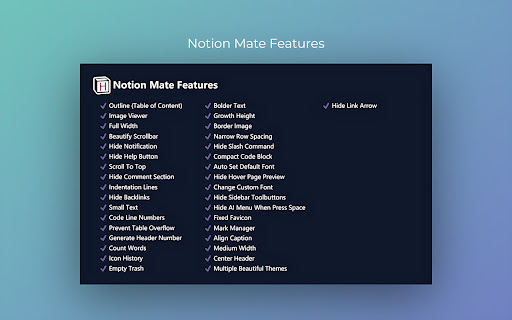
🚩Chrome and Edge browser extensions make your Notion more efficient and enhance your experience. Supports unlimited zoom, pan, and rotation of the image viewer, as well as icon history, colored text mark manager, outline (Table of Content), lots of beautiful themes.

🎉Free trial for 3 days 🎉

> The extension is available in Pro and Free versions, Pro version requires additional purchase, one-time purchase.

✔️ Outline - TOC
✔️ Image Viewer
✔️ Full Width
✔️ Beautify Scrollbar
✔️ Hide Notification
✔️ Hide Help Button
✔️ Scroll To Top
✔️ Hide Comment Section
✔️ Indentation Lines
✔️ Hide Backlinks
✔️ Small Text
✔️ Code Line Numbers
✔️ Prevent Table Overflow
✔️ Generate Header Number
✔️ Count Words
✔️ Icon History
✔️ Empty Trash
✔️ Bolder Text
✔️ Growth Height
✔️ Border Image
✔️ Narrow Row Spacing
✔️ Hide Slash Command
✔️ Compact Code Block
✔️ Auto Set Default Font
✔️ Hide Hover Page Preview
✔️ Change Custom Font
✔️ Hide Sidebar Toolbuttons
✔️ Hide AI Menu When Press Space
✔️ Fixed Favicon
✔️ Mark Manager
✔️ Align Caption
✔️ Medium Width
✔️ Center Header
✔️ Lots Of Beautiful Themes
✔️ Hide Link Arrow
✔️ Hide Corner AI Button
✔️ Align Image (left, center, right)
✔️ Hide Notion Default TOC
✔️ Auto Set Page Configuration
✔️ Set Code Block Language
✔️ Set Wrap Code Block
✔️ Wider Search Box
✔️ Disable Hover Sidebar
✔️ Header Hashtag Symbols
✔️ Align Media

🌐Homepage
https://www.notionmate.top

❓Feedback
https://github.com/joansnotion/NotionMate/issues

⭐⭐⭐⭐⭐If you find it helpful to you, hope to get your five-star praise, thank you!

_________________________________________________________
🛠️HOW IT WORKS

1. Visit any notion page.
2. Click on the extension icon (clickable only when you are on a notion page).
3. A popup menu will appear, you can toggle features from there.

_________________________________________________________
🕵️WHO MADE THIS?

Notion Mate is produced by Joans. I'm a coder and a productivity freak, and I rely heavily on Notion to organize things and manage work. I made this extension to make Notion more productive (and less distracting) by filling in gaps that I felt were lacking in the product. I hope you find this extension helpful :)

_________________________________________________________
⚖️PRIVACY POLICY

The Notion Mate extension is a secure browser extension with no ads, no analytics, and no trackers. In addition, the Notion Mate extension does not store or send any data from your Nontion account.

_________________________________________________________
📣SUPPORT

https://github.com/joansnotion/NotionMate/issues
Technical
- Version
- 2.5.2
- Manifest
- V3
- Size
- 132KiB
- Min Chrome
- 88
- Languages
- 1
- Featured
- Yes
Metadata
- ID
- pplckfedebdimphneohkmhlmhompgpmn
- Developer ID
- ubdd435f605c8af3c4b873e7ff0c97c1c
- Developer Email
- [email protected]
- Created
- Dec 1, 2023
- Last Updated (Store)
- May 29, 2026
- Last Scraped
- Jun 13, 2026
- Website
- notionmate.top
Similar extensions
Alternatives to Notion Mate, ranked by description similarity.
Notion Boost
Boost Notion productivity with 20+ customizations like outline, small text full width for all, back to top button etc
70.0K
★ 4.6
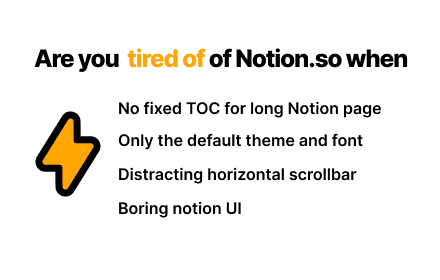
Notion Power
Numerous customization features, enhancing UX/UI for Notion page. Fixed TOC, change theme and font, scroll-to-top button, more...
325
★ 4.7

Notion App
Notion app for Windows and Mac in the Chrome sidebar. Open any site seamlessly with the Notion desktop app for macOS and PC
1.0K
★ 5.0

Notation
Floating notes that sync with your Notion workspace. Create and edit notes on any webpage.
4
★ 5.0

MindPane
Turn any web page into a mind map with clean, distraction-free reading mode
10.0K
★ 4.6

Quick Note to Notion
Save any webpage and notes in one click. Grouped by date. Sync to Notion as clean markdown. Simple, private, and fast.
13
Screenshot to Notion & Annotate
Snap and embed website and scrolling screenshots directly to Notion with annotation tools like arrows, callouts, crop +30 more tools
2.0K
★ 4.8

Highlight & Tooltip
Automatically highlights predefined terms from Notion and displays tooltips.
32
★ 5.0
Data sourced from the Chrome Web Store · last verified Jun 13, 2026.