
EmailTree.AI
Answer customers' questions in seconds using AI
As of June 2026, EmailTree.AI has 213 users and a 5.00/5 rating from 2 reviews in the Education category.
Usersdown 14.1 percent−14.1%
213
213
Ratingno change0%
5.00
2 reviews
Reviewsno change0%
2
Version
1.6.38
Manifest V3
History
3 snapshotsTracking since Apr 1, 2026.
View as table
| Date | Users | Rating | Reviews | Version |
|---|---|---|---|---|
| Apr 1, 2026 | 248 | 5.00 | 2 | 1.6.38 |
| May 3, 2026 | 246 | 5.00 | 2 | 1.6.38 |
| Jun 2, 2026 | 233 | 5.00 | 2 | 1.6.38 |
| Now | 213 | 5.00 | 2 | 1.6.38 |
Permissions & access
- Permissions
- tabsstorage
- Host access
- https://*/*, http://*/*
Screenshots

About
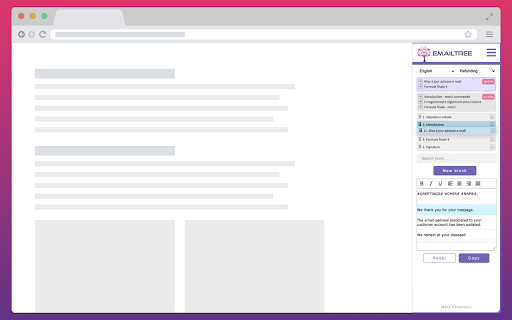
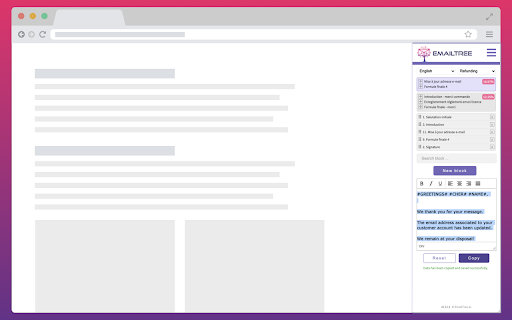
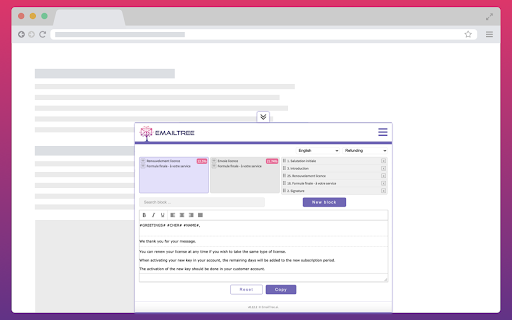
Reply to customers requests in a flash, right here in Chrome, using different techniques of AI (NLP, NLU, ML).

The powerful EmailTree.ai application and extension are a new way to respond quickly to questions and considerably increase your productivity.

Save precious time (up to 80%, depending on the confidence levels). Every new reply you generate helps improving the knowledge base you are building. The question-answer cycle permanently increases the machine learning knowledge, helping you to answer better, faster, and more accurately.

Spike up your team's productivity and install the EmailTree extension, quick and easy.

*** New in version 1.6.38 (October 2024)

Added:
Improved login flow for SSO compatibility:
The login process was improved to support single sign-on (SSO) options.

*** New in version 1.6.37 (August 2024)

Added:
Improved Display of Reply Suggestions:
Enhancements were made to optimize the visibility and functionality of reply suggestions.

Security Improvements:
Updated security protocols to strengthen the protection of user data and interactions.

*** New in version 1.6.34

Added:
Preserve formatting for most used blocks

We have improved the copy function for the most used blocks to ensure that formatting is preserved when content is copied. Previously, formatting was visible in the preview but lost upon copying. This update ensures consistency, similar to the "Learn and Copy" feature.

*** New in version 1.6.32

Added:
Uneditable Chrome Extension Suggestions: With our Chrome Extension, OpenAI suggestions are now locked in, ensuring data integrity and preventing accidental edits.

"No Suggestions Available" Notification: We've added a user-friendly feature that informs you with a clear message when there are no suggestions available, streamlining your workflow.

Content Color Blocking in Edit Response Area: Enjoy enhanced visual clarity with content color blocking in the edit response area, making it easier to differentiate and organize your text.

*** New in version 1.6.16

Added:
A notification to not leave empty the section field (feature to be activated on request)
Display "No suggestions available" when there are no suggestions available (e.g when treating a new scenario)

*** New in version 1.6.9

Added:
A quick way to access the most frequently used blocks (feature to be activated on request)

*** New in version 1.5.5

Added:
Alert for missing block title when adding a new one
Fixed:
Deactivated the “Get Suggestion” button after the first click, for preventing multiple accidental requests

*** New in version 1.5.4

Added:

Anonymization of personal data

Fixed:

Reference ID bug fixes
Select block from search single result
Extension used in multiple tabs saved initial detected language to AI (cross learning)
Mouse event not captured in TinyMCE on edit block
Font & size are kept for all information copied from outside and pasted in the extension

*** New in version 1.4.3

Added Reference ID field in order to offer the possibility  to reference the issue to an external ticketing system
Fixed bugs related to text formatting

*** New in version 1.3.8

Preserve the formatting for unordered lists (ul), ordered lists (ol), subscripts (
sub), superscripts (sup)

*** New in version 1.3.2

Added:
Fixed Font format Arial 10 on Learn & Copy

*** New in version 1.3.2

Added:
Option to unify Learn & Copy + Reset
Autocorrect on edit reply and edit blocks
Changed description on the button Copy to Learn & Copy
Font format Arial 10 black formatted on click on Learn & Copy


*** New in version 1.2.0

Search for a section and a language in the dropdown
Insert and remove hyperlinks in the reply & blocks text editor
Usability enhancements in order to remember the tabs on which the extension should be active, open, hidden
Fixed login when the option "On specific sites" is activated
Technical
- Version
- 1.6.38
- Manifest
- V3
- Size
- 806KiB
- Min Chrome
- 88
- Languages
- 1
- Featured
- No
Metadata
- ID
- lbakdofljpnpdakcoabckinlfgoaaopf
- Developer ID
- ueab333c096241cc8e980743c94d597bd
- Developer Email
- [email protected]
- Created
- Jan 28, 2021
- Last Updated (Store)
- Nov 8, 2024
- Last Scraped
- Jun 2, 2026
- Website
- emailtree.ai
- Support URL
- https://help.emailtree.ai/chrome-extension
- Privacy Policy
- https://emailtree.ai/privacy-policy/
Similar extensions
Alternatives to EmailTree.AI, ranked by description similarity.

PageTribe
This is PageTribe chrome extension
1

Highlight This: finds and marks words
Automatically finds and highlights words and phrases on the web page according to your list
100.0K
★ 3.8

Askly AI
Highlight any text and get instant AI-powered explanations without leaving the page.
3
★ 5.0

Rytr - AI powered writing assistant
Best AI Writer, Content Generator & Writing Assistant.
40.0K
★ 3.8

AI Reading Assistant
Using advanced AI language models to explain selected text and summarize web pages just with one quick click
99
★ 5.0

Prior
Notifications, notes, and AI typing feedback for Prior Network
5
★ 5.0

Annotate PRO
Create, share, and USE reusable comments to edit and grade faster! Use with Canvas, Google Docs/Classroom, Microsoft Teams, Bb...
5.0K
★ 4.9

Text Snippet Manager
Save, organize and manage your frequently used text snippets with categories, favorites, and powerful search
12
Data sourced from the Chrome Web Store · last verified Jun 2, 2026.