
Highlight This: finds and marks words
Automatically finds and highlights words and phrases on the web page according to your list
As of June 2026, Highlight This: finds and marks words has 100,000 users and a 3.78/5 rating from 429 reviews in the Education category.
Usersno change0%
100.0K
100,000
Ratingdown 0.3 percent−0.3%
3.78
429 reviews
Reviewsup 0.9 percent+0.9%
429
Version
6.3.12
Manifest V3
History
7 snapshotsTracking since Apr 14, 2026.
View as table
| Date | Users | Rating | Reviews | Version |
|---|---|---|---|---|
| Apr 14, 2026 | 100.0K | 3.79 | 425 | 6.3.12 |
| May 7, 2026 | 100.0K | 3.79 | 425 | 6.3.12 |
| May 15, 2026 | 100.0K | 3.79 | 426 | 6.3.12 |
| May 19, 2026 | 100.0K | 3.78 | 427 | 6.3.12 |
| May 23, 2026 | 100.0K | 3.78 | 428 | 6.3.12 |
| Jun 2, 2026 | 100.0K | 3.78 | 431 | 6.3.12 |
| Jun 24, 2026 | 100.0K | 3.78 | 430 | 6.3.12 |
| Now | 100.0K | 3.78 | 429 | 6.3.12 |
Permissions & access
- Permissions
- tabscontextMenusnotificationsalarmsstorageoffscreen
- Host access
- None declared
Screenshots

About
- No registration required
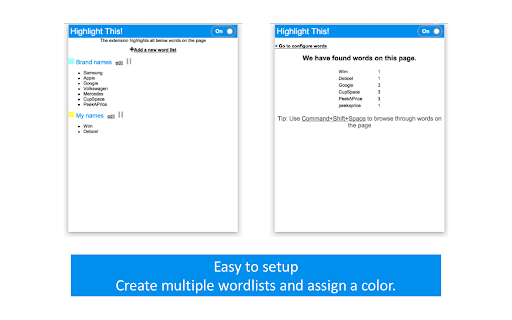
- Organize your search words in groups and lists
- Use Regular Expressions (Regex tokens)
- All data stored locally
- Auto-refreshes highlights on page reload and content changes
- Unlimited words and lists
- Synchronise lists between your browsers

Highlight This! comes:
- as a Free version, limited to 200 words and limited highlighting styles
- an Unlimited version with affiliate partner link highlighting https://highlightthis.net/PartnerLinks.html
- 2 paid versions.

Easy to use Chrome Extension that automatically searches for defined words in the current browser tab and marks them in a text. Many more advanced features available through settings:
- Create color-coded keyword lists
- Disable highlighting on certain sites
- Export or import your settings and keyword lists
- Define click action
- Use lists from Pastebin, Google Sheets

Privacy Statement: https://highlightthis.net/Privacy.html
EULA: https://highlightthis.net/EULA.pdf

** New in 6.3.10
- Fix: Issue with lookbehind regex

** New in 6.3.8
- Fix: Issue when extending license information

** New in 6.3.8
- Fix: Minor fix in detecting words after, or before, a forward-slash

** New in 6.3.7
- Fix: Minor fix in detecting words after lower quotation marks
- Fix: Incorrect highlighting with Regular Expressions that contain \b

** New in 6.3.6
- Fix: lists are not sorted anymore
- Fix: breaking highlights due to specific control for "flex" containers

** New in 6.3.4
- Fix: an issue with sequence of Regex words
- Fix: an issue with invalid characters in a wordlist
- New: You can now order lists of words to give priority in highlighting if there are duplicate words

** New in 6.3.3
- Fix: Complete words are not always correctly highlighted

** New in 6.3.2
- Improved: Word breaking symbols list has been extended

** New in 6.3.1
- Fix: zip file issue when installing extension

** New in 6.3
- New: Better support for languages which have no spaces or punctuation between words
- New: Better support for languages with diacritics
- Fixed: Sync with Google Sheets has been fixed

** New in 6.2.3
- New: You can now put a border around input fields if there is a matching word inside

** New in 6.2.2
- Fixed: a performance issue

** New in 6.2.1
- Fixed: an issue with highlighting in shadow-root elements

** New in 6.2
- New : Improved performance on large webpages
- Fixed: an issue whereby words could disappear while filtering the list of words

** New in 6.1
- New: Make backups automatically
- New: Open clicks on highights in new window or current tab

** New in 6.0.10
- Fixed: an issue with highlighting of web components
- Fixed: an issue with look behind regular expressions

** New in 6.0.9
- New: Now also highlighting in Shadow DOM

** New in 6.0.8
- Fixed: an issue whereby lists cannot be opened to edit
- Fixed: an issue on LinkedIn jobs

** New in 6.0.6
- Fixed: highlighting on Single Page Apps
- New: Form to send a bug to the developer

** New in 6.0.5
- Fixed: issue with corrupted synchronized lists which breaks the rendering of the lists

** New in 6.0.4
- Fixed: issue with restoring backups
- New: ability to reset all data and settings

** New in 6.0.1
- Fixed: issue with transforming Synchronized lists

** New in 6.0.0
- Extra styles for highlighting : Bold, Italic, Underline
- Ability to change highligting by selecting rounded corners, padding, shadow
- Ability to define a zone on a page for highlighting
- Switch to Manifest v3, which better protects user security
- Subscriptions
- Fixed: speed of editor
- Fixed: various small issues with remote lists

** New in 5.3.6
- Fixed: an issue with scrolling to highlight tags

** New in 5.3.5
- Fixed: Performance issues

** New in 5.2
- Define click actions for highlighted words
- Support for loading words from Google Sheets
- Define download frequency for remote lists
- Fixed: Negative reverse lookup regex
- Fixed: Issue with Highlight overview
- Fixed: Issue with download button

** New in 5.1
- Support for case sensitive matching
- Manage words from context menu

** New in 5.0
- New editor to manage your words (filter, select, delete, move)
- Support for Regex tokens

** Define words **
Easily specify words and phrases you want to be highlighted.

** Highlighting **
Highlights the words and phrases on the page
Shows how many words have been highlighted

** Works on Ajax pages **
The extension detects changes to the page and re-highlights the words.
Technical
- Version
- 6.3.12
- Manifest
- V3
- Size
- 4.24MiB
- Min Chrome
- 88
- Languages
- 5
- Featured
- Yes
Metadata
- ID
- fgmbnmjmbjenlhbefngfibmjkpbcljaj
- Developer ID
- ue85d90215ea5b6a9f4db0ad3707fa09b
- Developer Email
- [email protected]
- Created
- Apr 27, 2014
- Last Updated (Store)
- Mar 22, 2026
- Last Scraped
- Jun 24, 2026
- Website
- highlightthis.net
- Support URL
- —
- Privacy Policy
- —
Similar extensions
Alternatives to Highlight This: finds and marks words, ranked by description similarity.

Hilightext
Highlight, color-code, or replace text on any webpage. Organize with tags, notes, and CSV import/export.
25
★ 5.0

Highlight
A powerful web highlighter that lets you mark, annotate, and organize content across the web for better learning and research.
282
★ 5.0

Markr
Highlight custom words on any webpage with soft green and red highlights
4
★ 5.0

Custom Highlight Colors
Highlight text with beautiful custom colors - from neon brights to elegant pastels. Make your reading experience vibrant!
18
★ 1.0

Keyword Highlighter
Highlight keywords in red and green and retain them after reload.
121
★ 5.0

Word Highlighter - Vocabulary Builder
Highlight your vocabulary words on any webpage. Track word frequency, manage mastered words, and build your vocabulary effortlessly.
5
★ 5.0

EmailTree.AI
Answer customers' questions in seconds using AI
213
★ 5.0

Edgur.ai GRE Vocabulary Highlighter
Highlights GRE vocabulary words on any webpage and saves them to your Edgur.ai account
6
★ 5.0
Data sourced from the Chrome Web Store · last verified Jun 24, 2026.