
Auto-Continue & Download Codes for ChatGPT
Automatically continues generating and adds download buttons to code blocks in ChatGPT
As of May 2026, Auto-Continue & Download Codes for ChatGPT has 52 users in the Developer Tools category.
Usersdown 20.0 percent−20.0%
52
52
Ratingno change0%
—
— reviews
Reviewsno change0%
—
Version
1.0
Manifest V3
History
2 snapshotsTracking since Apr 27, 2026.
View as table
| Date | Users | Rating | Reviews | Version |
|---|---|---|---|---|
| Apr 27, 2026 | 65 | — | — | 1.0 |
| May 24, 2026 | 58 | — | — | 1.0 |
| Now | 52 | — | — | 1.0 |
Permissions & access
- Permissions
- activeTabstoragescripting
- Host access
- https://chat.openai.com/*, https://chatgpt.com/*
Screenshots


About
*** IF YOU WANT TO HAVE THE AUTO-NAMING FUNCTIONALITY, PLEASE INCLUDE THIS LINE OF TEXT IN YOUR CHATGPT CUSTOM INSTRUCTIONS OR PREPEND IT TO YOUR MESSAGE IN CHAT FOR O1-PREVIEW/O1-MINI --->>> <<< Always before the full code snippets you must write a filename of it like this: "Filename: filename.ext". >>> ***

Auto-Continue & Download Codes for ChatGPT: Your Coding Productivity Booster

Supercharge your ChatGPT coding experience with this essential Chrome extension for developers and programmers. Say goodbye to manual code copying and tedious file management!

Key Features:
🚀 Auto-Continue Generation: Never interrupt your flow again! Our extension automatically clicks the "Continue generating" button, ensuring seamless, uninterrupted code output.

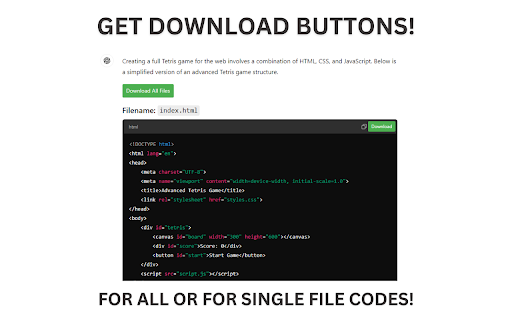
💾 One-Click Code Downloads: Instantly save any code snippet with a single click. No more copy-pasting or manual file creation!

📁 Smart File Naming: We automatically generate appropriate filenames based on the code content, saving you precious time and mental effort.

📦 Bulk Code Export: Download all code snippets from your entire ChatGPT conversation with just one click. Perfect for complex projects or long coding sessions.

⏱️ Time-Saving Workflow: Streamline your coding process and focus on what matters - solving problems and writing great code.

🔧 Customizable Settings: Tailor the extension to your workflow with easy-to-use toggle options.

Whether you're a seasoned developer or a coding novice, Auto-Continue & Download Codes for ChatGPT is your perfect companion for productive coding sessions with ChatGPT. Reclaim your time, reduce stress, and boost your coding efficiency today!

Download now and experience the future of AI-assisted coding productivity!
Technical
- Version
- 1.0
- Manifest
- V3
- Size
- 7.8KiB
- Min Chrome
- 88
- Languages
- 1
- Featured
- No
Metadata
- ID
- kpdhgkoeiegdfdinokiemagiiceihdak
- Developer ID
- udcc2b54d8206b7af1b4d4b53198a834d
- Developer Email
- [email protected]
- Created
- Sep 25, 2024
- Last Updated (Store)
- Sep 25, 2024
- Last Scraped
- May 24, 2026
- Website
- —
- Support URL
- —
- Privacy Policy
- https://bongozap.com/acdc-privacy-policy.txt
Similar extensions
Alternatives to Auto-Continue & Download Codes for ChatGPT, ranked by description similarity.

ChatGPT Code ZIP Downloader
Download all code blocks from a ChatGPT response as a ZIP file.
17

ExportGPTCode
Download code from ChatGPT in one click.
4
★ 5.0

ChatGPT Code Downloader
Download code snippets from ChatGPT responses directly to your computer with a single click.
31

GPT Code Download Button
Adds a download button next to GPT code copy button
27

Code Snippet Saver
Save and organize your code snippets.
8

ChatGPT UI Preview
Introducing ChatGPT UI Preview! Now, seamlessly view your HTML, CSS, or JS code results right in the ChatGPT sidebar
53
★ 4.7

Codify: Code Snippet Manager for Chrome
Unlock your coding potential with the Code Snippet Manager, a Chrome extension specifically designed to boost the productivity and…
165
★ 4.6

ChatGPT Message Downloader
Download ChatGPT messages as .txt files in markdown format, with one-click enable/disable.
23
Data sourced from the Chrome Web Store · last verified May 24, 2026.