
ChatGPT Message Downloader
Download ChatGPT messages as .txt files in markdown format, with one-click enable/disable.
As of May 2026, ChatGPT Message Downloader has 23 users in the Developer Tools category.
Usersdown 4.2 percent−4.2%
23
23
Ratingno change0%
—
— reviews
Reviewsno change0%
—
Version
0.1
Manifest V3
History
2 snapshotsTracking since Apr 24, 2026.
View as table
| Date | Users | Rating | Reviews | Version |
|---|---|---|---|---|
| Apr 24, 2026 | 24 | — | — | 0.1 |
| May 19, 2026 | 19 | — | — | 0.1 |
| Now | 23 | — | — | 0.1 |
Permissions & access
- Permissions
- downloadsclipboardReadstoragescriptingnotifications
- Host access
- *://*.openai.com/*
Screenshots

About
Ever wanted a simple and effective way to download ChatGPT messages? Look no further! This extension lets you effortlessly save ChatGPT outputs in TXT format with just a click.

🔹 Features:

- One-click download: Just click on the clipboard icon on ChatGPT outputs, and voila! Your chat is saved in TXT format.

- Markdown Support: The saved TXT files retain the markdown formatting from ChatGPT outputs, ensuring your chat looks just as good offline.

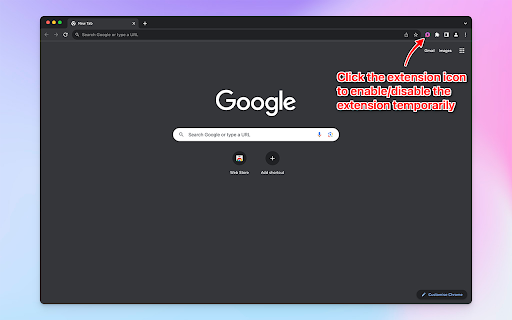
- Enable/Disable Toggle: Want to pause the extension temporarily? No worries! Simply click the extension icon to enable/disable it.

🔹 Use Cases:

1. Offline Reference: Save ChatGPT outputs for offline use. Perfect for researchers, students, or anyone wanting to revisit their ChatGPT interactions without internet access.

2. Bulk Posting: Ideal for bloggers and content creators! The saved TXT files can be seamlessly integrated for bulk posting on CMS sites like WordPress, streamlining blogging automation.

3. Archiving Conversations: Preserve memorable or important ChatGPT conversations for future reference or sentimental value.

4. Professional Documentation: Use the downloaded chats as evidence of customer support interactions, feedback sessions, or creative brainstorming.

5. Data Analysis: For analysts and data enthusiasts, collect ChatGPT interactions for pattern recognition, training, or other analytical purposes.

🔹 Easy to Use:

Getting started is a breeze! Once installed, click on the clipboard icon on any ChatGPT output. If you wish to pause the extension, use the one-click enable/disable toggle. For detailed instructions, refer to the 'instructions.html' included with the extension.

Experience the ultimate convenience with the ChatGPT Message Downloader. Give it a try today!
Technical
- Version
- 0.1
- Manifest
- V3
- Size
- 365KiB
- Min Chrome
- 88
- Languages
- 1
- Featured
- No
Metadata
- ID
- clcgnkjofbkgkdejbdilaakiigmfbcgg
- Developer ID
- uda6b0e6dbc0c10395d20677779cada5c
- Developer Email
- [email protected]
- Created
- Aug 25, 2023
- Last Updated (Store)
- Aug 25, 2023
- Last Scraped
- May 19, 2026
- Website
- forgedwithai.com
- Support URL
- https://forgedwithai.com/contact/
- Privacy Policy
- —
Similar extensions
Alternatives to ChatGPT Message Downloader, ranked by description similarity.

ChatGPT to PDF converter
Save ChatGPT content into PDF
22
★ 3.7

ChatGPT Clean Copy
Automatically clean formatting when copying text from ChatGPT - removes data attributes and HTML comments
46
★ 3.0

ChatGPT Citation Extractor
Extract citations from ChatGPT outputs
6

PolyCode Chat Bridge
Save, transfer, export, and continue AI chats
40
★ 5.0

ChatGPT Exporter
Export ChatGPT conversations to clean Markdown (.md) with live preview. Free downloads; Pro adds PDF/TXT/JSON/CSV + Google Drive.
163
★ 5.0

AI Chat Exporter – Save & Download Conversations
Export chats from ChatGPT, Claude, Gemini, and Copilot to PDF, Word, Markdown, or JSON. Never lose your conversations again!
679
★ 3.7

GitHub Markdown Exporter
Export GitHub issues, discussions, pull requests, and wiki pages to markdown format
60
★ 5.0

ChatGPT Bookmarks
Save, organize, and search ChatGPT chats with tags, pins, and cards.
6
★ 5.0
Data sourced from the Chrome Web Store · last verified May 19, 2026.