
Code Snippet Saver
Save and organize your code snippets.
As of June 2026, Code Snippet Saver has 8 users in the Developer Tools category.
Usersdown 27.3 percent−27.3%
8
8
Ratingno change0%
—
— reviews
Reviewsno change0%
—
Version
1.0
Manifest V3
History
3 snapshotsTracking since Apr 23, 2026.
View as table
| Date | Users | Rating | Reviews | Version |
|---|---|---|---|---|
| Apr 23, 2026 | 11 | — | — | 1.0 |
| May 12, 2026 | 10 | — | — | 1.0 |
| Jun 7, 2026 | 7 | — | — | 1.0 |
| Now | 8 | — | — | 1.0 |
Permissions & access
- Permissions
- storage
- Host access
- None declared
Screenshots
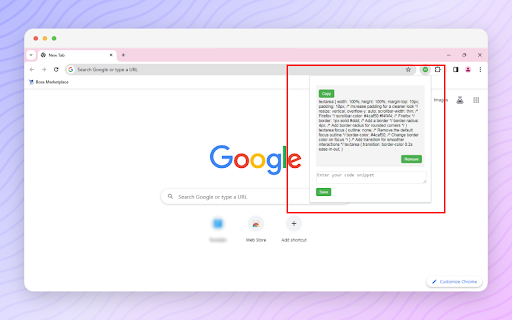
About
Elevate your coding experience with Code Snippet Saver, the ultimate tool for programmers! 🚀 This lightweight and stylish Chrome extension empowers developers to save, organize, and manage their code snippets effortlessly.

Key Features:

Save and Organize: 🗂️ Easily save and organize your code snippets directly within the extension, ensuring quick access to your favorite code blocks.

Copy to Clipboard: 📋 Quickly copy any saved snippet to your clipboard with a single click, streamlining your workflow and boosting productivity.

Stylish Design: 🎨 The extension features a clean and stylish design, making code management a breeze with an intuitive and aesthetically pleasing interface.

Remove with Ease: ❌ Remove snippets effortlessly using the intuitive interface, featuring a remove button with a cross entity icon for quick identification.

Responsive Layout: 📱 The extension provides a responsive layout that adjusts seamlessly to different screen sizes, ensuring a comfortable and user-friendly experience.

How to Use:

✅Open the extension by clicking on the toolbar icon.
✅Enter your code snippets in the text area.
✅Click the "Save" button to store your snippets.
✅Use the "Copy" button to copy a snippet to your clipboard.
✅Remove snippets easily with the intuitive remove button.

The Best Tool for Programmers: 🔧 Code Snippet Saver is designed for offline use, allowing programmers to access and manage their code snippets anytime, anywhere. Whether you're a seasoned developer or just getting started, this extension is the perfect companion for a more efficient and organized coding journey.

Upgrade your coding game with Code Snippet Saver! 🚀
Technical
- Version
- 1.0
- Manifest
- V3
- Size
- 23.91KiB
- Min Chrome
- 88
- Languages
- 1
- Featured
- No
Metadata
- ID
- jnfndfadpnipifplchfgaekkeaecppod
- Developer ID
- u2e5c9546910439dcae7fd3b55ea675b3
- Developer Email
- [email protected]
- Created
- Dec 14, 2023
- Last Updated (Store)
- Dec 14, 2023
- Last Scraped
- Jun 7, 2026
- Website
- —
- Support URL
- https://carsimulatormodapk.com/contact-us/
- Privacy Policy
- https://carsimulatormodapk.com/privacy-policy/
Similar extensions
Alternatives to Code Snippet Saver, ranked by description similarity.

Code Snippet Saver
Save, tag, search, and copy code snippets from the web
120

Codify: Code Snippet Manager for Chrome
Unlock your coding potential with the Code Snippet Manager, a Chrome extension specifically designed to boost the productivity and…
165
★ 4.6

Snipify: Code Snippet Collector
Save, tag, and search reusable code snippets directly from your browser.
11

Code Snippet Saver
Save and categorize code snippets from any webpage.
7

ChatGPT Code Saver
Allows saving code blocks generated by ChatGPT to local files.
11

Code Snippet Saver
Provides users with the ability to reuse code with built-in storage instead of having to write frequently used code from scratch.
47
★ 5.0

Code Snippet Library
Save and manage (WordPress) code snippets with titles and tags.
31
★ 5.0

CodeSnippet Saver
Save code snippets from any page with one click!
3
Data sourced from the Chrome Web Store · last verified Jun 7, 2026.