
Copy Button for ChatGPT
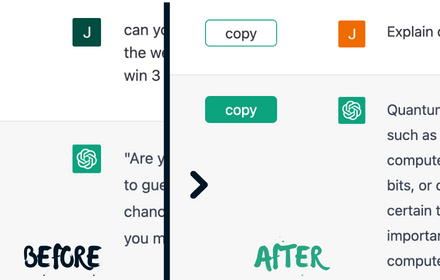
Adds a native looking copy button for ChatGPT messages.
As of June 2026, Copy Button for ChatGPT has 622 users and a 3.00/5 rating from 5 reviews in the Workflow & Planning category.
Usersdown 4.2 percent−4.2%
622
622
Ratingno change0%
3.00
5 reviews
Reviewsno change0%
5
Version
1.0.0
Manifest V3
History
3 snapshotsTracking since Apr 23, 2026.
View as table
| Date | Users | Rating | Reviews | Version |
|---|---|---|---|---|
| Apr 23, 2026 | 649 | 3.00 | 5 | 1.0.0 |
| May 12, 2026 | 644 | 3.00 | 5 | 1.0.0 |
| Jun 7, 2026 | 645 | 3.00 | 5 | 1.0.0 |
| Now | 622 | 3.00 | 5 | 1.0.0 |
Permissions & access
- Permissions
- clipboardWritescripting
- Host access
- *://chat.openai.com/*
Screenshots


About
🌟 Introducing Copy Button for ChatGPT 🌟

📌 What is it?
'Copy Button for ChatGPT' is a sleek, modern, and native-looking chrome extension designed specifically to enhance your ChatGPT experience. This extension seamlessly integrates with ChatGPT messages, allowing you to copy copy text, tables, lists, code blocks, and all markdown elements while maintaining their original formatting.

🚀 Boost your ChatGPT experience
Tired of struggling with copying messages from ChatGPT? Say goodbye to those tedious copy-pasting issues! With the 'Copy Button for ChatGPT' extension, a simple click is all it takes to duplicate messages without losing any formatting. Enjoy a hassle-free and more productive ChatGPT session!

🎨 Easy to Use and Visually Appealing
The 'Copy Button for ChatGPT' extension is incredibly user-friendly and requires no technical expertise. With just one click, the message is copied to your clipboard, complete with all formatting intact. Moreover, the button's design is carefully crafted to blend seamlessly with the ChatGPT interface, ensuring a consistent and unobtrusive appearance.

🌍 Multi-Language Support: This extension works flawlessly with ChatGPT messages in various languages, making it a versatile tool for users around the globe.

🔒 Privacy and security
Your privacy matters. We do not collect any personal information or data under any circumstances. It's focused solely on improving your ChatGPT experience while keeping your data safe and secure.

✅ Free to Use
This extension is completely free to use. Enhance your ChatGPT experience without any pesky ads, fees, or subscriptions.

📣 Spread the Word 📣
Love this extension? Don't keep it to yourself! Share it with your friends, colleagues, and fellow ChatGPT enthusiasts. Give them the opportunity to enjoy a seamless, hassle-free ChatGPT experience too!

🔓 Open Source and Community Driven 🔓
The extension is fully open source and available on GitHub. Feel free to contribute!
🔗 Access the GitHub repository here: https://github.com/tuffstuff9/Copy-Button-for-ChatGPT

💡 Got Feedback or Ideas? 💡
We're always looking for ways to improve our extension and make it even more useful for you. If you have any feedback, suggestions, or ideas, feel free to reach out to out. We endeavor to respond to all requests within 24 hours.
Technical
- Version
- 1.0.0
- Manifest
- V3
- Size
- 18.02KiB
- Min Chrome
- 88
- Languages
- 1
- Featured
- Yes
Metadata
- ID
- kinganchlhoclgmimjmmepddkdbdelik
- Developer ID
- u1966377631ed265208f9baa0278d3e67
- Developer Email
- [email protected]
- Created
- Apr 8, 2023
- Last Updated (Store)
- Apr 8, 2023
- Last Scraped
- Jun 7, 2026
- Website
- —
- Support URL
- —
- Privacy Policy
- —
Similar extensions
Alternatives to Copy Button for ChatGPT, ranked by description similarity.
ChatGPT Copy Button Extension
Creates Copy button on every ChatGPT chat to simplify the copy-paste process, easy copy and eliminates unwanted formatting in paste
10.0K
★ 3.1

CopyGPT
Share your ChatGPT chat logs with friends or save them to your computer.
724
★ 1.0

ChatGPT COPY
ChatGPT COPY adds an additional copy button under each content of conversations.
202
★ 3.7

ChatGPT Enhancer
Effortless file attachments in chat, clean text copying without formatting. Connect on Telegram https://t.me/ChatGPTEnhancer.
30

Dual Copy Button for ChatGPT
This extension duplicates the 'copy code' button on each ChatGPT reponse, so you dont need to scroll up to copy it.
6
★ 5.0

Chatpgt Copy Export Clipboard
🪄 Enhance CHATGPT with copy button, export chat in any extension and clipboard manager 📋. Compatible with AIPRM ✅
420
★ 4.3

Copy for Chat GPT
This extension allows you to copy chat GPT responses with a click of a button or CMD+K and runs it through plagiarism detectors
20.0K
★ 3.1

ChatGPT CopyIt
ChatGPT CopyIt adds a copy to clipboard button end of each answer. Also it shows word and character counter.
579
★ 5.0
Data sourced from the Chrome Web Store · last verified Jun 7, 2026.