
CopyGPT
Share your ChatGPT chat logs with friends or save them to your computer.
As of June 2026, CopyGPT has 724 users and a 1.00/5 rating from 2 reviews in the Workflow & Planning category.
Usersup 25.0 percent+25.0%
724
724
Ratingno change0%
1.00
2 reviews
Reviewsno change0%
2
Version
1.5
Manifest V3
History
3 snapshotsTracking since Apr 1, 2026.
View as table
| Date | Users | Rating | Reviews | Version |
|---|---|---|---|---|
| Apr 1, 2026 | 579 | 1.00 | 2 | 1.5 |
| May 2, 2026 | 607 | 1.00 | 2 | 1.5 |
| Jun 1, 2026 | 671 | 1.00 | 2 | 1.5 |
| Now | 724 | 1.00 | 2 | 1.5 |
Permissions & access
- Permissions
- clipboardWrite
- Host access
- https://chat.openai.com/*
Screenshots


About
Introducing CopyGPT - the ultimate Chrome extension for ChatGPT users who want to easily share and save their chat logs! With our seamless integration into the ChatGPT chat window, copying conversations has never been simpler. Compatible with the ChatGPT chat interface, our user-friendly design ensures that you can effortlessly capture and preserve your AI-generated discussions.

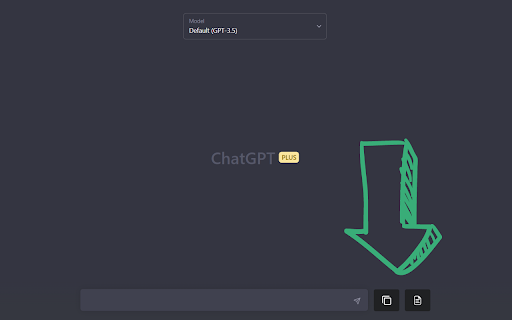
CopyGPT adds two handy buttons right next to the message input box in the chat interface, giving you full control over the chat log copying process.

Button 1: Copy Conversation
Capture your entire chat log in a neatly formatted conversation style. Perfect for sharing with friends or archiving for future reference, the output is structured as follows:

You: <Your message>

ChatGPT: <Chat message>

You: <Your message>

ChatGPT: <Chat message>

...

Button 2: Copy Chat Messages Only
If you prefer to focus on the AI-generated content, use this button to copy only the ChatGPT messages. This option is ideal for those who want to incorporate the chat responses into another document without the conversation format.

Why choose CopyGPT?

1. Easy integration: Effortlessly blends into the ChatGPT chat window for seamless user experience.
2. Simple to use: Two clearly labeled buttons make it a breeze to copy your chat logs.
3. Versatile: Choose between copying the entire conversation or just the ChatGPT messages.
4. Shareable: Perfect for sharing AI-generated content with friends or colleagues.
5. Archivable: Save your valuable chat logs to your computer for future reference.

Don't miss out on the chance to enhance your ChatGPT experience with CopyGPT - the ultimate browser extension for capturing, sharing, and preserving your AI-generated conversations. Install it now and unlock the full potential of your ChatGPT chats!


-------------------------------------------------------------------------------------------------

v1.0:
- First implamantation

v1.1:
- Add support to lists (ordered and unordered)
- Add support to code blocks
- Copy buttons work in the different chat conversations history

v1.2:
- Handle errors

v1.3:
- Add support to new domain for ChatGPT

v1.4:
- Fix bug: buttons added twice

v1.5:
- Fix bug: Query messages
Technical
- Version
- 1.5
- Manifest
- V3
- Size
- 108KiB
- Min Chrome
- 88
- Languages
- 1
- Featured
- Yes
Metadata
- ID
- aaijojmbigpbeplhpjfmebpebcaabbjp
- Developer ID
- u842490a4e0fd57392fdf65c86ce20a3a
- Developer Email
- [email protected]
- Created
- Mar 23, 2023
- Last Updated (Store)
- Apr 30, 2023
- Last Scraped
- Jun 1, 2026
- Website
- —
- Support URL
- —
- Privacy Policy
- —
Similar extensions
Alternatives to CopyGPT, ranked by description similarity.

ChatGPT COPY
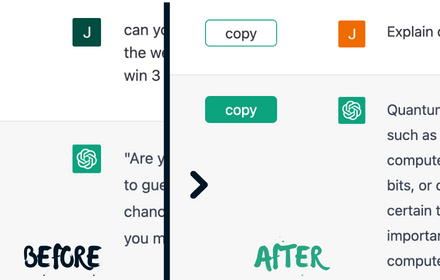
ChatGPT COPY adds an additional copy button under each content of conversations.
202
★ 3.7

Copy Button for ChatGPT
Adds a native looking copy button for ChatGPT messages.
622
★ 3.0
ChatGPT Copy Button Extension
Creates Copy button on every ChatGPT chat to simplify the copy-paste process, easy copy and eliminates unwanted formatting in paste
10.0K
★ 3.1

ChatGPT to PNG
Capture ChatGPT conversations as a single long vertical image.
273
★ 1.3
Scribe GPT
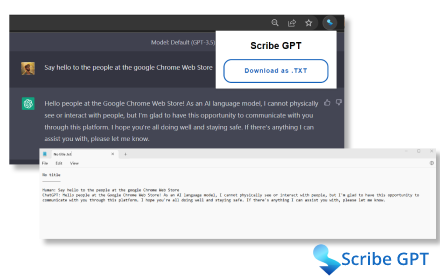
Download ChatGPT conversations as text files.
170

Paste GPT
Paste web content directly into Chat GPT or Claude AI
31

Chatpgt Copy Export Clipboard
🪄 Enhance CHATGPT with copy button, export chat in any extension and clipboard manager 📋. Compatible with AIPRM ✅
420
★ 4.3

SharePrompts: Share your ChatGPT,Bard Prompts
SharePrompts is a Chrome extension that allows you to share your prompts with one click from ChatGPT and Bard
56
★ 5.0
Data sourced from the Chrome Web Store · last verified Jun 1, 2026.