Okay Xero
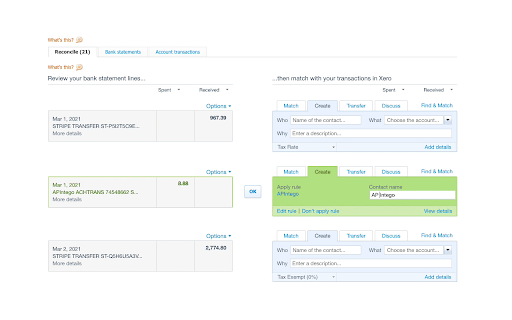
The missing shortcut key for reconciling bank accounts in Xero. Select your contact and account, hit Ctrl/Cmd-Enter. Done.
As of June 2026, Okay Xero has 30 users and a 3.67/5 rating from 3 reviews in the Workflow & Planning category.
Usersup 11.1 percent+11.1%
30
30
Ratingno change0%
3.67
3 reviews
Reviewsno change0%
3
Version
0.3
Manifest V3
History
6 snapshotsTracking since Apr 18, 2026.
View as table
| Date | Users | Rating | Reviews | Version |
|---|---|---|---|---|
| Apr 18, 2026 | 27 | 3.67 | 3 | 0.3 |
| Apr 28, 2026 | 27 | 3.67 | 3 | 0.3 |
| May 7, 2026 | 30 | 3.67 | 3 | 0.3 |
| May 15, 2026 | 31 | 3.67 | 3 | 0.3 |
| May 28, 2026 | 30 | 3.67 | 3 | 0.3 |
| Jun 8, 2026 | 32 | 3.67 | 3 | 0.3 |
| Now | 30 | 3.67 | 3 | 0.3 |
Permissions & access
- Permissions
- None declared
- Host access
- None declared
Screenshots
About
Xero's frontend engineers still haven't added this super-useful feature, so I've done it for them.
Reconcile all of your bank account transactions without reaching for your mouse.

Now you can.

1. Tab through statement fields
2. Select your contact & account
3. Hit Ctrl/Cmd-Enter
4. Done
Technical
- Version
- 0.3
- Manifest
- V3
- Size
- 187KiB
- Min Chrome
- 88
- Languages
- 1
- Featured
- No
Metadata
- ID
- kgnhcajopcajjgiclnknhkbopcjmhljo
- Developer ID
- u345ade190edb10e009375a0a230ab174
- Developer Email
- [email protected]
- Created
- Mar 10, 2021
- Last Updated (Store)
- Nov 15, 2025
- Last Scraped
- Jun 8, 2026
- Website
- —
- Support URL
- —
- Privacy Policy
- —
Similar extensions
Alternatives to Okay Xero, ranked by description similarity.

Xero Auto Reconcile by The Growth Accountant
Automates Xero reconciliation for same & foreign currency. Bulk reconciles 1000's automatically. Set smart matching criteria.
27
★ 5.0
Xero Accounting Reconciliation Automation
Xero Accounting Reconciliation Automation. Automate Xero Accounting with this automatic reconciliation robot tool.
475
★ 3.0

Xero Reconcile Robot
Automates Xero payments reconciliation
544
★ 5.0

Xero Reconcile
Quickly reconcile payments in Xero by matching batch payments to multiple invoices and updating your workflow.
24

Chazy
Additional integration of compatible accounting systems with Chazy.io
27
★ 5.0

Xero Smart Reconciler
A smart Xero reconciliation automation tool that saves time and eliminates manual effort.
40

mesha Accounting Assistant
Automate your accounting workflow with instant answers and task automation in your browser.
54
★ 5.0

Xero 极速自动填表
逐行自动填表,快速选择账户,支持快捷键触发
2
Data sourced from the Chrome Web Store · last verified Jun 8, 2026.