
Pointer - Element Inspector for DevTools
Enhanced element inspection with cursor-driven workflow. Visual highlighting, measurements, and DevTools integration.
As of May 2026, Pointer - Element Inspector for DevTools has 196 users and a 3.00/5 rating from 2 reviews in the Developer Tools category.
Usersdown 2.5 percent−2.5%
196
196
Ratingdown 40.0 percent−40.0%
3.00
2 reviews
Reviewsup 100.0 percent+100.0%
2
Version
1.0.3
Manifest V3
History
5 snapshotsTracking since Apr 1, 2026.
View as table
| Date | Users | Rating | Reviews | Version |
|---|---|---|---|---|
| Apr 1, 2026 | 201 | 5.00 | 1 | 1.0.3 |
| Apr 21, 2026 | 188 | 5.00 | 1 | 1.0.3 |
| May 6, 2026 | 189 | 5.00 | 1 | 1.0.3 |
| May 17, 2026 | 550 | 5.00 | 1 | 1.0.3 |
| May 31, 2026 | — | 3.00 | 2 | 1.0.3 |
| Now | 196 | 3.00 | 2 | 1.0.3 |
Permissions & access
- Permissions
- scriptingstoragecommands
- Host access
- <all_urls>
Screenshots


About
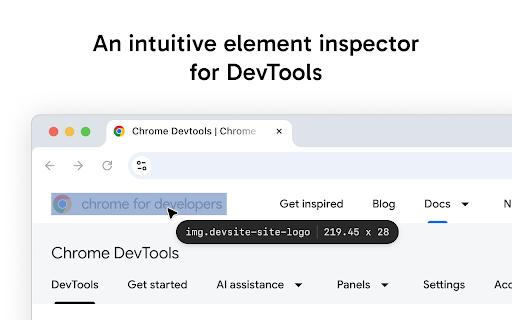
Pointer enhances Chrome's built-in element inspector with a persistent, intuitive DOM navigation tool that stays active while you work. Unlike the default DevTools inspector that turns off after selecting an element, Pointer keeps running so you can quickly inspect multiple elements without constantly reactivating the tool.

FEATURES

— Always-On Element Selection - Navigate the DOM using arrow keys or click to select elements. The pointer stays active between selections.
— Visual Box Model Display - See margin, padding, and content areas with color-coded overlays.
— Element Information - Hover over any element to see its tag name, dimensions, CSS classes, and behavioral badges (flex, grid, media, scroll containers and event listeners).
— Built-In Ruler - Hold Alt to see pixel distances between selected and hovered elements.
— DevTools Integration - Selected elements automatically sync with Chrome DevTools Elements panel. The inspector scrolls elements into view and maintains selection state when DevTools is reopened.
— Pass-Through Mode - Hold "`" (backtick) to temporarily interact with page elements normally while keeping the inspector active.
— DOM Manipulation - Cut, copy, paste, delete, and duplicate (Cmd/Ctrl+D) elements directly in the page. Full undo/redo support.

PRO FEATURES

— Inline Attribute Editor - Press "/" to add attributes, classes, and properties to selected elements without switching to the DevTools elements panel.
— JavaScript Console - Press ";" to execute JavaScript commands with the selected element as "this" context. Perfect for quick DOM modifications and debugging.
— Selector Search - Press "f" to enter find mode and highlight all elements matching a CSS selector in real-time.

KEYBOARD SHORTCUTS

Navigation
— Arrow Keys - Navigate between elements (up/down for siblings, left for parent, right for children).

Inspection Tools
— Alt - Show measurement rulers between selected and hovered elements
— ` (backtick) - Hold to enable pass-through mode so you can interact with the web page

Editing
— Cmd/Ctrl + C - Copy selected element
— Cmd/Ctrl + X - Cut selected element
— Cmd/Ctrl + V - Paste element
— Cmd/Ctrl + D - Duplicate selected element
— Backspace - Delete selected element
— Cmd/Ctrl + Z - Undo last change
— Cmd/Ctrl + Shift + Z - Redo last change

Pro Input Modes
— / - Enter attribute editing mode
— ; - Enter console mode
— f - Enter CSS selector search mode
— Esc - Exit current input mode
Technical
- Version
- 1.0.3
- Manifest
- V3
- Size
- 68.33KiB
- Min Chrome
- 116
- Languages
- 7
- Featured
- Yes
Metadata
- ID
- keomkegfndepkhgeeediaeemebnnjafc
- Developer ID
- ub35186ba2fe065983d099b234cc90e37
- Developer Email
- [email protected]
- Created
- Jun 25, 2025
- Last Updated (Store)
- Aug 15, 2025
- Last Scraped
- May 31, 2026
- Website
- —
- Support URL
- —
- Privacy Policy
- —
Similar extensions
Alternatives to Pointer - Element Inspector for DevTools, ranked by description similarity.

Element Copy
Advanced HTML element selection and copying capabilities
61
★ 3.5

Quick DOM
Instantly store hovered or right-clicked elements as global console variables.
5
★ 5.0

Developer DOM Inspector
Inspect DOM elements visually
68
★ 5.0

CSS Peek: Element Inspector
Instantly inspect elements and explore CSS properties, XPath, and more. Easily export assets, color palettes, and typography.
367
★ 5.0

Snaplensy
Snap any UI element, copy its selector, React path, styles & attributes — paste into any AI coding assistant.
17

DevKnife: Color Picker, Ruler, Font, CSS Tools & More - AUFOUNDATION
All-in-one dev toolkit: Color Picker, Font Finder, Page Ruler, CSS Outliner, Image Downloader & Source Grabber.
51
★ 5.0

Element Inspector
Hover to inspect CSS properties of any element. Ideal for developers debugging and optimizing web styles.
85

CSS Inspector Pro
Beautiful CSS, HTML & Style Inspector with copy functionality
71
★ 5.0
Data sourced from the Chrome Web Store · last verified May 31, 2026.