
Quick DOM
Instantly store hovered or right-clicked elements as global console variables.
As of June 2026, Quick DOM has 5 users and a 5.00/5 rating from 1 reviews in the Developer Tools category.
Usersup 150.0 percent+150.0%
5
5
Ratingno change0%
5.00
1 reviews
Reviewsno change0%
1
Version
0.1.1
Manifest V3
90-day change · In the last 90 days this extension 1 version update.
History
8 snapshotsTracking since Apr 10, 2026.
View as table
| Date | Users | Rating | Reviews | Version |
|---|---|---|---|---|
| Apr 10, 2026 | 2 | — | — | 0.1.0 |
| Apr 20, 2026 | 3 | — | — | 0.1.0 |
| Apr 25, 2026 | 4 | — | — | 0.1.0 |
| May 9, 2026 | 4 | — | — | 0.1.0 |
| May 14, 2026 | 6 | — | — | 0.1.0 |
| May 26, 2026 | 4 | — | — | 0.1.0 |
| Jun 2, 2026 | 5 | 5.00 | 1 | 0.1.1 |
| Jun 8, 2026 | 4 | 5.00 | 1 | 0.1.1 |
| Now | 5 | 5.00 | 1 | 0.1.1 |
Permissions & access
- Permissions
- activeTabscripting
- Host access
- None declared
Screenshots


About
Quick DOM supercharges your front-end debugging workflow by bringing powerful DevTools-style DOM utilities directly into your everyday browsing experience.

Instantly store any element as a global variable, inspect elements with a keyboard shortcut, copy advanced DOM data in seconds, and track real-time element events — without digging through DevTools menus.

Core Features:

Store as Global Variable
Right-click any element and instantly assign it to window.temp1, temp2, and so on, just like in Chrome DevTools.

Keyboard-Powered DOM Inspector
Activate Inspector Mode with a shortcut and hover to highlight elements in real time. Click to instantly capture and store.

Advanced Copy Utilities
Copy outerHTML, unique CSS selectors, JavaScript query paths, computed styles, XPath, and full XPath with a single action.

Element Event Observer
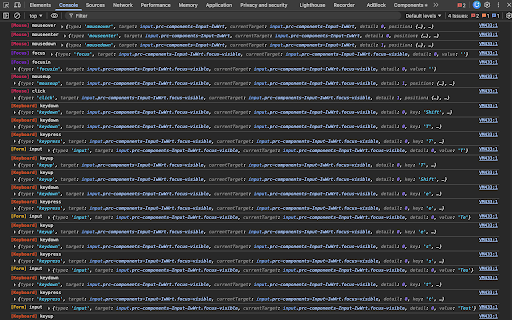
Spy on DOM interactions effortlessly. Select an element and toggle which events to monitor (Mouse, Keyboard, Form, High-Frequency, etc.). All fired events are intercepted and logged silently to your console, color-coded by category with extracted payload data.

Manage Active Observers
Keep track of everything you are monitoring. Open the inline Manage Active list to see all running event observers. Hovering an active observer highlights the target element on the webpage, and a single click lets you unbind the listeners.

Clean, Developer-Focused Experience
Includes a subtle highlight overlay, lightweight action menu, and in-page toast notifications that confirm exactly what was saved.

Feature Request Form: https://forms.gle/qAxCMAWsMP5Rx9WW8
Technical
- Version
- 0.1.1
- Manifest
- V3
- Size
- 137KiB
- Min Chrome
- 88
- Languages
- 1
- Featured
- No
Metadata
- ID
- nahkdnnkpidmdgmoggdpjhamcohgikng
- Developer ID
- uaf44603ce01a60b918f5e1602d228c31
- Developer Email
- [email protected]
- Created
- Feb 24, 2026
- Last Updated (Store)
- May 24, 2026
- Last Scraped
- Jun 8, 2026
- Website
- —
- Support URL
- —
- Privacy Policy
- —
Similar extensions
Alternatives to Quick DOM, ranked by description similarity.

Pointer - Element Inspector for DevTools
Enhanced element inspection with cursor-driven workflow. Visual highlighting, measurements, and DevTools integration.
196
★ 3.0

Element Copy
Advanced HTML element selection and copying capabilities
61
★ 3.5

Developer DOM Inspector
Inspect DOM elements visually
68
★ 5.0

Quick Copy DOM
Visually select any element on the page and instantly copy its HTML to clipboard. Like DevTools element inspector, but faster.
127
★ 5.0

DOMTree Explorer+
Explore, inspect, and annotate the DOM tree of any web page.
136
★ 1.0

Show Data Variables
Powerful side panel browser extension that discovers, organizes, and helps inspect hidden or non-obvious page data across the DOM,…
11

Focus: The Elements - DOM Inspector & Editor
DOM Inspector & Editor, inspect and edit HTML element styles directly on any page.
63
★ 5.0

Gripper - DevTools for Designers
A powerful browser extension for developers and designers. Inspect elements, pick colors, analyze typography, and export assets.
47
★ 5.0
Data sourced from the Chrome Web Store · last verified Jun 8, 2026.