
WPS PDF - Read, Edit, Fill, Convert, and AI Chat PDF with Ease
Easy-to-use PDF tools to view, edit, convert, fill, e-sign PDF files, and more in your browser.
As of June 2026, WPS PDF - Read, Edit, Fill, Convert, and AI Chat PDF with Ease has 7,000,000 users and a 4.48/5 rating from 182 reviews in the Productivity category.
Usersno change0%
7.0M
7,000,000
Ratingup 0.7 percent+0.7%
4.48
182 reviews
Reviewsup 9.0 percent+9.0%
182
Version
1.0.0.55
Manifest V3
90-day change · In the last 90 days this extension 3 version updates, changed permissions.
History
9 snapshotsTracking since Apr 20, 2026.
View as table
| Date | Users | Rating | Reviews | Version |
|---|---|---|---|---|
| Apr 20, 2026 | 7.0M | 4.45 | 167 | 1.0.0.52 |
| May 5, 2026 | 7.0M | 4.47 | 173 | 1.0.0.52 |
| May 8, 2026 | 7.0M | 4.47 | 177 | 1.0.0.53 |
| May 10, 2026 | 7.0M | 4.47 | 177 | 1.0.0.54 |
| May 22, 2026 | 7.0M | 4.48 | 178 | 1.0.0.54 |
| May 30, 2026 | 7.0M | 4.48 | 179 | 1.0.0.55 |
| Jun 2, 2026 | 7.0M | 4.48 | 178 | 1.0.0.55 |
| Jun 10, 2026 | 7.0M | 4.48 | 179 | 1.0.0.55 |
| Jun 13, 2026 | 7.0M | 4.48 | 180 | 1.0.0.55 |
| Now | 7.0M | 4.48 | 182 | 1.0.0.55 |
Changelog
- May 8, 2026permissions
webRequest, webNavigation, storage, tabs, nativeMessaging, declarativeNetRequest, gcm, cookies
webRequest, webNavigation, storage, tabs, nativeMessaging, declarativeNetRequest, gcm, cookies, notifications, scripting
Permissions & access
- Permissions
- webRequestwebNavigationstoragetabsnativeMessagingdeclarativeNetRequestgcmcookiesnotificationsscripting
- Host access
- <all_urls>
Screenshots



About
WPS PDF, part of the WPS Office suite with over 600 million monthly active users worldwide, offers an efficient approach to managing PDFs. Now integrated into Google Chrome, it enables effortless handling of PDF files across both desktop and web platforms, ensuring a consistent and powerful user experience.
By adding the extension in Chrome, you can gain instant access to a wide range of tools, including various editing tools, parallel translate, fill & sign, chat PDF, drawing highlights, adding comments, making notes, and more. More features are waiting for your exploration here.


 How to Use the WPS PDF Chrome Extension:
• Install and pin WPS PDF Chrome Extension
• Open your PDFs in browser
• Browse and process your PDFs

View, Download, Print, and Store PDFs
• Get the best PDF viewing experience online with WPS PDF extension.
• Download or print your PDFs with a quick click.
• Sign in to store your PDF files for fast access to them from anywhere.
• Find your PDFs instantly.

Edit PDFs
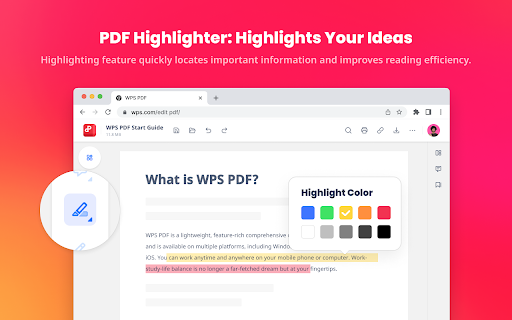
• Add notes, text comments, and highlights to improve your work efficiency.
• Use drawing tools to freely mark your ideas on your PDFs.
• Unlock full PDF edit tools in WPS Office desktop, such as managing pages, extracting PDFs, protecting PDFs, combining PDF files, compressing PDFs, and more.

Fill and Sign PDFs
• Open a PDF file in WPS PDF extension and then fill or sign it in your WPS Office desktop.
• Easily complete a form within WPS Office Fill & Sign feature.
• E-sign your documents with your signatures or initials.

Explore More Popular Premium Tools to Elevate Your Performance in Chrome

PDF Parallel Translate
• Supported by reliable LLMs with various languages.
• Provide precise and layout-preserved translation.
• Side-by-side comparison for intuitive reading and checking.

Chat PDF
• Extract essential information and provide concise summaries through insight.
• Gain deeper insights and suggestions by asking the intelligent AI.
• Provides credible and accurate AI responses backed by supporting citations.

PDF Converter
Offers over a dozen PDF solutions on the WPS online platform. Enjoy quick and high-quality PDF conversions to streamline your workflow.
• Convert PDF to Word
• Convert PDF to Excel
• Convert PDF to PPT
• Convert Word to PDF
• Convert Excel to PDF
• Convert PPT to PDF
• Convert JPG to PDF
Besides the PDF converter here, you can also find PDF tools such as compressor, splitter, merger, and more.
Technical
- Version
- 1.0.0.55
- Manifest
- V3
- Size
- 4.57MiB
- Min Chrome
- 88
- Languages
- 7
- Featured
- Yes
Metadata
- ID
- kdpelmjpfafjppnhbloffcjpeomlnpah
- Developer ID
- u8534ad20449ae29727e1b71e08169f9d
- Developer Email
- [email protected]
- Created
- Dec 28, 2023
- Last Updated (Store)
- May 21, 2026
- Last Scraped
- Jun 19, 2026
- Website
- —
- Support URL
- —
- Privacy Policy
- https://www.wps.com/privacy-policy
Similar extensions
Alternatives to WPS PDF - Read, Edit, Fill, Convert, and AI Chat PDF with Ease, ranked by description similarity.

Smallpdf—Edit, Convert, Compress, & AI Summarize PDF
Easy-to-use PDF tools to compress, convert, merge, chat to, split, e-sign, and edit PDF files in your browser.
3.0M
★ 4.6

PDF Guru: PDF Converter & Editor Extension for Chrome
PDF Guru's extension connects you to the platform so that you can convert, edit, compress, and merge files all in one place!
10.0K
★ 3.6

PDF Viewer Pro - View, Edit, Fill, Convert, Sign, and More
PDF Viewer Pro: Your all-in-one PDF solution. View, edit, fill, comment, and sign PDFs seamlessly in your browser.
4.0K
★ 4.8

PDF Toolkit - handle all your PDF Manipulation
PDF Toolkit transforms the way you work with PDF documents in Chrome, providing editing capabilities without the complexity or cost.
21

SmallPDF Free Chrome Extension
With SmallPDF Free you can easily manage PDFs and images from your browser.
2.0K
★ 3.7

Free PDF Editor & Reader — Compress, Merge, Convert PDFs · PDFly
Edit PDF, convert PDF to Word, merge, split & compress PDF files. Free PDF editor, reader, e-sign & AI tools — all in one.
2.0K
★ 4.2

PDF to DOCX
Transform PDF to DOCX online – make PDF fillable, editable, or add text to documents with the PDF to DOCX converter.
175

Smart PDF - Professional Tools
Premium PDF Tools: Merge (Grid), Watermark, Page Numbers, Convert, Edit.
35
★ 5.0
Data sourced from the Chrome Web Store · last verified Jun 19, 2026.