
Archetype Code Editor
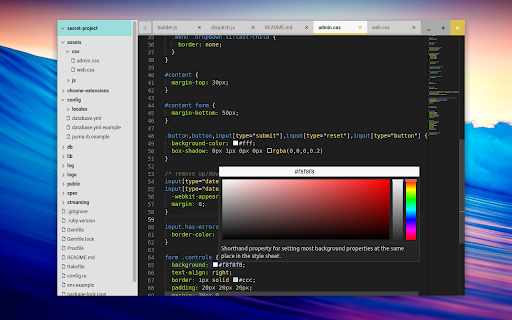
A fast, offline code editor for all Chromebooks, based on the Monaco editor from VS Code.
As of May 2026, Archetype Code Editor has 659 users and a 4.67/5 rating from 27 reviews in the Developer Tools category.
Usersdown 10.3 percent−10.3%
659
659
Ratingno change0%
4.67
27 reviews
Reviewsno change0%
27
Version
0.7.1
Manifest V2
History
2 snapshotsTracking since Apr 25, 2026.
View as table
| Date | Users | Rating | Reviews | Version |
|---|---|---|---|---|
| Apr 25, 2026 | 735 | 4.67 | 27 | 0.7.1 |
| May 22, 2026 | 710 | 4.67 | 27 | 0.7.1 |
| Now | 659 | 4.67 | 27 | 0.7.1 |
Permissions & access
- Permissions
- clipboardReadclipboardWritecontextMenusstoragenotificationssyncFileSystem
- Host access
- None declared
Screenshots

About
A native code editor for Chrome OS that doesn't require Crouton or Crostini. Among other tricks, it features:

 - Multiple cursors
 - Code minimap
 - Code folding
 - Directory browser with right-click support (add/rename/delete)
 - Code formatting via Prettier (prettier.io)
 - Ctrl + Scrollwheel Zoom

Currently in beta and free for personal use.

Changelog
=========

## Version 0.7.1

 - Fix menu icon not showing on some versions of Chrome (SVG path fill).
 - Allow closing tabs by middle-clicking on them.

## Version 0.7.0

 - New logo and icon
 - Update Monaco to v0.21.2
 - Updated 'new/open' menu with a few options
 - Added monaco-ace-tokenizer (syntax highlight for 20 new languages).
 - Fixed a few bugs regarding the open/save dialog.

## Version 0.6.1

 - Initial (beta) theme support. Open with Alt+Shift+T
 - Add tab menu for language and tab configuration
 - Added convert indentation function (tabs <-> spaces)
 - Skip more directories when searching (.git, .hg, .svn, CVS, .cache, node_modules)
 - Fix syntax highlight for files with no extension (eg. "README")
 - Added commands.showWelcome and map it to Ctrl+Alt+?
 - Fixed event listener logic when using child selectors
 - Recalculate search resuts height when toggling line visibility
 - Add new mappings (.c, .h, .rs, .gemspec, .jinja, .rst, .ink, .jwmrc)
 - UI tweaks (window buttons, tab positioning and icons, etc)

## Version 0.6.0

 - New 'Search Files' option, within dir or globally (mapped to Ctrl+Shift+F)
 - Speed up file finder initial render
 - Move tab close button to beginning of tab
 - Restore cursor position on tab.reload()
 - Update tab entry when renaming files
 - Add file type mapping from 'bash' extension
 - Added support for .vue files
 - Several minor UI tweaks (padding, tabs, buttons, icons, etc)
 - Move close prompt behaviour to ui.js
 - Added icons in different sizes

## Version 0.5.3

 - Added 'new version' page: shows the changelog when a new version is released
 - Palette: Sort files by proximity, from closest to farthest
 - Refactored tabs.js module a bit, close open tab when deleting file, if found
 - Fixed overflow of text in file finder palette
 - Add support for reopen closed tab with Ctrl+Shift+T
 - Update tabs.setModified logic, to handle abort when showing prompt
 - Add Ctrl+R for reloading current tab
 - Prevent close tab or app from being called when prompt is already shown
 - Fix race condition that prevented open file from Files app randomly
 - Reduce timeout wait for hold + click in newtab
 - Better prompt when input is shown (cancel, focuCurrently in beta and free. s, etc)

## Version 0.5.2

 - Fixed error when closing an open/shown directory.

## Version 0.5.1

 - Better session restore (reopen all previous tabs and directories)
 - Remove formatting when copying text (copyWithSyntaxHighlighting)
 - Add shebang file type detection for files without extension
 - Add line/word wrapping command and detection (plaintext vs code)
 - Map Alt + Space to Command Palette
 - Set language correctly when saving new files (untitled.txt)
 - Fix keyboard shortcut when using nonstandard layouts (e.g. dvorak)
 - Fix tab config (tab size and insert spaces) save/restore
 - Fix Prettify command
 - Handle additional extensions for language detection

## Version 0.5.0

 - Initial release
Technical
- Version
- 0.7.1
- Manifest
- V2
- Size
- 3.4MiB
- Min Chrome
- 23
- Languages
- 1
- Featured
- No
Metadata
- ID
- kdkdfjfadjdgonjjkkfjimiachohndeb
- Developer ID
- u8e6f0fe31802bcae67fe6599fe8b9fb9
- Developer Email
- [email protected]
- Created
- Feb 27, 2019
- Last Updated (Store)
- Jan 23, 2021
- Last Scraped
- May 22, 2026
- Website
- —
- Support URL
- —
- Privacy Policy
- —
Similar extensions
Alternatives to Archetype Code Editor, ranked by description similarity.

Text
A text editor for Chrome OS and Chrome.
—
★ 4.0

Chrome Emacs
Use Emacs to edit textareas and online editors
742
★ 5.0

Caret
Professional text editing for Chrome and Chrome OS
300.0K
★ 4.6

eDoC
eDoC is both an offline and an online editor with dropbox and local file integration. Built on top of the ace editor it offers many…
417
★ 3.3

Keypress Editor
An code editor for Chrome.
1.0K
★ 3.9
Code Pad Text Editor
An multi-language code text-editor crafted for the Chrome OS. Completely free to use and to modify under the GPL!
20.0K
★ 4.4

Web Maker
Blazing fast & offline playground for your web experiments
50.0K
★ 4.8

Black Apps Script
This extension brings new functionality to the Google Apps Script Monaco Editor
20.0K
★ 4.8
Data sourced from the Chrome Web Store · last verified May 22, 2026.