
Web Maker
Blazing fast & offline playground for your web experiments
As of June 2026, Web Maker has 50,000 users and a 4.79/5 rating from 1,009 reviews in the Developer Tools category.
Usersno change0%
50.0K
50,000
Ratingno change0%
4.79
1.0K reviews
Reviewsdown 0.1 percent−0.1%
1.0K
Version
6.9.0
Manifest V3
History
5 snapshotsTracking since Apr 14, 2026.
View as table
| Date | Users | Rating | Reviews | Version |
|---|---|---|---|---|
| Apr 14, 2026 | 50.0K | 4.79 | 1.0K | 6.9.0 |
| Apr 22, 2026 | 50.0K | 4.79 | 1.0K | 6.9.0 |
| May 15, 2026 | 50.0K | 4.79 | 1.0K | 6.9.0 |
| May 24, 2026 | 50.0K | 4.79 | 1.0K | 6.9.0 |
| May 29, 2026 | 50.0K | 4.79 | 1.0K | 6.9.0 |
| Now | 50.0K | 4.79 | 1.0K | 6.9.0 |
Permissions & access
- Permissions
- storagetabsoffscreen
- Host access
- <all_urls>
Screenshots


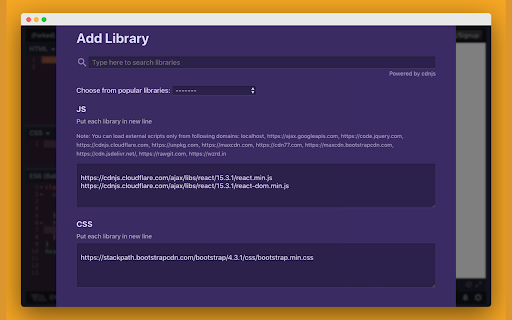
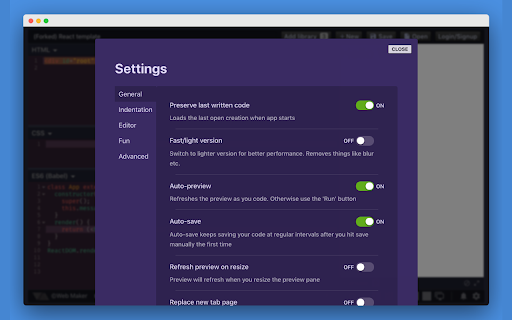

About
Free Offline & Super-fast Code Editor for HTML, CSS & JavaScript

This extension provides you with a very easy accessible and offline frontend playground for your experiments with HTML, CSS & JS!

Perfect for developers who want to experiment or practice in HTML/CSS/JS quickly, even without Internet connectivity.

Latest version comes with PRO plans that gets your advanced super-powers:
🪟 Asset hosting to host your images, CSS and JS
🌏 Share your creations publicly (available in FREE plan too)
📁 Unlimited File mode creations
⚙️ Also, lots of improvements and bug fixes

Enjoy! 🎉

Features:

* Works offline
* User accounts
* Supports preprocessors: HTML (jade, markdown), CSS (SCSS, LESS, Atomic CSS, Stylus) & JavaScript (ES6, CoffeeScript, TypeScript)
* Inbuilt Console
* Asset Hosting
* Multi-player collab mode
* Share publicly
* Save and load your creations with Auto-save
* Fork any creation
* Various templates for popular libraries - React, Vue, Tailwind and more
* Multi-monitor support with detached preview
* Import & Export all creations anytime, anywhere
* Multiple editor themes & other configurable settings
* Font options + use any system font
* Code autocompletion
* Very easily accessible. Simply open a new tab in Chrome! (configurable setting).
* Multiple layouts with saved collapsed states
* Save as HTML file
* Edit in CodePen
* Preview screenshot capture
* Open source on Github

Let's create!

Permissions Required
---------------------
* Read URL of the opened page - This is required to give optional new tab replacement feature because Web Maker shows itself only when chrome://newtab is opened

Disclaimer
----------
Web Maker does not track any user specific data. It uses Google Analytics to track aggregated events to improve user experience based on what features are used more. If still you want to opt-out of Google Analytics tracking, please visit http://tools.google.com/dlpage/gaoptout or you can set up a filter in Adblock Plus or similar ad blocker tools like AdBlock, uBlock or Adblock Pro.

Help & Support
---------------
Twitter - https://twitter.com/webmakerApp
Website - https://webmaker.app
Help & support - https://github.com/chinchang/web-maker/discussions

Changelog
-------------
v6.9.0
- New layout - Tabbed code panes
- Keyboard shortcuts to focus code and preview panes
- New language support: Chinese, French, Dutch, German
- Minimize individual code panes

v6.7.0
- [New] Multi-player collab mode
- [New] Collections
- Minimize code panes

v6.5.1
- [New] Light Theme
- Keyboard shortcuts for manual preview refresh and console toggle
- Bugfix: Console is working again!
- [New] Feedback board to add and upvote suggestions.

v6.4.1
- Make CSS changes super fast and don't refresh the page anymore

v6.3.0
- JavaScript is working again!
- Extension is on latest MV3 and more secure than ever.

v6.0.0
- PRO plans with asset hosting, public sharing and unlimited file mode creations
- UX improvements
- bugfixes

v5.0.0
- Local language support! First up, Spanish & Hindi! 🔥
- Lots of bug fixes
- Dev changes to make changes a lot faster. Stay tuned for some amazing features!

v4.2.0
Added Tailwind to popular CSS library list. We are back in action! Stay tuned :)

v4.1.1
Remove background script not being used anymore.

v4.0.4
Remove downloads permission

v4.0.2
New overhauled UI. Note, Files mode is only available in Web app currently.

v.3.4.0
Templates, Js13kGames mode and more!

v.3.3.0
Ported to Preact.js

v.3.0.0
Web Maker now as web app -> https://webmakerapp.com/app/

v.2.9.7
Tailwind CSS added, Popular libraries updated, and code refactor.

v.2.9.5
Improvements in external library ux, pane collapsing and bugfixes

v.2.9.0
Detached preview, Atomic CSS configurations, find/replace, more settings & bugfixes.

v.2.8.0
Auto-save, custom system font, configurable auto-completion, matching tag highlighting, bugfixes and improvements

v.2.7.1
Lots of bug fixes and minor improvements

v.2.7.0
Fork feature, fonts, bugfixes and improvements

v2.6.1
Several bugfixes.

v2.6.0
Inbuilt Console added.!

v2.5.0
search saved items, Atomic CSS support, more configurable settings and bugfixes.

v2.4.3
Whitelist scripts from stripe.com.

v2.4.2
Improved infinite loop protection.

v2.4.0
Import/export, editor themes, more settings, vim keybindings, Add library policy changes.

v2.3.2
Onboarding improvements, does not replace new tabs by default and babel update.

v2.3.0
Preview screenshot capture (new downloads permission required for this), keyboard navigation, auto code alignment & bugfixes.

v2.2.2
Bugfixes in autocompletion

v2.2.0
Code autocompletion, full screen preview, SASS support and bugfixes.
Technical
- Version
- 6.9.0
- Manifest
- V3
- Size
- 11.9MiB
- Min Chrome
- 88
- Languages
- 1
- Featured
- Yes
Metadata
- ID
- lkfkkhfhhdkiemehlpkgjeojomhpccnh
- Developer ID
- ub98893f641c825c98002302e590e0004
- Developer Email
- [email protected]
- Created
- May 6, 2016
- Last Updated (Store)
- Mar 28, 2026
- Last Scraped
- Jun 13, 2026
- Website
- https://webmaker.app/
- Privacy Policy
- https://webmaker.app/privacy-policy/
Similar extensions
Alternatives to Web Maker, ranked by description similarity.

Text
A text editor for Chrome OS and Chrome.
—
★ 4.0
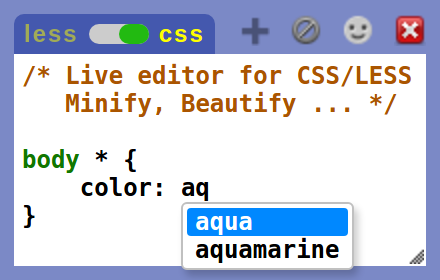
Live editor for CSS, Less & Sass - Magic CSS
Live preview of CSS/Less/Sass code changes. Auto-save file, autocomplete, Less/Sass to CSS, beautify, CSS reloader, lint, ...
70.0K
★ 4.6

User JavaScript and CSS
User JavaScript and CSS on any website
200.0K
★ 4.8

Archetype Code Editor
A fast, offline code editor for all Chromebooks, based on the Monaco editor from VS Code.
659
★ 4.7

GrowthBook DevTools
GrowthBook DevTools helps you debug feature flags and experiments and design A/B tests visually — all from your browser.
10.0K
★ 3.3

Developer's Toolkit
DevTools companion with side panel diagnostics for CSS, JS, network, and cookies.
16
★ 5.0

Nuweb - Build your web easier in the browser
A chrome extension that lets you change the design within your browser.
63
★ 5.0

pastaable
Copy Paste Tailwind Code from your favorite website with Pastaable
55
★ 3.9
Data sourced from the Chrome Web Store · last verified Jun 13, 2026.