
Box Detector
Your Ultimate Website Element Inspector.
As of May 2026, Box Detector has 17 users in the Developer Tools category.
Usersdown 15.0 percent−15.0%
17
17
Ratingno change0%
—
— reviews
Reviewsno change0%
—
Version
1.2
Manifest V3
History
2 snapshotsTracking since Apr 25, 2026.
View as table
| Date | Users | Rating | Reviews | Version |
|---|---|---|---|---|
| Apr 25, 2026 | 20 | — | — | 1.2 |
| May 22, 2026 | 18 | — | — | 1.2 |
| Now | 17 | — | — | 1.2 |
Permissions & access
- Permissions
- scriptingactiveTab
- Host access
- None declared
Screenshots


About
🔍 Easily Inspect and Highlight Web Elements

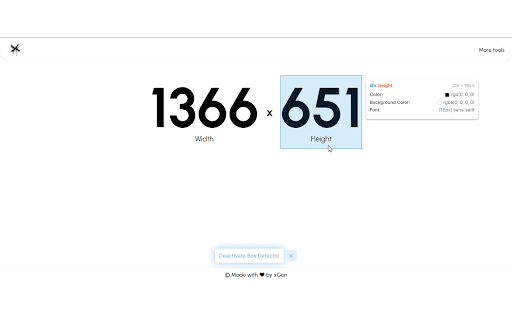
Box Detector is a powerful browser extension designed for developers, designers, and testers to improve your workflow. It allows you to visually inspect elements on any webpage by hovering over them, displaying advanced details like dimensions, colors, fonts, and more - AI update coming soon.

🚀 Features:
✅ Element Highlighting – Instantly outline any element under your cursor.
✅ Advanced Tooltip – View details like tag type, ID, classes, dimensions, font styles, colors, and padding.
✅ Keyboard Shortcut – Toggle the inspector with Ctrl + B for quick access.
✅ Lightweight & Fast – Runs smoothly without slowing down your browsing experience.
✅ Easy Toggle – Activate or deactivate the inspector from the extension popup.

🎯 Perfect for:
- Developers debugging HTML & CSS
- Designers checking UI styles
- Testers identifying elements for automation

🔧 How to Use:
- Click the extension icon or press Ctrl + B to enable the inspector.
- Hover over elements to view details in real-time.
- Click the toggle button in the popup to enable or disable the tool.

🔒 Privacy Notice:
Box Detector does not collect, store, or share any user data. All processing happens locally on your device, ensuring complete privacy and security.

💬 Join Our Community:
Share feedback, get updates, and chat about our products in our Telegram group (https://t.me/mlkvinc) 🚀
Technical
- Version
- 1.2
- Manifest
- V3
- Size
- 27.1KiB
- Min Chrome
- 88
- Languages
- 1
- Featured
- No
Metadata
- ID
- kapglelokndninibhaelgckcignjlind
- Developer ID
- u2304f3e30f0d81be23bcd0807a752088
- Developer Email
- [email protected]
- Created
- Nov 29, 2023
- Last Updated (Store)
- Mar 25, 2025
- Last Scraped
- May 22, 2026
- Website
- mlkv.xyz
- Support URL
- https://mlkv.xyz/support/box-detector
Similar extensions
Alternatives to Box Detector, ranked by description similarity.

Developer DOM Inspector
Inspect DOM elements visually
68
★ 5.0

Element Inspector - Precision UI Analysis
Professional UI inspection toolkit for developers. Analyze element alignment, colors, spacing, and typography with precision.
351
★ 5.0

DOM Element Highlighter
Visually identify and interact with testable DOM elements on web pages
11

Element Inspector
One-click element capture for AI debugging. Copy element info, styles, and screenshots to clipboard.
39

Element Inspect
Inspect padding, margin, tag, class, and size by hovering over elements.
156
★ 5.0

Designer's Little Helper
Developer & designer toolkit: Grid, CSS Inspector, Color Picker, Contrast Checker, Responsive Testing & more.
20

Web Inspector
Use Web Inspector tool as a CSS viewer and website inspector for any page. It is a browser plugin for google chrome inspect element.
943
★ 4.6

Font Detective
Hover over text to see font style, size, weight, and other typography details
5
Data sourced from the Chrome Web Store · last verified May 22, 2026.