
Font Detective
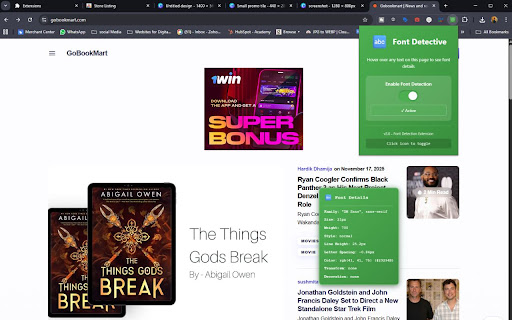
Hover over text to see font style, size, weight, and other typography details
As of June 2026, Font Detective has 5 users in the Developer Tools category.
Usersup 25.0 percent+25.0%
5
5
Ratingno change0%
—
— reviews
Reviewsno change0%
—
Version
2.0
Manifest V3
History
5 snapshotsTracking since Apr 19, 2026.
View as table
| Date | Users | Rating | Reviews | Version |
|---|---|---|---|---|
| Apr 19, 2026 | 4 | — | — | 2.0 |
| Apr 28, 2026 | 5 | — | — | 2.0 |
| May 8, 2026 | 6 | — | — | 2.0 |
| May 16, 2026 | 5 | — | — | 2.0 |
| May 25, 2026 | 4 | — | — | 2.0 |
| Now | 5 | — | — | 2.0 |
Permissions & access
- Permissions
- activeTabstorage
- Host access
- None declared
Screenshots
About
Font Detective is a sleek, user-friendly Chrome extension designed for anyone who wants to quickly identify the font properties of text on any website. Whether you're a web designer, developer, content creator, or typography enthusiast, Font Detective provides instant, comprehensive font details with just a hover of your cursor.

Key Features
This extension gives you detailed typographic information of any text on a webpage simply by hovering over it. You instantly see font family, size, weight, style, line height, letter spacing, color (in RGB and HEX), text transformation, and text decoration. These details pop up in a stylish tooltip that follows your cursor for convenience.

One of the standout features of this extension is the easy-to-use toggle switch within the popup. You can quickly enable or disable the font detection feature with a single click, directly from the extension icon on your Chrome toolbar. This toggle state is remembered across browsing sessions, providing a seamless experience.

Intuitive and Attractive Interface
Font Detective offers a beautiful user interface enhanced with attractive gradient icons in multiple sizes, ensuring it looks great in any Chrome toolbar. When activated, the tooltip appears with a modern translucency effect and clear visual hierarchy for effortless readability. The popup window for settings is designed with a consistent green gradient theme and includes a status indicator that clearly states whether the extension is active or inactive.

Practical for Professionals and Enthusiasts
Web developers can use Font Detective to efficiently inspect typography without digging through developer tools. Designers can review font applications in real time without switching tools. Content creators and bloggers can verify font consistency and styling across articles. Typography lovers get an easy way to explore fonts on their favorite sites.

Installation and Usage
Installing Font Detective is simple and quick. After downloading the extension package, install it through Chrome’s “Load unpacked” option in developer mode. Once installed, just hover over any text on any website to see the font details appear automatically in the tooltip.

To toggle the detection on and off, click the extension icon to open the popup. Flip the switch to activate or deactivate the font detection instantly. The extension automatically saves your preference, so it will stay as you left it even after restarting your browser.

Why Choose Font Detective?
Comprehensive Font Details: Covers all essential font metrics in one hover.

Seamless Toggle: Control your extension easily without navigating menus.

Elegant Design: Gradient themes and smooth animations for an awesome UX.

Cross-Site Compatibility: Works flawlessly on any webpage.

Lightweight and Efficient: Minimal impact on browser performance.

Font Detective is the perfect tool for anyone serious about typography on the web. Its elegant design combined with powerful functionality makes font inspection effortless and enjoyable.
Technical
- Version
- 2.0
- Manifest
- V3
- Size
- 10.42KiB
- Min Chrome
- 88
- Languages
- 1
- Featured
- No
Metadata
- ID
- gaohamkneneblbagildmmancogicdmoe
- Developer ID
- u361a9e3bb9901780765fb59f054ab443
- Developer Email
- [email protected]
- Created
- Nov 21, 2025
- Last Updated (Store)
- Nov 21, 2025
- Last Scraped
- Jun 6, 2026
- Website
- gobookmart.com
- Support URL
- —
- Privacy Policy
- https://gobookmart.com/font-detective-privacy-policy/
Similar extensions
Alternatives to Font Detective, ranked by description similarity.

Font Detector
Detects font details on any webpage to find Fonr family, height and more
77
★ 1.0

Font Detector – What font is this?
Font Detector is a fast and free font finder tool that helps you identify any font on a webpage instantly. What font is used here?
473
★ 5.0

Font Finder
Easily identify and analyze fonts on any webpage. Get font family, size, weight, style, color, and more.
20

Font Inspector
Font Inspector — Instantly Identify Fonts on Any Website
760
★ 4.0

Typeface finder
Hover with typeface finder to look up fonts on any website. Find out typefaces fast including font and typeface details.
139
★ 4.7

Font Finder - Typography Inspector
Highlight text to see font details instantly. Perfect for designers and developers!
8

Font Analyzer
Use Font Analyzer to analyze font type and style on any page. Website font identifier answering what font is this.
150
★ 5.0

Font Master
Inspect any font on any website. Hover to see font details, click to lock and copy CSS.
4
Data sourced from the Chrome Web Store · last verified Jun 6, 2026.