
Element Inspect
Inspect padding, margin, tag, class, and size by hovering over elements.
As of June 2026, Element Inspect has 156 users and a 5.00/5 rating from 4 reviews in the Developer Tools category.
Usersup 30.0 percent+30.0%
156
156
Ratingno change0%
5.00
4 reviews
Reviewsno change0%
4
Version
1.0.0
Manifest V3
History
4 snapshotsTracking since Apr 1, 2026.
View as table
| Date | Users | Rating | Reviews | Version |
|---|---|---|---|---|
| Apr 1, 2026 | 120 | 5.00 | 4 | 1.0.0 |
| Apr 21, 2026 | 138 | 5.00 | 4 | 1.0.0 |
| May 11, 2026 | 140 | 5.00 | 4 | 1.0.0 |
| Jun 6, 2026 | 145 | 5.00 | 4 | 1.0.0 |
| Now | 156 | 5.00 | 4 | 1.0.0 |
Permissions & access
- Permissions
- activeTab
- Host access
- None declared
Screenshots
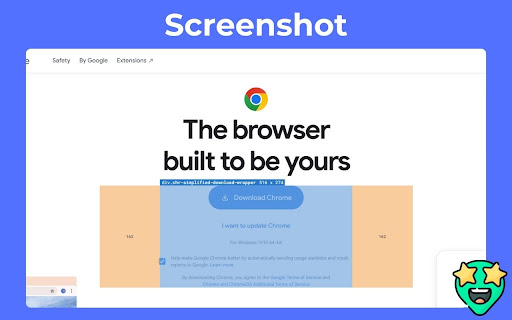

About
Inspect HTML elements visually — instantly.
Element Inspect is a powerful Chrome extension designed for web developers and designers to effortlessly inspect and debug layout properties by simply hovering over any element on a webpage.

With Element Inspect, you can see:
1. Tag name
2. Class names
3. Element dimensions (width × height)
4. Padding and margin values

All displayed in a smart overlay directly on the page — no more digging through the DevTools!

Whether you're refining pixel-perfect layouts, fixing spacing issues, or learning how a site is structured, Element Inspect gives you an instant, visual understanding of how elements are styled and spaced.

Key Features:
1. Hover-based inspection without clicking
2. Clean overlay showing box model properties
3. Works on any webpage (no setup required)
4. Lightweight, fast, and privacy-focused

Great for developers, designers, and learners

Save time, stay focused, and inspect like a pro — directly on the live page.
Technical
- Version
- 1.0.0
- Manifest
- V3
- Size
- 197KiB
- Min Chrome
- 88
- Languages
- 1
- Featured
- No
Metadata
- ID
- ilbffjohgdabjlcnionhkmljmoidcojh
- Developer ID
- u21c24b9ce535025f5706b873da816b7e
- Developer Email
- [email protected]
- Created
- Apr 15, 2025
- Last Updated (Store)
- Apr 15, 2025
- Last Scraped
- Jun 6, 2026
- Website
- —
- Support URL
- —
- Privacy Policy
- https://tvicky7x.github.io/element-inspect-policy/
Similar extensions
Alternatives to Element Inspect, ranked by description similarity.

Element Inspector
Instantly capture XPath, CSS Selector, and OuterHTML of any DOM element. Hold Ctrl and click to inspect
10
★ 5.0

Element Inspector
Inspect HTML elements on hover - view IDs, classes, tags, and attributes instantly
9

by Crawford Squarespace Code Inspector
A tool that acts as a code inspector, displaying real-time CSS properties.
30

Web Inspector
Use Web Inspector tool as a CSS viewer and website inspector for any page. It is a browser plugin for google chrome inspect element.
943
★ 4.6

Inspectify
Quickly copy HTML element data-{id}/input-id attributes for developers, QA, and designers.
18

Outliner - HTML Element Inspector
Professional HTML element inspector with custom outlines. Perfect for web developers to visualize page structure.
55
★ 5.0

Focus: The Elements - DOM Inspector & Editor
DOM Inspector & Editor, inspect and edit HTML element styles directly on any page.
63
★ 5.0

Element Inspector
One-click element capture for AI debugging. Copy element info, styles, and screenshots to clipboard.
39
Data sourced from the Chrome Web Store · last verified Jun 6, 2026.