
FontDetector
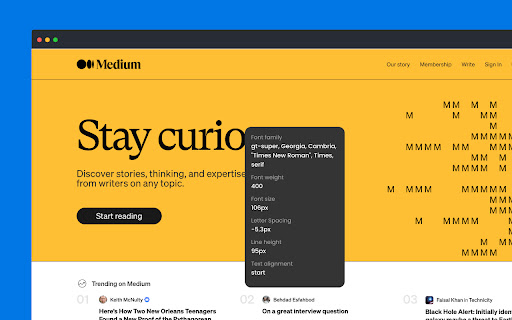
Display font information on hover over text elements.
As of June 2026, FontDetector has 509 users and a 5.00/5 rating from 1 reviews in the Developer Tools category.
Usersup 0.6 percent+0.6%
509
509
Ratingno change0%
5.00
1 reviews
Reviewsno change0%
1
Version
1.3
Manifest V3
History
8 snapshotsTracking since Apr 1, 2026.
View as table
| Date | Users | Rating | Reviews | Version |
|---|---|---|---|---|
| Apr 1, 2026 | 506 | 5.00 | 1 | 1.3 |
| Apr 17, 2026 | 504 | 5.00 | 1 | 1.3 |
| Apr 22, 2026 | 508 | 5.00 | 1 | 1.3 |
| Apr 27, 2026 | 518 | 5.00 | 1 | 1.3 |
| May 10, 2026 | 514 | 5.00 | 1 | 1.3 |
| May 19, 2026 | 522 | 5.00 | 1 | 1.3 |
| May 28, 2026 | 521 | 5.00 | 1 | 1.3 |
| Jun 6, 2026 | 520 | 5.00 | 1 | 1.3 |
| Now | 509 | 5.00 | 1 | 1.3 |
Permissions & access
- Permissions
- tabsactiveTabscriptingdownloadsstorage
- Host access
- <all_urls>
Screenshots


About
Run plugin:
- win: Shift + Alt + X
- mac: Shift + Command + X

Close plugin:
- win: ESC
- mac: ESC

————— Divider ——————

FontDetector is a tool powered by myself and Cursor. You can easily explore your favorite font informations

————— Divider ——————

1.3.0
Add localized tooltip labels and update LCH/HCL text for non-English locales.
Standardize extension UI typography on Inter with CJK system fallbacks and drop the bundled font asset.

1.2.0
With the brand new 1.2.0, we have ushered in a major update, and now FontDetector has updated its new interactive mode. Create a font panel by boxing text. At the same time, we have added a quick copy function to easily copy font color information

refactor:
- Real-time Detection: Hover over any text element to view font information
- Mini Tooltip: A lightweight tooltip follows your cursor, indicating when text selection is available
- Fixed Tooltips: Create fixed information tooltips by selecting text for comparing different elements
- Long Press Support: Press and hold to trigger text selection mode
- Color Information: Display text colors in HEX, LCH, and HCL formats
- One-click Copy: Easily copy font information and color values
- Keyboard Shortcuts: Use ESC key to quickly close floating tooltips while preserving fixed ones
- Tips after the plug-in is enabled: Now, after the plug-in is enabled, it will turn into a green icon

feat: Updated shortcut keys for activating FontDetector, Now you could use
- win: Shift + Alt + X
- mac: Shift + Command + X

1.1.9
feat: Add color detection and fixed tooltip features
- Now, you can view different types of font colors. Meanwhile, after selecting the text, you can fix the tooltip window to help you better view font information.

1.1.8
feat: Updated shortcut keys for activating FontDetector, Now you could use
- win: Shift + Alt + X
- mac: Shift + Alt + X

1.1.7
feat: Updated shortcut keys for activating FontDetector, Now you could use
- win: Ctrl + Shift + Z
- mac: Command + Shift + Z

1.1.6
fixed: Gray out the fonts on the website when the plugin is activated

1.1.5
fixed: Body was injected into 18px padding

1.1.4
feat: Removed tabs permissions
Technical
- Version
- 1.3
- Manifest
- V3
- Size
- 932KiB
- Min Chrome
- 88
- Languages
- 6
- Featured
- Yes
Metadata
- ID
- jphgedmdokkhlllaibcbndaccmdcckfe
- Developer ID
- u086e8bb33e0762714c45bce6df8e61cc
- Developer Email
- [email protected]
- Created
- Apr 18, 2023
- Last Updated (Store)
- Jan 29, 2026
- Last Scraped
- Jun 6, 2026
- Website
- —
- Support URL
- —
- Privacy Policy
- —
Similar extensions
Alternatives to FontDetector, ranked by description similarity.

Font Detective
Hover over text to see font style, size, weight, and other typography details
5

WhatFont
The easiest way to identify fonts on web pages.
3.0M
★ 4.0

Font Detector
Detects font details on any webpage to find Fonr family, height and more
77
★ 1.0

Font Finder - Font Detector
Detects font properties and styles
160
★ 5.0

Font Picker
Use font picker for detection and as google font finder extension. A picker used for identify size on website with fond finder tool.
956
★ 4.8

FontSpy
Hover to reveal font details & download in 1 click - the ultimate font inspector for devs & designers. Part of the DesignSpy Toolkit
7
★ 5.0

Identify Font - What is the font
Easily Identify Font on any webpage. Discover what is the font used with a simple click.
621
★ 5.0

Font Detector – What font is this?
Font Detector is a fast and free font finder tool that helps you identify any font on a webpage instantly. What font is used here?
473
★ 5.0
Data sourced from the Chrome Web Store · last verified Jun 6, 2026.