
ElementForge
Copy and transform website elements into perfect HTML/CSS with advanced options
As of June 2026, ElementForge has 16 users and a 5.00/5 rating from 1 reviews in the Developer Tools category.
Usersdown 5.9 percent−5.9%
16
16
Ratingno change0%
5.00
1 reviews
Reviewsno change0%
1
Version
1.0.0
Manifest V3
History
3 snapshotsTracking since Apr 20, 2026.
View as table
| Date | Users | Rating | Reviews | Version |
|---|---|---|---|---|
| Apr 20, 2026 | 17 | 5.00 | 1 | 1.0.0 |
| May 11, 2026 | 16 | 5.00 | 1 | 1.0.0 |
| Jun 6, 2026 | 17 | 5.00 | 1 | 1.0.0 |
| Now | 16 | 5.00 | 1 | 1.0.0 |
Permissions & access
- Permissions
- activeTabstoragescriptingclipboardWritecontextMenus
- Host access
- http://*/*, https://*/*
Screenshots


About
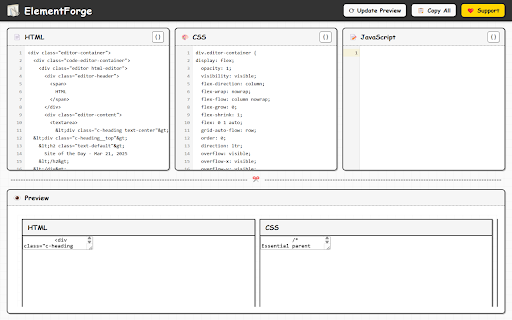
ElementForge is a tool for your Chrome browser. It helps you take pieces of websites—HTML, CSS, and JavaScript code—and use them for your own projects. Think of it like a copy-paste tool, but smarter.

What it does:

* Pick exactly what you need: You can select single parts of a webpage, or groups of parts, very precisely.
* Keep the style and functionality: When you copy, the tool makes sure the look and behavior of the copied part stays the same. It keeps all the style details and associated scripts.
* Change how you copy: You can choose what to include or leave out—like extra code, IDs, or classes.
* Organize the code: The tool makes the HTML, CSS, and JavaScript code easy to read and use again.
* Copy in different ways: You can copy everything together, or HTML, CSS, and JavaScript separately. CSS can also be exported in SCSS format.
* Preview your selection: You can instantly preview the extracted elements to see how they look and function.
* Navigate through elements: The interactive navigation allows you to explore and understand complex element relationships.
* Smart size handling: For very large elements, ElementForge creates minimal versions that still work even if they exceed storage limits.
* Error-proof copying: Even when elements are too large for preview, you can still copy the code successfully.

Who is this for?

* People who build websites: You can learn from good website designs quickly.
* People who design user interfaces: You can easily copy and use parts of website designs.
* JavaScript developers: You can extract and understand script functionality from existing sites.
* Teachers: You can get code examples to show to students.

What you can do with ElementForge:

* Learn from websites: You can understand how complex websites are built.
* Code faster: You can copy working code instead of writing it from scratch.
* Keep designs the same: You can make sure your website looks consistent by copying styles correctly.
* Study interactions: You can examine how JavaScript powers interactive elements.
* Test components: You can preview extracted elements to ensure they work as expected.

Note: When working with large or complex elements, ElementForge will warn you before previewing. Very large elements may cause your browser to slow down or freeze. You can always use the copy feature instead, which works with elements of any size.
Technical
- Version
- 1.0.0
- Manifest
- V3
- Size
- 2.69MiB
- Min Chrome
- 88
- Languages
- 1
- Featured
- No
Metadata
- ID
- jphceipfnmhhmfjdchhmggmjjbennkdi
- Developer ID
- u3c49c1b556074f34344ab7a331a29e3e
- Developer Email
- [email protected]
- Created
- Apr 2, 2025
- Last Updated (Store)
- Apr 2, 2025
- Last Scraped
- Jun 6, 2026
- Website
- —
- Support URL
- —
- Privacy Policy
- https://erdasolutions.github.io/elementforge-privacy/
Similar extensions
Alternatives to ElementForge, ranked by description similarity.

HTML/CSS Section Copier
Extracts selected section and provides raw HTML and CSS.
162

HTML/CSS Extractor
Extract HTML & CSS from any element with live preview, smart selector simplification, and syntax-highlighted editor
115
★ 5.0

Element Copier
Right-click on any element to copy its text or HTML
32
★ 5.0

Webpage Code Extractor
Extract, view, copy, and download HTML/CSS/JS code from any webpage. Full-page screenshots, Monaco editor, customizable settings.
1.0K
★ 2.4

DOM Lens
Grab any element on any website and give it to AI coding agents
—
★ 5.0

Code Extractor Pro
Extract and convert HTML, CSS, and JavaScript code from web pages with Tailwind CSS support.
826
★ 4.0

CopyUI - HTML, CSS & Tailwind Inspector
Stop coding from scratch. Copy any element of any website and export it to Tailwind CSS, JSX or clean CSS in one click.
185
★ 5.0

WebExtract Pro
Select any element on a page and copy its HTML, CSS, Tailwind or React code instantly.
29
★ 5.0
Data sourced from the Chrome Web Store · last verified Jun 6, 2026.