
Code Extractor Pro
Extract and convert HTML, CSS, and JavaScript code from web pages with Tailwind CSS support.
As of June 2026, Code Extractor Pro has 826 users and a 4.00/5 rating from 4 reviews in the Developer Tools category.
Usersup 6.6 percent+6.6%
826
826
Ratingno change0%
4.00
4 reviews
Reviewsno change0%
4
Version
1.0.4
Manifest V3
History
6 snapshotsTracking since Apr 7, 2026.
View as table
| Date | Users | Rating | Reviews | Version |
|---|---|---|---|---|
| Apr 7, 2026 | 775 | 4.00 | 4 | 1.0.4 |
| Apr 22, 2026 | 803 | 4.00 | 4 | 1.0.4 |
| May 2, 2026 | 848 | 4.00 | 4 | 1.0.4 |
| May 10, 2026 | 843 | 4.00 | 4 | 1.0.4 |
| May 18, 2026 | 844 | 4.00 | 4 | 1.0.4 |
| Jun 1, 2026 | 839 | 4.00 | 4 | 1.0.4 |
| Now | 826 | 4.00 | 4 | 1.0.4 |
Permissions & access
- Permissions
- activeTabscriptingstorageclipboardWritenotifications
- Host access
- <all_urls>
Screenshots
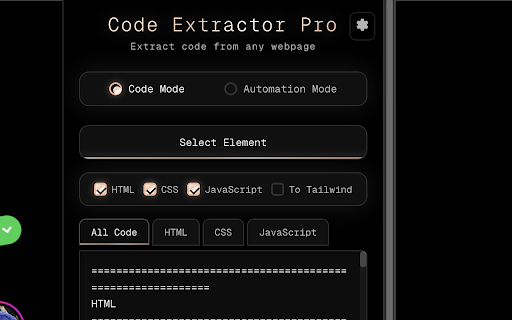


About
Extract web code instantly with a single click.

Code Extractor Pro is the ultimate developer tool for capturing and analyzing website code. Whether you're studying designs, reverse-engineering components, or building automation scripts, this extension makes it effortless.

✨ Key Features:

- One-Click Code Extraction – Select any element on any webpage and instantly extract its HTML, CSS, and JavaScript
- Tailwind CSS Conversion – Automatically convert traditional CSS to modern Tailwind utility classes
- Automation Mode – Generate precise selectors (ID, CSS, XPath) for testing and web scraping
- Clean, Formatted Output – Get production-ready code that's properly indented and easy to read
- Tab-Based Organization – View HTML, CSS, and JavaScript separately or all together
- Auto-Copy to Clipboard – Code is automatically copied for instant pasting

Perfect for:

- Frontend developers learning from existing websites
- UI/UX designers analyzing component structures
- QA engineers writing test automation scripts
- Web scrapers building data extraction tools
- Students studying modern web development

How it works:

Click the extension icon
Select "Code Mode" or "Automation Mode"
Click on any element on the webpage
Copy the extracted code instantly

No configuration needed. No complicated setup. Just pure productivity.
Technical
- Version
- 1.0.4
- Manifest
- V3
- Size
- 27.59KiB
- Min Chrome
- 88
- Languages
- 1
- Featured
- No
Metadata
- ID
- eicjiadlmeiifinloinipgckncmhhabi
- Developer ID
- udc7bcc092dbde86b1c0544bb0f4d01b7
- Developer Email
- [email protected]
- Created
- Dec 12, 2024
- Last Updated (Store)
- Nov 17, 2025
- Last Scraped
- Jun 1, 2026
- Website
- —
- Support URL
- —
- Privacy Policy
- —
Similar extensions
Alternatives to Code Extractor Pro, ranked by description similarity.

Webpage Code Extractor
Extract, view, copy, and download HTML/CSS/JS code from any webpage. Full-page screenshots, Monaco editor, customizable settings.
1.0K
★ 2.4

HTML/CSS Extractor
Extract HTML & CSS from any element with live preview, smart selector simplification, and syntax-highlighted editor
115
★ 5.0

Styles.Zone
Get {{ Web Page Styles }} and {{ Neat Code }} with a click.
68

WebExtract Pro
Select any element on a page and copy its HTML, CSS, Tailwind or React code instantly.
29
★ 5.0

HTML/CSS Section Copier
Extracts selected section and provides raw HTML and CSS.
162

Css Extracter
Inspect CSS styles and save snapshots of web components and designs
19

CSS Extractor Pro - Extract Clean CSS Code & Color Palettes
Extract clean CSS code from any webpage element & generate complete color palettes. Essential developer tool.
908
★ 3.0

Website Code Extractor
Extract a website's HTML, CSS, JS, and images, then download everything as a ZIP file.
3.0K
★ 5.0
Data sourced from the Chrome Web Store · last verified Jun 1, 2026.