
LMT Zeppelin Boost
Improving Zeppelin on Chromium at once.
As of June 2026, LMT Zeppelin Boost has 143 users in the Developer Tools category.
Usersdown 5.9 percent−5.9%
143
143
Ratingno change0%
—
— reviews
Reviewsno change0%
—
Version
0.1.5
Manifest V3
History
3 snapshotsTracking since Apr 23, 2026.
View as table
| Date | Users | Rating | Reviews | Version |
|---|---|---|---|---|
| Apr 23, 2026 | 152 | — | — | 0.1.5 |
| May 12, 2026 | 138 | — | — | 0.1.5 |
| Jun 7, 2026 | 135 | — | — | 0.1.5 |
| Now | 143 | — | — | 0.1.5 |
Permissions & access
- Permissions
- None declared
- Host access
- http://localhost:8080/*, file:///*.json, http://*/*.json, https://*/*.json
Screenshots
About
**PLEASE NOTE: THIS EXTENSION IS STILL IN BETA DEVELOPMENT STATE**
Improving Zeppelin experience on Chromium browser.
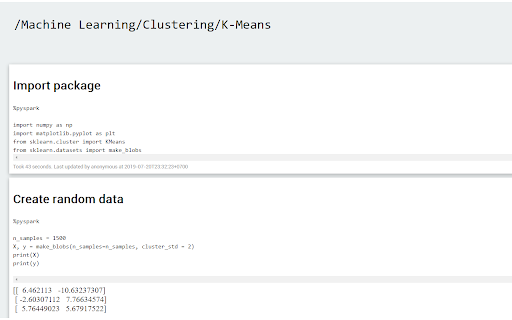
- Read JSON notebook by opening JSON file on browser.
- Speed up Zeppelin by removing unnecessary effects, web components,…
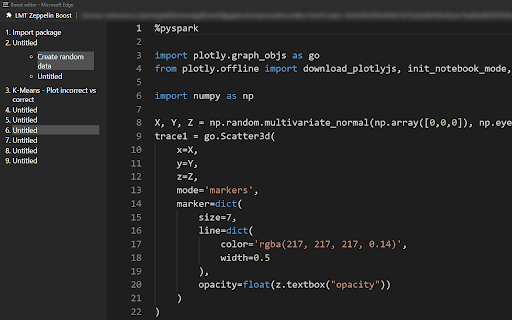
- Boost editor is embed as separate window. To activate, click on "Open with Boost editor" next to the setting icon in a paragraph. Ctrl + S to manually save the paragraph.
Warning: Boost editor icon may not appear and need you to refresh the page (F5). I will fix this later.

Changelogs:
0.1.5
- Fix black background and black texts while Windows is in light theme.
- Fix output image out of view due to being oversized.

0.1.4
- Fix code format issues (indent, wrapping) when reading JSON notebook.
Technical
- Version
- 0.1.5
- Manifest
- V3
- Size
- 3.05MiB
- Min Chrome
- 88
- Languages
- 1
- Featured
- No
Metadata
- ID
- jpgkjneapajhoilcdcikmmbdoolchaai
- Developer ID
- u7c868d0ef1c03710cddca9365525a8df
- Developer Email
- [email protected]
- Created
- Jul 29, 2019
- Last Updated (Store)
- May 12, 2023
- Last Scraped
- Jun 7, 2026
- Website
- —
- Support URL
- —
- Privacy Policy
- —
Similar extensions
Alternatives to LMT Zeppelin Boost, ranked by description similarity.

Chrome Emacs
Use Emacs to edit textareas and online editors
742
★ 5.0

SkySpark Tweaks
Adds small tweaks to SkySpark.
18

Archetype Code Editor
A fast, offline code editor for all Chromebooks, based on the Monaco editor from VS Code.
659
★ 4.7

Text
A text editor for Chrome OS and Chrome.
—
★ 4.0

CSS Stacking Context inspector
Helps inspecting the css stacking contexts and solving the z-index war.
9.0K
★ 3.7

Zed Code Editor
Offline-capable, feature rich, extensible code editor designed for Chrome
10.0K
★ 4.2

Smart Tab - Dev Toolkit
Smart Tab – Dev Toolkit by Volizio turns new tabs into a handy hub, helping developers stay productive and focused.
—

Web Maker
Blazing fast & offline playground for your web experiments
50.0K
★ 4.8
Data sourced from the Chrome Web Store · last verified Jun 7, 2026.