
Google Analytics Debugger
Prints useful information to the JavaScript console by enabling the debug version of the Google Analytics Javascript.
As of June 2026, Google Analytics Debugger has 600,000 users and a 4.17/5 rating from 535 reviews in the Developer Tools category.
Usersno change0%
600.0K
600,000
Ratingdown 0.2 percent−0.2%
4.17
535 reviews
Reviewsdown 0.2 percent−0.2%
535
Version
3.0
Manifest V3
History
3 snapshotsTracking since Apr 23, 2026.
View as table
| Date | Users | Rating | Reviews | Version |
|---|---|---|---|---|
| Apr 23, 2026 | 600.0K | 4.18 | 536 | 3.0 |
| May 12, 2026 | 600.0K | 4.18 | 535 | 3.0 |
| Jun 7, 2026 | 600.0K | 4.17 | 536 | 3.0 |
| Now | 600.0K | 4.17 | 535 | 3.0 |
Permissions & access
- Permissions
- tabsdeclarativeNetRequeststorage
- Host access
- <all_urls>
Screenshots

About
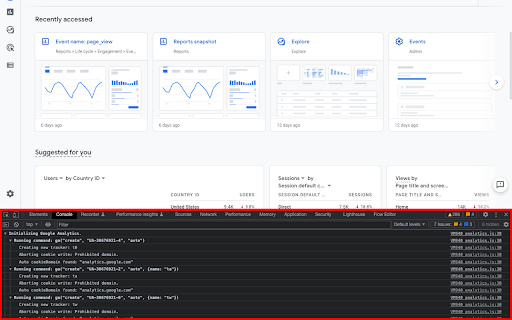
This extension loads the debug version of the Google Analytics Javascript for all sites you browse using Google Chrome.  It prints useful information to the Javascript console.  These messages include error messages and warnings which can tell you when your analytics tracking code is set up incorrectly.  In addition, it provides a detailed breakdown of each tracking beacon sent to Google Analytics.

To use this extension, You need to follow three steps:

1. Turn it on by clicking its icon to the right of the address bar.
2. Open the Chrome Javascript console to see the messages.
        On Windows and Linux, press Control-Shift-J.
        On Mac, press Command-Option-J.
3. Refresh the page you are on.

By installing this extension, you agree to the Chrome Gallery Terms of Service at https://chrome.google.com/extensions/intl/en/gallery_tos.html

You can ask questions about the plugin and report bugs at [email protected]

New in this version:
- Upgraded to Manifest v3
Technical
- Version
- 3.0
- Manifest
- V3
- Size
- 28.41KiB
- Min Chrome
- 88
- Languages
- 1
- Featured
- No
Metadata
- ID
- jnkmfdileelhofjcijamephohjechhna
- Developer ID
- udf690e8904e23703d343098ce6de6f54
- Developer Email
- [email protected]
- Created
- Aug 25, 2010
- Last Updated (Store)
- Dec 30, 2024
- Last Scraped
- Jun 7, 2026
- Website
- —
- Privacy Policy
- https://policies.google.com/privacy?hl=en-US
Similar extensions
Alternatives to Google Analytics Debugger, ranked by description similarity.

Monk Debugger
Detailed and easier to read overview of Google Analytics 4 (GA4) requests, printing information on the JavaScript console.
230
★ 5.0

Debugger for Google Analytics 4 (GA4)
Browser DevTools extension for debugging Google Analytics 4 (GA4) events.
50.0K
★ 4.0
Analytics Debugger
Your Single Source of Truth (SSOT) for debugging analytics implementations
100.0K
★ 4.6

Instant Tracking Monitor for Google Analytics
Show Analytics hits & tracking errors in the extension Icon hits.
2.0K
★ 5.0

Chrome Logger
For server side logging and debugging in chrome console.
30.0K
★ 4.0

Tag Manager Server Debug Console
Extension for TMS debug mode
275
★ 5.0

Optimizely Assistant
Debug your Optimizely experiments with useful JavaScript console logging and powerful caching and snippet injection options.
6.0K
★ 3.7

Console Logger
Captures JavaScript console messages from the active tab, displays them live, and automatically saves them to a file.
24
Data sourced from the Chrome Web Store · last verified Jun 7, 2026.