
Optimizely Assistant
Debug your Optimizely experiments with useful JavaScript console logging and powerful caching and snippet injection options.
As of June 2026, Optimizely Assistant has 6,000 users and a 3.67/5 rating from 3 reviews in the Developer Tools category.
Usersno change0%
6.0K
6,000
Ratingdown 8.3 percent−8.3%
3.67
3 reviews
Reviewsdown 25.0 percent−25.0%
3
Version
3.1.2
Manifest V3
History
2 snapshotsTracking since Apr 21, 2026.
View as table
| Date | Users | Rating | Reviews | Version |
|---|---|---|---|---|
| Apr 21, 2026 | 6.0K | 4.00 | 4 | 3.1.2 |
| May 11, 2026 | 6.0K | 4.00 | 4 | 3.1.2 |
| Now | 6.0K | 3.67 | 3 | 3.1.2 |
Permissions & access
- Permissions
- activeTabcookiesidentitystoragetabswebNavigationdeclarativeNetRequestwebRequestuserScriptsscripting
- Host access
- <all_urls>
Screenshots

About
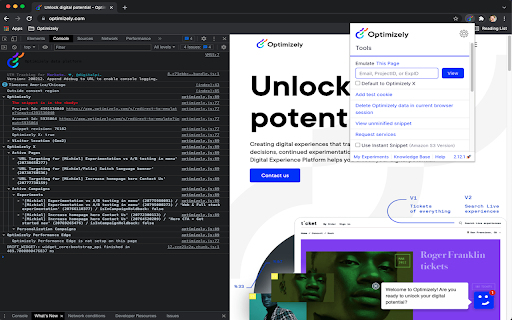
This extension reads Optimizely JavaScript data and state for any snippet that you have access to in your Optimizely account. Visit the website your snippet is installed on and it prints useful debugging information to the JavaScript console. The messages include information about what experiments are running on the page and what experiment and variation you are currently bucketed into.

The extension also enables you to use a non-cached version of your Optimizely snippet or even swap to use a different snippet you own on that page. These are useful tools for reducing wait time when debugging and trying out staging content on a production site.

Here are the steps to setup the extension:
 - Turn on the extension by clicking on the Optimizely logo to the right of the address bar.
 - Login to your Optimizely account when prompted. This fetches the list of projects and snippets you have permission to view with the extension.
 - Open the Chrome JavaScript console to see the messages.
    - On Windows and Linux, press Control-Shift-J.
    - On Mac, press Command-Option-J.
 - Navigate to a site where your snippet is installed to see the console log populate with Optimizely information.
- You will need to enable developer mode in order to use certain features

The terms of the applicable agreement between you and Optimizely (including the online terms of service located at the following URL, https://www.optimizely.com/terms/ ) shall govern your access, installation and/or usage of this Optimizely Assistant Extension.

You can learn more about the extension in our Knowledge Base at https://help.optimizely.com/QA_Campaigns_and_Experiments/The_Optimizely_Chrome_extension.
Technical
- Version
- 3.1.2
- Manifest
- V3
- Size
- 515KiB
- Min Chrome
- 88
- Languages
- 1
- Featured
- No
Metadata
- ID
- hkmpnondmidmfdlaphahbalnmphelnfo
- Developer ID
- u02741641442cb83c4e738f8280046515
- Developer Email
- [email protected]
- Created
- Jun 27, 2017
- Last Updated (Store)
- Apr 17, 2025
- Last Scraped
- Jun 7, 2026
- Website
- —
- Privacy Policy
- https://www.optimizely.com/legal/privacy-notice/
Similar extensions
Alternatives to Optimizely Assistant, ranked by description similarity.

Webtrends Optimize Editing Tools
The official extension for Webtrends Optimize. Build AB tests and personalise using our WYSIWYG editor and this Extension.
478
★ 5.0

AB TESTING TOOL
Simple extension for displaying the optimizely data
15

Google Analytics Debugger
Prints useful information to the JavaScript console by enabling the debug version of the Google Analytics Javascript.
600.0K
★ 4.2

Kameleoon Debug Assistant
Instantly see live experiments, feature flags, and personalization campaigns on your site and verify everything is firing correctly.
2.0K
★ 5.0

Toggle Experiment
A browser extension to inject the LocalStorage of a website for Optimizely experiments.
40
★ 5.0

Conversion.com's Optimizely Chrome Extension
This extension allows you to learn information about Optimizely on a given page
2.0K
★ 4.3

Extension Data
Quickly see stats for any chrome extension
113
★ 5.0

Convert Experience Tools
Helps customers that use Convert Experiences A/B testing tool from Convert.com in the process of developing and debugging
7.0K
★ 4.2
Data sourced from the Chrome Web Store · last verified Jun 7, 2026.