
Redwood Help Center Enhancer
Enhance the Oracle Help Center with fully expanded navigation, quick access buttons, and enhanced usability.
As of May 2026, Redwood Help Center Enhancer has 55 users in the Workflow & Planning category.
Usersup 3.8 percent+3.8%
55
55
Ratingno change0%
—
— reviews
Reviewsno change0%
—
Version
25.1.1
Manifest V3
History
2 snapshotsTracking since Apr 29, 2026.
View as table
| Date | Users | Rating | Reviews | Version |
|---|---|---|---|---|
| Apr 29, 2026 | 53 | — | — | 25.1.1 |
| May 26, 2026 | 47 | — | — | 25.1.1 |
| Now | 55 | — | — | 25.1.1 |
Permissions & access
- Permissions
- None declared
- Host access
- None declared
Screenshots
About
* Redwood Help Center Enhancer - Browser Extension
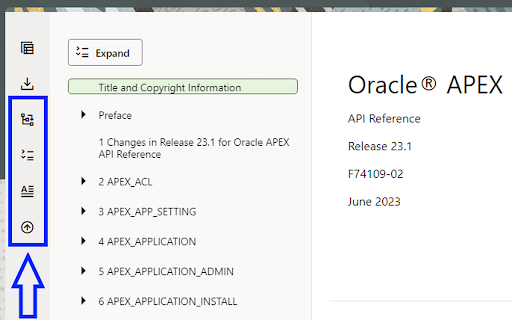
The Redwood Help Center Enhancer is a browser extension designed to improve the user experience of the new Redwood themed Oracle Help Center. This extension enhances the navigation options by adding useful features to the navigation center's button bar.

* Purpose
The Oracle Help Center provides comprehensive documentation on Oracle products, and in 2023, it introduced the Redwood theme to enhance the user interface. However, some users may find the navigation experience lacking certain functionalities.

One such opinion was expressed via a blog Post "Oracle-base: Oracle Documentation - The Redwood Look & Feel"

The Redwood Help Center Enhancer aims to address these limitations by offering several navigational enhancements.

* Features
The Redwood Help Center Enhancer implements the following features through additional buttons in the navigation center's button bar:

- Fully Expand Navigation Menu: This feature allows users to expand the navigation menu to the last level, providing a complete view of the available documentation sections.

- Close Auxiliary Navigation Drawer: To maximize the screen space for reading the documentation, this feature automatically closes the auxiliary navigation drawer conveniently.

- Access Expand/Collapse Button Anywhere: Users can access the expand/collapse button from anywhere on the page, making it easier to toggle the navigation menu.

- Fast Access to Document Title: This feature provides users with quick access to the document title, allowing them to promptly move to the document title page.

- Fast Scroll to Top: Users can instantly scroll to the top of the page efficiency.

* How to Use
To use the this browser extension, follow these steps:

Download and install the extension from the appropriate web browser store (Chrome Web Store, Firefox Add-ons, etc.).

Once installed, navigate to the Oracle Help Center.

In the navigation center's button bar, you will find the additional buttons added by the Redwood Help Center Enhancer.

Click on the buttons to utilize the respective features:

- To fully expand the navigation menu, click the "Expand" button.
- To reopen the auxiliary navigation drawer, click the "Chevron" icon button.
- To access the expand/collapse button from anywhere, click the "Expand/Collapse" button.
- To quickly view the document title, click the "Document Title" button.
- To fast scroll to the top of the page, click the "Scroll to Top" button.

* Feedback and Issues
If you encounter any problems while using this browser extension or have suggestions for additional features, please feel free to submit issues or provide feedback on the GitHub repository.

* Resources
-Oracle Help Center: https://www.oracle.com/help/
- Blog Post on Oracle-base: Oracle Documentation - The Redwood Look & Feel

I hope you find the Redwood Help Center Enhancer useful in enhancing your navigation experience on the Oracle Help Center! Happy browsing!
Technical
- Version
- 25.1.1
- Manifest
- V3
- Size
- 27.73KiB
- Min Chrome
- 88
- Languages
- 1
- Featured
- No
Metadata
- ID
- jjafobbfjlanabndedbimoappjnagjbd
- Developer ID
- u04cd8bf69a9471f76d6160ee964adb8c
- Developer Email
- [email protected]
- Created
- Jul 27, 2023
- Last Updated (Store)
- Jan 23, 2025
- Last Scraped
- May 26, 2026
- Website
- —
- Privacy Policy
- —
Similar extensions
Alternatives to Redwood Help Center Enhancer, ranked by description similarity.

Power BI Navigator
Get more done in Power BI
216

Peoplesoft Financial Aid COD File Assistant
This extension enhances PeopleSoft Financial Aid with file selection & input field management. Streamline your workflow!
12

New Window to the Right
Opens a new window directly to the right of the current window and wraps when the window reaches the edge of the monitor.
58

Elements.cloud
This Chrome Extension allows the Elements documentation and analytics to be displayed inside Salesforce and Jira.
3.0K
★ 5.0

Keyboard Navigator
Keyboard navigation for many sites including help.sap.com
5

Boomi Platform Enhancer
This extension enhances Boomi Web Platform in multiple ways to provide a more robust experience
1.0K
★ 5.0

Enhance Salesforce Header
This extension displays logged in Org/User name, current time and Logout, Dev Console, My Settings and My Profile as separate links.
148
★ 4.6

3D Tree
Web Browsing on a new level - 3D Tree with amazing animation on new page.
237
★ 4.8
Data sourced from the Chrome Web Store · last verified May 26, 2026.