
Boomi Platform Enhancer
This extension enhances Boomi Web Platform in multiple ways to provide a more robust experience
As of June 2026, Boomi Platform Enhancer has 1,000 users and a 5.00/5 rating from 19 reviews in the Workflow & Planning category.
Usersno change0%
1.0K
1,000
Ratingno change0%
5.00
19 reviews
Reviewsup 5.6 percent+5.6%
19
Version
1.7.4.8
Manifest V3
90-day change · In the last 90 days this extension 1 version update, changed permissions.
History
2 snapshotsTracking since May 2, 2026.
View as table
| Date | Users | Rating | Reviews | Version |
|---|---|---|---|---|
| May 2, 2026 | 1.0K | 5.00 | 18 | 1.7.4.7 |
| May 19, 2026 | 1.0K | 5.00 | 18 | 1.7.4.8 |
| Now | 1.0K | 5.00 | 19 | 1.7.4.8 |
Changelog
- May 2, 2026description
Boomi Platform Enhancer is designed to provide UI and Usage enhancements to provide a more streamlined use of the Boomi Web Platforms UI and process.

Disclaimer:Boomi has no affiliation with this extension and does not support it, endorse its use, or provide any promises or warranties (as per legal requirements)

Images only show some of the available items, to much to show :)

The following provides the current abilities of the released extension for use within the Boomi Web Platform:

* Keyboard Shortcuts
  * Ctrl+Alt + S = Save Current Flow
  * Ctrl+Alt + T = Test Current Flow
  * ~ = Toggle Full Screen - On/Off
* Adjustments to the portal for integration around font sizing, header and menu sizing to provide more build and processing space within the default view.
* Account dashboard now defaults to 7 days instead of the maximum value.
* Shapes that don't have a end connection will glow.
* Quickly add stop shape to flow by hovering over end arrow and clicking stop.
* Add components directly within the build tab by double clicking the flow and selecting from a drop down.
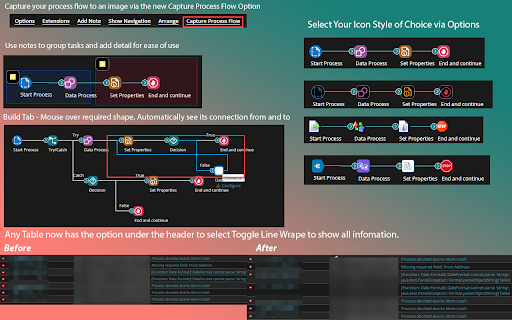
* Capture the entire flow without resize and save to a local image by using the "Capture Process Flow" button above the build canvas.
* Hover over flow shape to see the connection points it make.
* Use notes to group tasks and provide information relating to multiple areas of the flow.
* Add Markdown in the process description or notes to show better visual formatting.
* When tables (for example Process Reporting list view) is displayed there's an option to tabble wrap - Always/Never Wrap or Toggle when Hover over Header..
* Ability to assign keyboard button to easily go into and out of Full Screen Mode - default is the `~` key.
* JSON & XML Viewing toggle added to Message and Notify Shapes; will format the JSON and add the ' quote padding automatically.
* Capture a diagram of your process flow easily via the "Capture Process Flow" button; will capture the entire flow and save an image to a local file.
  * Options available are - Use Transparent Background, Zoom Size and Ability to Expand all notes to capture the note detail
* Debug has been enhanced to provide more robust coloring, this includes glowing colors, item selection and error emphasis.
* Ability to Remove the Canvas Build Background (dots) which works well with dark modes.
* Save Reminder – When packaging a component you will be reminded to save the process as Boomi doesn't save automatically when packaging.
* Schedule Reminder - Once a deployment has occurred or been deployed to another environment the notification message will also provide a reminder to setup a schedule (if enabled).
* Easily copy the current Component URL/ID using the Copy Component ID Button (In the ⚙️ action button above the build canvas).
* Build Shape "connector" Pallet has been restored back to its better life before Boomi UX decided to change it and make it unusable.
* Enable the selection of Icon Sets within the option to define user experience instead of default Boomi UX.
* In Process Reporting, Pending Executions runtime clock/timer now auto-updates - Note: Auto Refresh must be turned on for this to work.
* Define a custom refresh period and have process reporting auto refresh to your needs.
* Expand the Element Selection Screen within Shapes to provide more visual room for ease of use.
* Platform Status Detail - Shows if operational or if any Boomi systems are not operational.
* Brand new code editor attached to Message, Notify and Command Shape, click Edit message to open up a dedicated code window with choice of code display
* Tab names remove the account name to enable better display of tabs function i.e. Build, Reporting etc. Toggle Option Available.
* New Icon against Drop Down Menu items i.e. Manage to allow you to click and open in new tab instead of the same window.
* Default SQL Editor in Data Base Operation code area is now resizable for use with larger screens.
* Connector Operation Screen for HTTP has increased sizing on Request details for better use.
* Ability to Collapse All Processes into Folders in the Process Reporting Process Filter screen.
* Ability to Collapse All Processes into Folders in the Deployed Process Screen in Atom Management.
* Ability to remove the sticky revision notification from the build view.
* Ability to adjust Schedule Section Icons in Atom Management to the old style prior to the new release due to new icons being hard to define based on a little color difference.
* Ability to reverse the modal button layout to match side panel layout i.e. OK - Cancel instead of new default of Cancel - OK.
* Ability to single-anywhere on a process folder or title to open (Instead of the tiny icon to expand).
* Document viewer has been changed to Mono-Spaced to provide all round better display.
Boomi Platform Enhancer is designed to provide UI and Usage enhancements to provide a more streamlined use of the Boomi Web Platforms UI and process.

Disclaimer:Boomi has no affiliation with this extension and does not support it, endorse its use, or provide any promises or warranties (as per legal requirements)

Images only show some of the available items, to much to show :)

The following provides the current abilities of the released extension for use within the Boomi Web Platform:

* Keyboard Shortcuts
  * Ctrl+Alt + S = Save Current Flow
  * Ctrl+Alt + T = Test Current Flow
  * ~ = Toggle Full Screen - On/Off
* Adjustments to the portal for integration around font sizing, header and menu sizing to provide more build and processing space within the default view.
* Account dashboard now defaults to 7 days instead of the maximum value.
* Shapes that don't have a end connection will glow.
* Quickly add stop shape to flow by hovering over end arrow and clicking stop.
* Add components directly within the build tab by double clicking the flow and selecting from a drop down.
* Capture the entire flow without resize and save to a local image by using the "Capture Process Flow" button above the build canvas.
* Hover over flow shape to see the connection points it make.
* Use notes to group tasks and provide information relating to multiple areas of the flow.
* Add Markdown in the process description or notes to show better visual formatting.
* When tables (for example Process Reporting list view) is displayed there's an option to tabble wrap - Always/Never Wrap or Toggle when Hover over Header..
* Ability to assign keyboard button to easily go into and out of Full Screen Mode - default is the `~` key.
* JSON & XML Viewing toggle added to Message and Notify Shapes; will format the JSON and add the ' quote padding automatically.
* Capture a diagram of your process flow easily via the "Capture Process Flow" button; will capture the entire flow and save an image to a local file.
  * Options available are - Use Transparent Background, Zoom Size and Ability to Expand all notes to capture the note detail
* Debug has been enhanced to provide more robust coloring, this includes glowing colors, item selection and error emphasis.
* Ability to Remove the Canvas Build Background (dots) which works well with dark modes.
* Save Reminder – When packaging a component you will be reminded to save the process as Boomi doesn't save automatically when packaging.
* Schedule Reminder - Once a deployment has occurred or been deployed to another environment the notification message will also provide a reminder to setup a schedule (if enabled).
* Easily copy the current Component URL/ID using the Copy Component ID Button (In the ⚙️ action button above the build canvas).
* Build Shape "connector" Pallet has been restored back to its better life before Boomi UX decided to change it and make it unusable.
* Enable the selection of Icon Sets within the option to define user experience instead of default Boomi UX.
* In Process Reporting, Pending Executions runtime clock/timer now auto-updates - Note: Auto Refresh must be turned on for this to work.
* Define a custom refresh period and have process reporting auto refresh to your needs.
* Expand the Element Selection Screen within Shapes to provide more visual room for ease of use.
* Platform Status Detail - Shows if operational or if any Boomi systems are not operational.
* Brand new code editor attached to Message, Notify and Command Shape, click Edit message to open up a dedicated code window with choice of code display
* Tab names remove the account name to enable better display of tabs function i.e. Build, Reporting etc. Toggle Option Available.
* New Icon against Drop Down Menu items i.e. Manage to allow you to click and open in new tab instead of the same window.
* Default SQL Editor in Data Base Operation code area is now resizable for use with larger screens.
* Connector Operation Screen for HTTP has increased sizing on Request details for better use.
* Ability to Collapse All Processes into Folders in the Process Reporting Process Filter screen.
* Ability to Collapse All Processes into Folders in the Deployed Process Screen in Atom Management.
* Ability to remove the sticky revision notification from the build view.
* Ability to adjust Schedule Section Icons in Atom Management to the old style prior to the new release due to new icons being hard to define based on a little color difference.
* Ability to reverse the modal button layout to match side panel layout i.e. OK - Cancel instead of new default of Cancel - OK.
* Ability to single-anywhere on a process folder or title to open (Instead of the tiny icon to expand).
* Document viewer has been changed to Mono-Spaced to provide all round better display.
* Document downloads are automatically renamed from the default timestamp filename to a meaningful name based on the process name, execution timestamp, and detected file type (e.g. MyProcess_20260405_153958.json). Supports JSON, XML, EDI, CSV, and TXT.
- May 2, 2026permissions
storage
storage, downloads, webRequest
Permissions & access
- Permissions
- storagedownloadswebRequest
- Host access
- None declared
Screenshots



About
Boomi Platform Enhancer is designed to provide UI and Usage enhancements to provide a more streamlined use of the Boomi Web Platforms UI and process.

Disclaimer:Boomi has no affiliation with this extension and does not support it, endorse its use, or provide any promises or warranties (as per legal requirements)

Images only show some of the available items, to much to show :)

The following provides the current abilities of the released extension for use within the Boomi Web Platform:

* Keyboard Shortcuts
  * Ctrl+Alt + S = Save Current Flow
  * Ctrl+Alt + T = Test Current Flow
  * ~ = Toggle Full Screen - On/Off
* Adjustments to the portal for integration around font sizing, header and menu sizing to provide more build and processing space within the default view.
* Account dashboard now defaults to 7 days instead of the maximum value.
* Shapes that don't have a end connection will glow.
* Quickly add stop shape to flow by hovering over end arrow and clicking stop.
* Add components directly within the build tab by double clicking the flow and selecting from a drop down.
* Capture the entire flow without resize and save to a local image by using the "Capture Process Flow" button above the build canvas.
* Hover over flow shape to see the connection points it make.
* Use notes to group tasks and provide information relating to multiple areas of the flow.
* Add Markdown in the process description or notes to show better visual formatting.
* When tables (for example Process Reporting list view) is displayed there's an option to tabble wrap - Always/Never Wrap or Toggle when Hover over Header..
* Ability to assign keyboard button to easily go into and out of Full Screen Mode - default is the `~` key.
* JSON & XML Viewing toggle added to Message and Notify Shapes; will format the JSON and add the ' quote padding automatically.
* Capture a diagram of your process flow easily via the "Capture Process Flow" button; will capture the entire flow and save an image to a local file.
  * Options available are - Use Transparent Background, Zoom Size and Ability to Expand all notes to capture the note detail
* Debug has been enhanced to provide more robust coloring, this includes glowing colors, item selection and error emphasis.
* Ability to Remove the Canvas Build Background (dots) which works well with dark modes.
* Save Reminder – When packaging a component you will be reminded to save the process as Boomi doesn't save automatically when packaging.
* Schedule Reminder - Once a deployment has occurred or been deployed to another environment the notification message will also provide a reminder to setup a schedule (if enabled).
* Easily copy the current Component URL/ID using the Copy Component ID Button (In the ⚙️ action button above the build canvas).
* Build Shape "connector" Pallet has been restored back to its better life before Boomi UX decided to change it and make it unusable.
* Enable the selection of Icon Sets within the option to define user experience instead of default Boomi UX.
* In Process Reporting, Pending Executions runtime clock/timer now auto-updates - Note: Auto Refresh must be turned on for this to work.
* Define a custom refresh period and have process reporting auto refresh to your needs.
* Expand the Element Selection Screen within Shapes to provide more visual room for ease of use.
* Platform Status Detail - Shows if operational or if any Boomi systems are not operational.
* Brand new code editor attached to Message, Notify and Command Shape, click Edit message to open up a dedicated code window with choice of code display
* Tab names remove the account name to enable better display of tabs function i.e. Build, Reporting etc. Toggle Option Available.
* New Icon against Drop Down Menu items i.e. Manage to allow you to click and open in new tab instead of the same window.
* Default SQL Editor in Data Base Operation code area is now resizable for use with larger screens.
* Connector Operation Screen for HTTP has increased sizing on Request details for better use.
* Ability to Collapse All Processes into Folders in the Process Reporting Process Filter screen.
* Ability to Collapse All Processes into Folders in the Deployed Process Screen in Atom Management.
* Ability to remove the sticky revision notification from the build view.
* Ability to adjust Schedule Section Icons in Atom Management to the old style prior to the new release due to new icons being hard to define based on a little color difference.
* Ability to reverse the modal button layout to match side panel layout i.e. OK - Cancel instead of new default of Cancel - OK.
* Ability to single-anywhere on a process folder or title to open (Instead of the tiny icon to expand).
* Document viewer has been changed to Mono-Spaced to provide all round better display.
* Document downloads are automatically renamed from the default timestamp filename to a meaningful name based on the process name, execution timestamp, and detected file type (e.g. MyProcess_20260405_153958.json). Supports JSON, XML, EDI, CSV, and TXT.
Technical
- Version
- 1.7.4.8
- Manifest
- V3
- Size
- 578KiB
- Min Chrome
- 88
- Languages
- 1
- Featured
- No
Metadata
- ID
- behhfojpggobllhaifocfcampokbfhko
- Developer ID
- ud11993ef59ddab655d11a95149f60ca4
- Developer Email
- [email protected]
- Created
- Aug 26, 2020
- Last Updated (Store)
- Apr 17, 2026
- Last Scraped
- Jun 7, 2026
- Website
- —
- Privacy Policy
- —
Similar extensions
Alternatives to Boomi Platform Enhancer, ranked by description similarity.

Boomi Extension
Some new functionalities for the DELL Boomi AtomSphere
86

GoLess: Browser Automation and Web Scraping
GoLess no-code browser automation and Robotic Process Automation (RPA) tool
3.0K
★ 4.3

Inbox2Action: The power of Notion in your Gmail Inbox
Turn emails into actions 🚀
847
★ 5.0

Shortcuts For Zoho
Easy navigation to all of Zoho's services in a single dropdown panel.
5.0K
★ 4.3

Agentic Prompt Queue
Build and run multi-step prompt chains on ChatGPT and Claude with context-aware automation workflows.
3
★ 5.0

Medtel Cloud Extension
Used with your Amiba Cloud PBX to receive call-, voicemail- and chat messages, and Click2Dial from any webpage.
2.0K
★ 5.0

EasyTasker.io for Asana
EasyTasker.io for Asana, built by TeamKickstart.com
204
★ 5.0

PromptFlow Pro - ChatGPT, Gemini & Claude
Chain prompts together for ChatGPT, Gemini, and Claude with a clean Prompts & Chains Library and contextual actions.
38
Data sourced from the Chrome Web Store · last verified Jun 7, 2026.