
Keyboard Navigator
Keyboard navigation for many sites including help.sap.com
As of June 2026, Keyboard Navigator has 5 users in the Workflow & Planning category.
Usersdown 16.7 percent−16.7%
5
5
Ratingno change0%
—
— reviews
Reviewsno change0%
—
Version
0.2.5
Manifest V3
History
4 snapshotsTracking since Apr 20, 2026.
View as table
| Date | Users | Rating | Reviews | Version |
|---|---|---|---|---|
| Apr 20, 2026 | 6 | — | — | 0.2.5 |
| Apr 25, 2026 | 5 | — | — | 0.2.5 |
| Jun 1, 2026 | 5 | — | — | 0.2.5 |
| Jun 10, 2026 | 2 | — | — | 0.2.5 |
| Now | 5 | — | — | 0.2.5 |
Permissions & access
- Permissions
- None declared
- Host access
- None declared
Screenshots
About
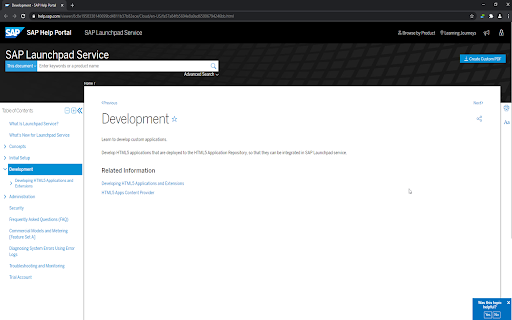
This extension enables below keyboard shortcut for help.sap.com

Left Arrow -> Go to previous item in the tree
Right Arrow -> Go to next item in the tree
Space Bar -> Scroll the page, if end has reached of the page, go to next section
Technical
- Version
- 0.2.5
- Manifest
- V3
- Size
- 27.51KiB
- Min Chrome
- 88
- Languages
- 1
- Featured
- No
Metadata
- ID
- dlnojdepgdfkdeodoihhbkpbhdeacnop
- Developer ID
- u6242e179e87150f38288fc2dd7ce140b
- Developer Email
- [email protected]
- Created
- May 18, 2021
- Last Updated (Store)
- Feb 9, 2026
- Last Scraped
- Jun 10, 2026
- Website
- —
- Support URL
- —
- Privacy Policy
- —
Similar extensions
Alternatives to Keyboard Navigator, ranked by description similarity.

Moly Keys
Optimum key bindings.
135
★ 2.6

Go Back with Backspace 2.0
Turn the “BACKSPACE” ⏪ key into “BACK” ⏮ navigation button.
954
★ 4.7

My Open Tabs
Show open tab of Sheets, Docs and Slides
90
★ 5.0

Tab Groups Manager
A Chrome extension to manage tab groups
101
★ 4.0
Forward-Backward Bookmarks
Go to the next or previous sibling of the current bookmark.
12

SAP Simple Document Searcher
Search SAP official documents easily from your chrome extension. This tool is developed privately and not an official tool.
178
★ 5.0

Keyboard Navigator for Google Search™
Navigate Google Search results using arrows and keyboard shortcuts.
214
★ 4.9
Last Tab Back
Use the back key to close the tab if there are no pages to go back to. When it closes, go to the tab that created it.
868
★ 2.8
Data sourced from the Chrome Web Store · last verified Jun 10, 2026.